
What Is a Sales Email?
A sales email is a targeted message sent to a prospective customer with the goal of starting a business conversation, scheduling a meeting, or moving a deal forward. Unlike marketing emails that broadcast to a list, sales emails are typically one-to-one or one-to-few communications that combine personalization with a clear value proposition. They are the backbone of outbound B2B sales, used by SDRs, account executives, and founders to generate pipeline and close deals.
Why Most Sales Emails Fail Before They Are Read
Before a single word of your email is read, it must survive two barriers: the spam filter and the inbox glance. Over 20% of legitimate cold emails never reach the primary inbox because the sending infrastructure has not been properly configured. Even among those that land in the inbox, most are deleted within three seconds based on the subject line and sender name alone. Understanding this pre-read failure is essential because it changes how you approach sales email writing. You cannot optimize for replies until you first optimize for delivery and opens.
Sales Email Anatomy: 7 Elements Every Email Needs

Every high-performing sales email contains seven structural elements that work together to earn a reply. When any one is missing or weak, response rates drop measurably.
Subject Line
The subject line is the first thing a prospect sees. It determines whether the email is opened or archived. Effective sales email subject lines are short (30-50 characters), avoid spam trigger words like “free” or “guaranteed,” and hint at relevance rather than revealing everything. Subject lines phrased as questions or referencing a specific trigger event outperform generic ones by a significant margin.
Personalized Greeting
Use the prospect’s first name and, when appropriate, reference their company or role. Avoid “Dear Sir/Madam” or overly formal structures. A greeting like “Hi Sarah” followed by a brief connection point (“saw that your team recently expanded”) sets a human tone. Personalization signals that the email is not part of a spray-and-pray blast.
Opening Line with Context
The opening line must establish why you are emailing this specific person at this specific time. Generic openers like “I wanted to reach out” waste the prospect’s attention. Strong opening lines reference a trigger event (funding news, job change, content published), a mutual connection, or a specific observation about their business.
Value-Focused Body
The body should communicate how you can help the prospect achieve a goal or solve a problem. Focus on outcomes rather than features. Keep paragraphs to 1-3 sentences and the total body under 125 words for cold outreach. Use bullet points sparingly, only when listing specific benefits or proof points.
Clear Call to Action
Every sales email needs exactly one ask. Asking for a 15-minute call, a reply with a quick answer to a question, or a referral is standard. Avoid multiple CTAs that confuse the recipient. The CTA should be specific and low-friction.
Professional Signature
Include your full name, title, company, phone number, and links to LinkedIn or your company website. A professional signature builds credibility. Ensure your email signature matches your brand and includes a mailing address if required by CAN-SPAM regulations.
Unsubscribe Link or Opt-Out
Every commercial email must include a way for the recipient to opt out of future communications. This is not optional. A simple “Reply STOP to unsubscribe” or a one-click unsubscribe link satisfies legal requirements and builds trust. Emails without opt-out mechanisms damage sender reputation and violate anti-spam laws in most jurisdictions.
Sales Email Deliverability: How to Actually Reach the Inbox
Writing a great sales email is useless if it goes to spam. Deliverability is the technical foundation that determines whether your email reaches the inbox at all. None of the top-ranking articles on sales emails adequately cover this topic, which is why so many senders see poor results even with well-written copy.
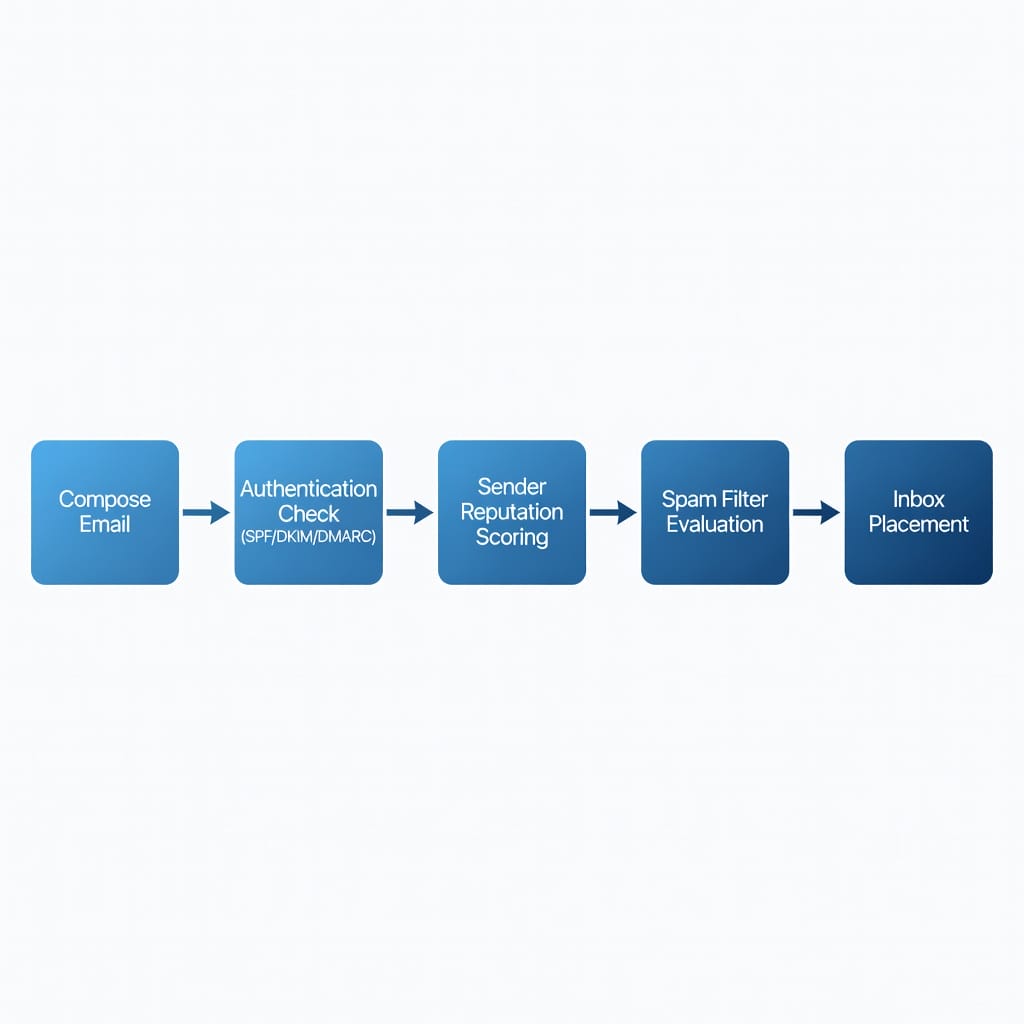
SPF, DKIM, and DMARC Authentication
Email authentication protocols tell receiving servers that your email is legitimate and not forged. SPF (Sender Policy Framework) lists which servers are authorized to send email for your domain. DKIM (DomainKeys Identified Mail) adds a cryptographic signature that verifies the email has not been tampered with. DMARC (Domain-based Message Authentication, Reporting, and Conformance) tells receivers what to do if authentication fails. Without all three configured correctly, your sales emails will be marked as spam or rejected outright.
Sender Reputation and Domain Warm-Up
Every sending domain and IP address has a reputation score maintained by mailbox providers like Google, Microsoft, and Yahoo. New domains start with no reputation and must be warmed up gradually by sending low volumes to engaged recipients before scaling to cold prospects. Rushing this process triggers spam filters immediately. A proper warm-up takes 2-4 weeks of gradually increasing send volume.
Email Verification and Bounce Management
Sending to invalid addresses damages your reputation and increases bounce rates. High bounce rates (above 2-3%) signal to providers that you do not maintain your list and may be sending unsolicited email. Use an email verification service like FilterBounce to clean your list before sending. FilterBounce checks each address against known invalid formats, disposable domains, and role-based accounts, catching over 95% of bad addresses before they enter your sequence.
Spam Score Checking
Before sending any campaign, test your email against common spam filters using tools like Mail-Tester or your email platform’s built-in spam check. Look for a score above 8/10. Common spam triggers include excessive use of exclamation marks, all-caps subject lines, too many links, and words like “free,” “guaranteed,” or “act now.”
How to Write Sales Emails That Get Replies
Writing a sales email that earns a reply requires a specific structure and tone. The goal is not to sell in the first email but to start a conversation.
Start with Research, Not a Template
The best sales emails begin before you type a single word. Research the prospect on LinkedIn, their company website, and recent news. Identify a trigger event that makes your outreach relevant: a recent funding round, a new product launch, a leadership change, or a specific challenge their industry faces. Without a trigger, your email is generic. With one, it becomes relevant.
Lead with Value, Not a Pitch
The first sentence after your greeting should communicate what is in it for them. Do not lead with who you are or what your company does. Lead with an insight, an observation about their business, or a relevant result you achieved for a similar company. Prospects open sales emails to learn something useful, not to read your company bio.
Keep It Short and Scannable
Cold sales emails should be between 50 and 125 words. Every sentence must earn its place. Remove adjectives, soften claims, and cut any line that does not directly support the CTA. Use short sentences and short paragraphs. Mobile devices account for over 60% of email opens, so your email must be readable on a phone screen without zooming.
Use Open-Ended Questions
Questions that can be answered with “yes” or “no” tend to end conversations. Instead, ask open-ended questions that invite a response: “What is your current approach to handling X?” or “Would it be valuable to see how others in your space solved Y?” Open-ended questions signal that you are looking for a conversation, not a transaction.
Write Like a Human, Not a Sales Bot
Avoid corporate jargon, buzzwords, and overly formal language. Write the way you would speak to a peer at a conference. Using contractions, occasional sentence fragments, and a natural rhythm makes your email feel personal rather than automated. Read your email aloud before sending. If it does not sound like something you would say, rewrite it.
Sales Email Templates for Every Scenario
The following sales email templates are designed for common outreach scenarios. Each includes a subject line, body, and CTA. Customize the bracketed fields with your prospect’s specific context.
Cold Outreach Email
Subject: Quick question about [company] approach to [topic]
Hi [First Name],
I noticed that [company] has been [specific observation about their growth, product, or content].
We have helped [similar company type] improve [specific metric] by [amount] through [your approach]. I have an idea that might be relevant to your current [goal or challenge].
Would you be open to a 15-minute call next week to discuss?
Best,
[Your Name]
[Title]
[Company]
[Phone]
Follow-Up Email
Subject: Re: Quick question about [topic]
Hi [First Name],
Following up on my previous email. I know you are busy, so I will keep this brief.
[New value add: a relevant insight, article, or data point they might find useful, or a specific case study that mirrors their situation]
Would [day] or [day] next week work for a quick chat?
Best,
[Your Name]
Value-Add Email
Subject: Thought this might be useful for [company]
Hi [First Name],
Came across [specific article, report, or tool] about [topic relevant to their industry]. Given your work on [specific area], I thought it might be relevant.
[1-2 sentence summary of the resource and why it is valuable]
Wanted to share regardless of whether we end up working together.
Best,
[Your Name]
Social Proof Email
Subject: How [similar company] achieved [result]
Hi [First Name],
We recently helped [similar company name] achieve [specific result, e.g., 40% more qualified demos] using [your approach].
[1-2 sentences describing the approach at a high level]
Would you be interested in a brief call to see if we can do something similar for [company]?
Best,
[Your Name]
Breakup Email
Subject: Should I close your file?
Hi [First Name],
I have reached out a few times without hearing back, so I will assume the timing is not right for [company].
If your priorities change or a relevant project comes up, feel free to reach out. I will close your file on my end.
Wishing you and your team a great quarter.
Best,
[Your Name]
Sales Email Sequence Architecture
A single sales email rarely converts. The most effective approach is a multi-touch sequence that delivers value across multiple interactions over time. Most competitors cover only individual templates, not the full sequence design that determines conversion rates.
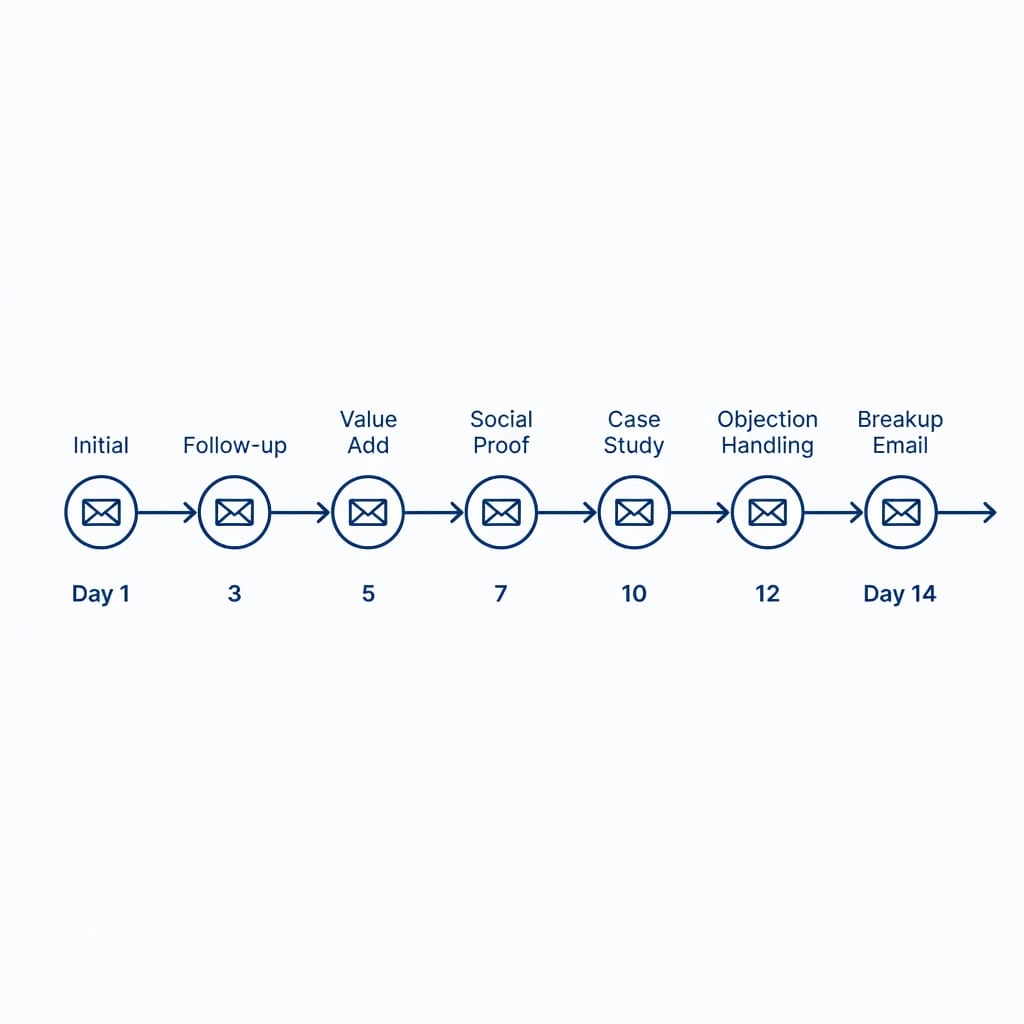
The 7-Step Sequence Framework
A standard cold email sequence spans 14-21 days and includes the following touches:
1. Day 1: Initial outreach – The first cold email introducing yourself and your value proposition
2. Day 3: Follow-up – A brief reminder with a new angle or additional value
3. Day 5: Value add – Share a relevant resource, article, or insight
4. Day 7: Social proof – Mention a similar company or result you delivered
5. Day 10: Case study – Share a specific example of the problem you solve
6. Day 12: Objection handling – Address common concerns or hesitations
7. Day 14: Breakup – Respectfully close the sequence
Sequencing Best Practices
Space your touches at least 48 hours apart to avoid appearing aggressive. Vary the subject lines across emails so they do not all look the same in the inbox. Alternate between text-only and lightly formatted emails to keep the sequence feeling organic. Use a platform like Mystrika to automate the sequencing while maintaining personalization. Mystrika’s sequencer allows you to set delays, conditional steps (e.g., stop if the prospect replies), and A/B test variations within the same sequence.
Stopping Rules
Define clear stopping rules before launching any sequence. If a prospect replies, immediately stop the sequence and transition to a human conversation. If a prospect unsubscribes, never re-add them. If a bounce occurs, remove the address from the sequence and investigate the reason. These rules protect your sender reputation and respect the prospect’s preferences.
A/B Testing Sales Emails the Right Way
A/B testing removes guesswork from sales email optimization. By testing one variable at a time, you can identify what resonates with your specific audience rather than relying on generic advice.
What to Test
The most impactful elements to test are subject lines (question vs. statement, short vs. longer), opening lines (trigger event vs. generic), body length (50 words vs. 125 words), CTAs (meeting request vs. reply to a question), and sending time (morning vs. afternoon, Tuesday vs. Thursday).
How to Structure a Test
Split your list randomly into two groups. Change exactly one variable per test. Send both versions at the same time. Track the open rate, reply rate, and positive reply rate for each version. Wait until you have at least 50 sends per variation before declaring a winner. Statistical significance matters more than a small observed difference.
Reading the Results
Look at reply rate as your primary metric, not open rate. A subject line that drives high opens but low replies may be misleading or overly promotional. The combination of subject line and body must work together to earn a reply. Track positive replies (those that express interest or agree to a meeting) separately from total replies to measure actual conversion.
Sales Email Compliance and Legal Essentials
Sending sales emails without understanding the legal framework is a risk that can result in fines and reputation damage. Two major regulations govern commercial email in most markets. None of the top-ranking competitor articles on sales emails adequately cover this compliance landscape.
CAN-SPAM Act (United States)
The CAN-SPAM Act requires that every commercial email includes a clear opt-out mechanism, a valid physical postal address, accurate header information, and a subject line that is not deceptive. Violations can result in fines of up to $50,120 per email. Compliance is straightforward: include an unsubscribe link, use accurate sender information, and honor opt-out requests within 10 business days.
GDPR (European Union)
GDPR applies to any business sending email to individuals in the EU, regardless of where the business is based. For B2B sales emails, GDPR requires a legitimate interest assessment, clear identification of the sender, and an easy unsubscribe process. Unlike CAN-SPAM, GDPR requires that you document your legal basis for contacting each prospect. Fines can reach EUR 20 million or 4% of annual global turnover, whichever is higher.
Best Practices for Compliance
Regardless of jurisdiction, follow these rules: always identify yourself accurately, never use deceptive subject lines, include a working unsubscribe link in every email, honor opt-out requests immediately, maintain a suppression list of unsubscribed addresses, and keep records of consent or legitimate interest for each prospect.
Sales Email Analytics: What to Track and How to Improve
Data-driven sales email improves with every campaign. Tracking the right metrics tells you what is working and what needs adjustment.
Key Metrics to Monitor
Open rate: The percentage of delivered emails that were opened. A healthy cold email open rate is 40-60%. Below 30% indicates a subject line or sender reputation issue.
Reply rate: The percentage of delivered emails that received a reply. This is the most important engagement metric. A good cold email reply rate is 3-10%. Below 2% indicates a body copy or targeting problem.
Bounce rate: The percentage of emails that were not delivered. Hard bounces (invalid addresses) should be below 2%. Above 5% requires list cleaning.
Positive reply rate: The percentage of replies that express interest, ask a question, or agree to a meeting. This filters out negative or out-of-office replies.
Unsubscribe rate: The percentage of recipients who opt out. A rate above 1% per send may indicate a targeting or relevance problem.
How to Improve Based on Data
Low open rates point to subject line or sender reputation issues. Test new subject line formats and check your deliverability setup. Low reply rates with good open rates point to body copy or CTA issues. Revise your value proposition and make your ask clearer. High bounce rates indicate list quality issues. Run your list through FilterBounce before the next campaign. High unsubscribe rates suggest the audience or timing is wrong. Review your targeting criteria and email frequency.
Sales Email Tools and Platforms
Choosing the right tools for sending sales emails affects deliverability, efficiency, and scalability. While many platforms exist, the key is finding one that handles both sending infrastructure and outreach management.
A comprehensive sales email platform should include a built-in email warmup feature, a visual sequence builder, unified inbox for replies from all prospects, AI-powered personalization, and whitelabel capabilities for sending from your own domain. The platform should also integrate with your CRM and provide analytics at the campaign, sequence, and individual email level.
For those building a sales email operation from scratch, starting with a platform like Mystrika gives you the sequencer, warmup, unified inbox, and AI writer in one tool at a starting price of $15 per month. For email verification before sending, FilterBounce catches invalid addresses and protects your sender reputation. For those who need dedicated sending infrastructure with custom SMTP/IMAP, DoYouMail provides reliable delivery routing.
How to Personalize Sales Emails at Scale
Personalization is the single most effective way to improve reply rates on sales emails. But doing it manually for hundreds of prospects is not sustainable. The solution is layered personalization that combines automated data enrichment with human-quality customization.
Layer 1: Account-Level Personalization
Start by segmenting your prospects by industry, company size, role, or geographic region. This allows you to customize your value proposition for each segment without writing every email from scratch. A sales email to a SaaS CTO should reference different challenges than one to a manufacturing VP of Operations. Draft template variations for each segment before you begin outreach.
Layer 2: Trigger-Based Personalization
Trigger events make your outreach timely and relevant. Common triggers include a new funding announcement, a leadership hire, a product launch, a job posting that signals expansion, or recent media coverage. Tools like Google Alerts, LinkedIn notifications, and CRM intent data feeds can surface these triggers automatically. When a trigger is identified, reference it in the opening line of your sales email to signal that the message is timely and specific.
Layer 3: AI-Assisted Personalization
AI writing tools can research a prospect and generate personalized opening lines based on their LinkedIn profile, recent content, and company activity. This allows you to scale personalization beyond what manual research can sustain. The key is to review and edit AI-generated lines before sending. AI can suggest the raw material, but your judgment determines whether the personalization feels authentic.
Common Personalization Mistakes
The most common personalization mistake is using only the prospect’s first name and calling it personalized. True personalization requires demonstrating that you understand their specific situation. The second most common mistake is over-personalizing to the point where the email feels stalkerish. Mentioning one relevant detail is enough. Listing every detail you found about them creates discomfort and reduces response rates.
Email Deliverability Monitoring and Maintenance
Deliverability is not something you set up once and forget. It requires ongoing monitoring to maintain inbox placement rates as mailbox provider algorithms change and your sending patterns evolve.
Monitoring Key Deliverability Metrics
Track your inbox placement rate, spam placement rate, and missing rate (emails that disappear without a bounce or delivery notification) for every campaign. A healthy inbox placement rate for cold email is above 95%. If it drops below 90%, pause sending and investigate. Common causes include a sudden increase in bounce rate, a spike in spam complaints, or a change in your sending volume that triggered a reputation review.
When to Rotate Domains and IPs
Sending domains and IPs have a limited lifespan for cold email. As reputation inevitably degrades from a mix of complaints, bounces, and spam traps, you may need to rotate to a fresh domain or IP. Most cold email operations rotate sending domains every 3-6 months. Having multiple domains pre-warmed and ready ensures continuity when a domain needs to be retired.
Handling Blacklists
If your domain or IP ends up on a blacklist, identify the cause before attempting removal. Common causes include a high bounce rate, spam trap hits, or a recipient marking your email as spam. Fix the underlying issue first, then submit a removal request through the blacklist’s delisting process. Most blacklists remove listings within 24-48 hours once the cause is resolved. Using a platform with built-in deliverability monitoring helps you detect blacklisting before it significantly impacts your results.
Sales Email Subject Lines That Drive Opens
The subject line is the gatekeeper of your sales email. No subject line, no open. No open, no reply. Crafting subject lines that earn opens while avoiding spam filters is a skill that directly impacts campaign results.
Subject Line Formulas That Work
The most effective sales email subject lines fall into a few proven patterns. Question subject lines (“Quick question about [topic]?” or “How are you handling [challenge]?”) perform well because they create curiosity. Personal observation subject lines (“Saw your post about [topic]”) signal relevance. Referral subject lines (“[Mutual contact] suggested I reach out”) leverage trust transfer. The common thread is relevance to the recipient, not promotion of the sender.
Subject Line Don’ts
Avoid ALL CAPS subject lines, excessive punctuation (!!!), spam trigger words (free, guarantee, act now, limited time), misleading claims, and subject lines that are longer than 60 characters. Also avoid starting every subject line with the prospect’s first name. While personalization helps, overusing the same pattern across thousands of sends looks templated.
Testing Subject Line Performance
Track open rates by subject line variant for every campaign. A subject line that underperforms your average by more than 20% should be retired. A subject line that significantly outperforms should become the new baseline. Over time, you will build a library of proven subject line patterns specific to your audience and offering.
Key Takeaways
- Sales emails require both good writing and proper deliverability infrastructure to succeed
- Every sales email needs seven elements: subject line, greeting, opening line, value body, CTA, signature, and unsubscribe link
- SPF, DKIM, and DMARC authentication are non-negotiable for reaching the inbox
- Domain warm-up takes 2-4 weeks and cannot be rushed
- Email verification with a tool like FilterBounce reduces bounces below 2%
- Cold email sequences should include 5-7 touches over 14-21 days
- A/B test one variable at a time and measure reply rate as the primary metric
- CAN-SPAM and GDPR compliance requires an unsubscribe link, accurate sender info, and proper legal basis
- Track open rate, reply rate, bounce rate, and positive reply rate for each campaign
- The best sales email platform combines sequencing, warmup, unified inbox, and AI personalization
Frequently Asked Questions
What is a sales email?
A sales email is a targeted message sent to a prospective customer to initiate a business conversation, schedule a meeting, or advance a deal. It differs from marketing email by being personalized for a specific recipient rather than broadcast to a list.
How long should a sales email be?
For cold outreach, a sales email should be between 50 and 125 words. The body should be short enough to read in under 15 seconds on a mobile device. Follow-up emails can be even shorter, focusing on one additional value point.
What is a good reply rate for cold sales emails?
A good reply rate for cold sales emails ranges from 3% to 10%. Rates above 10% are exceptional and usually indicate strong targeting and personalization. Rates consistently below 2% signal a problem with the offer, audience, or copy.
How many follow-ups should I send in a sales email sequence?
Most effective sequences include 5 to 7 touches spread over 14 to 21 days. The sequence should include the initial outreach followed by a mix of follow-ups, value-adds, social proof, a case study, objection handling, and a final breakup email.
What are SPF, DKIM, and DMARC?
SPF (Sender Policy Framework), DKIM (DomainKeys Identified Mail), and DMARC (Domain-based Message Authentication, Reporting, and Conformance) are email authentication protocols. They verify that an email is genuinely from the domain it claims to come from and protect against spoofing. All three must be configured correctly for reliable inbox delivery.
Do I need to warm up a new email domain?
Yes. New domains have no reputation with mailbox providers. Sending cold email from a fresh domain without warming up will result in most emails landing in spam. The warm-up process takes 2-4 weeks of gradually increasing send volume starting from 5-10 emails per day.
Is cold email legal?
Cold email is legal in most jurisdictions when it complies with applicable laws. In the United States, CAN-SPAM requires an opt-out mechanism, accurate headers, and a physical address. In the EU, GDPR requires a legitimate interest assessment and clear identification. Cold email to consumers is more restricted than B2B cold email in many regions.
How do I reduce my bounce rate?
Reduce bounce rate by verifying email addresses before sending using an email verification service like FilterBounce, removing invalid addresses immediately, maintaining your list by re-verifying addresses quarterly, and using double opt-in for any inbound list building.
What should I put in a sales email subject line?
A good sales email subject line is 30-50 characters, personalized to the prospect, avoids spam trigger words, and hints at relevance without giving everything away. Subject lines that reference a trigger event or ask a question tend to outperform generic promotional subject lines.
How do I scale sales emails without losing personalization?
Scale personalization by using email platforms with dynamic fields, AI-powered personalization that researches each prospect and generates customized lines, and segmenting your list so that each batch of prospects shares a common trigger or characteristic. Platforms like Mystrika offer AI writer features that help personalize at scale.
{ “@context”: “https://schema.org”, “@type”: “Article”, “headline”: “How to Write Sales Emails That Get Replies in 2026”, “description”: “Learn how to write sales emails that actually get replies. This guide covers subject lines, body copy, deliverability, templates, and compliance for B2B outreach in 2026.”, “author”: { “@type”: “Organization”, “name”: “Mystrika Blog” }, “datePublished”: “2026-07-02”, “dateModified”: “2026-07-02” } { “@context”: “https://schema.org”, “@type”: “FAQPage”, “mainEntity”: [ { “@type”: “Question”, “name”: “What is a sales email?”, “acceptedAnswer”: { “@type”: “Answer”, “text”: “A sales email is a targeted message sent to a prospective customer to initiate a business conversation, schedule a meeting, or advance a deal. It differs from marketing email by being personalized for a specific recipient rather than broadcast to a list.” } }, { “@type”: “Question”, “name”: “How long should a sales email be?”, “acceptedAnswer”: { “@type”: “Answer”, “text”: “For cold outreach, a sales email should be between 50 and 125 words. The body should be short enough to read in under 15 seconds on a mobile device. Follow-up emails can be even shorter, focusing on one additional value point.” } }, { “@type”: “Question”, “name”: “What is a good reply rate for cold sales emails?”, “acceptedAnswer”: { “@type”: “Answer”, “text”: “A good reply rate for cold sales emails ranges from 3% to 10%. Rates above 10% are exceptional and usually indicate strong targeting and personalization. Rates consistently below 2% signal a problem with the offer, audience, or copy.” } }, { “@type”: “Question”, “name”: “How many follow-ups should I send in a sales email sequence?”, “acceptedAnswer”: { “@type”: “Answer”, “text”: “Most effective sequences include 5 to 7 touches spread over 14 to 21 days. The sequence should include the initial outreach followed by a mix of follow-ups, value-adds, social proof, a case study, objection handling, and a final breakup email.” } }, { “@type”: “Question”, “name”: “What are SPF, DKIM, and DMARC?”, “acceptedAnswer”: { “@type”: “Answer”, “text”: “SPF, DKIM, and DMARC are email authentication protocols. They verify that an email is genuinely from the domain it claims to come from and protect against spoofing. All three must be configured correctly for reliable inbox delivery.” } }, { “@type”: “Question”, “name”: “Do I need to warm up a new email domain?”, “acceptedAnswer”: { “@type”: “Answer”, “text”: “Yes. New domains have no reputation with mailbox providers. Sending cold email from a fresh domain without warming up will result in most emails landing in spam. The warm-up process takes 2-4 weeks of gradually increasing send volume starting from 5-10 emails per day.” } }, { “@type”: “Question”, “name”: “Is cold email legal?”, “acceptedAnswer”: { “@type”: “Answer”, “text”: “Cold email is legal in most jurisdictions when it complies with applicable laws. In the United States, CAN-SPAM requires an opt-out mechanism, accurate headers, and a physical address. In the EU, GDPR requires a legitimate interest assessment and clear identification. Cold email to consumers is more restricted than B2B cold email in many regions.” } }, { “@type”: “Question”, “name”: “How do I reduce my bounce rate?”, “acceptedAnswer”: { “@type”: “Answer”, “text”: “Reduce bounce rate by verifying email addresses before sending using an email verification service, removing invalid addresses immediately, maintaining your list by re-verifying addresses quarterly, and using double opt-in for any inbound list building.” } }, { “@type”: “Question”, “name”: “What should I put in a sales email subject line?”, “acceptedAnswer”: { “@type”: “Answer”, “text”: “A good sales email subject line is 30-50 characters, personalized to the prospect, avoids spam trigger words, and hints at relevance without giving everything away. Subject lines that reference a trigger event or ask a question tend to outperform generic promotional subject lines.” } }, { “@type”: “Question”, “name”: “How do I scale sales emails without losing personalization?”, “acceptedAnswer”: { “@type”: “Answer”, “text”: “Scale personalization by using email platforms with dynamic fields, AI-powered personalization that researches each prospect and generates customized lines, and segmenting your list so that each batch of prospects shares a common trigger or characteristic.” } } ] } { “@context”: “https://schema.org”, “@type”: “HowTo”, “name”: “How to Write Effective Sales Emails”, “description”: “A step-by-step guide to writing and sending sales emails that get replies.”, “step”: [ { “@type”: “HowToStep”, “position”: 1, “name”: “Research the Prospect”, “text”: “Identify a trigger event on LinkedIn, company news, or content that makes your outreach relevant.” }, { “@type”: “HowToStep”, “position”: 2, “name”: “Craft the Subject Line”, “text”: “Write a 30-50 character subject line that hints at relevance without spam triggers.” }, { “@type”: “HowToStep”, “position”: 3, “name”: “Write the Body”, “text”: “Lead with value in 50-125 words. Use an open-ended question for the CTA.” }, { “@type”: “HowToStep”, “position”: 4, “name”: “Set Up Deliverability”, “text”: “Configure SPF, DKIM, and DMARC. Verify your list and warm up your domain.” }, { “@type”: “HowToStep”, “position”: 5, “name”: “Launch the Sequence”, “text”: “Build a 5-7 step sequence over 14-21 days with spaced touches.” }, { “@type”: “HowToStep”, “position”: 6, “name”: “Track and Optimize”, “text”: “Monitor reply rate, open rate, and bounce rate. A/B test one variable at a time.” } ] }