
RocketReach.co Quick Verdict
RocketReach.co is a B2B contact database and email finder for teams that need professional email addresses, phone numbers, company data, Chrome extension lookup, CSV exports, CRM sync, and API access. It can be useful for building prospect lists, but it is not a complete cold email system by itself. You still need verification, segmentation, compliant copy, sending infrastructure, warmup, inbox monitoring, and reply handling.
If you are evaluating RocketReach, the most important question is not only “Can it find contacts?” The better question is: “Can my team turn those contacts into a clean, compliant, deliverable outbound workflow without wasting credits or damaging sender reputation?”

Here is the short version.
| Question | Practical answer |
|---|---|
| What is RocketReach.co best for? | Finding B2B contacts, enriching prospect lists, researching companies, exporting data, and syncing contacts into sales tools. |
| Is RocketReach an email sending platform? | It includes messaging and sequences on paid plans, but most teams still need a dedicated cold email workflow for deliverability, inbox rotation, warmup, unibox management, and campaign operations. |
| Does RocketReach verify emails? | RocketReach says lookups are used when it finds and verifies email or phone data. Treat this as a first verification layer, not the final deliverability gate. |
| Is it cheap? | It is accessible for individuals compared with enterprise-only databases, but cost depends heavily on credits, exports, seats, and how many contacts are actually usable. |
| Who should consider it? | SDRs, founders, recruiters, agencies, and RevOps teams that need contact discovery and can run their own verification and outbound process. |
| Who should skip it? | Teams that want an all-in-one deliverability-first cold email stack without stitching together prospecting, validation, sending domains, sequences, and inbox operations. |
A better stack is often: use RocketReach.co to source contacts, use Filter Bounce to validate risky lists, use DoYouMail or separate cold email domains for infrastructure, then run segmented campaigns in Mystrika with warmup, sequencer, unibox, AI assistance, and reply management.
What Is RocketReach.co?
RocketReach.co is a sales intelligence and contact lookup platform. It helps users search for people and companies, reveal professional email addresses and phone numbers, build lists, export data, enrich CSV files, and connect contact data to sales workflows.
In practical terms, RocketReach sits at the top of the outbound funnel. It helps answer questions like:
- Who works at this company?
- What is the likely email address for this decision-maker?
- Can I build a list by job title, company, industry, technology, or location?
- Can I export this list into a CRM or sales engagement workflow?
- Can my team enrich a list we already have?
That makes RocketReach useful, but also easy to misunderstand. A contact database is not the same thing as a working outbound engine. The data is the input. Your results still depend on list hygiene, email verification, ICP fit, personalization, sender reputation, offer quality, compliance, and follow-up discipline.
RocketReach in one sentence
RocketReach.co is a B2B contact data platform for finding and exporting professional contact information, while tools like Mystrika, Filter Bounce, and DoYouMail help turn that data into verified, deliverable cold email campaigns.
Core RocketReach features
| Feature | What it does | Why it matters |
|---|---|---|
| Contact search | Search for people by name, company, title, location, industry, and other filters. | Helps build target lists faster than manual research. |
| Company search | Find companies and employees that match your market. | Useful for account-based prospecting. |
| Email lookup | Reveals professional email addresses when available. | Reduces manual guessing and scraping. |
| Phone lookup | Available on higher plans. | Useful for sales teams that mix email and calling. |
| Chrome extension | Finds contacts while browsing LinkedIn or company pages. | Speeds up rep-level research workflows. |
| Lists and exports | Save prospects and export to CSV or connected systems. | Turns research into usable campaign inputs. |
| CSV enrichment | Upload an existing file and fill missing contact fields. | Helps revive partial or stale lists. |
| CRM integrations | Connects with tools such as Salesforce, HubSpot, Outreach, Salesloft, and Bullhorn on supported plans. | Reduces manual data movement. |
| API access | Lets technical teams embed lookup or enrichment into internal systems. | Useful for automated data workflows. |
RocketReach.co Pricing and Plan Differences
RocketReach pricing matters because contact data tools can look affordable at the seat level while becoming expensive at the usable-contact level. The right way to compare plans is to calculate the cost per verified, relevant, non-duplicate, deliverable prospect that actually fits your ICP.
Based on the RocketReach pricing page available during research, the public individual plans were structured as follows. Treat vendor pricing as subject to change and confirm before purchase.
| Plan | Listed monthly price | Listed annual price | Monthly lookups | Monthly exports | Best fit |
|---|---|---|---|---|---|
| Essentials | $33/mo | $399/yr | 100 | 100 | Email-only prospecting for individuals or low-volume teams. |
| Pro | $75/mo | $899/yr | 250 | 250 | Teams that need email plus phone data, technographics, news, org charts, and integrations. |
| Ultimate | $142/mo | $1,699/yr | 1,000 | 1,000 | Higher-volume users that need more exports, intent data, healthcare data, and advanced mapping. |
| Custom | Starts at vendor-stated $6K annually | Custom | Custom | Custom | Larger teams needing pooled credits, company exports, higher API limits, and account support. |
RocketReach also states that annual billing includes unlimited lookups across these tiers, while exports remain limited by plan. That distinction matters. Looking up a contact inside the product is not the same as exporting and operationalizing that contact in your outbound workflow.
The pricing trap: lookups are not the same as usable prospects
A contact can pass through several filters before it becomes a real campaign-ready lead.
| Stage | Example loss factor | What can go wrong |
|---|---|---|
| Search result | Wrong title, wrong region, wrong company size | The person appears relevant but is not a buyer. |
| Lookup | Missing email or phone | You spend time but cannot use the record. |
| Export | Duplicate contacts or old list members | You pay attention to volume instead of net new prospects. |
| Verification | Risky, invalid, role-based, disposable, or catch-all email | Sending can hurt bounce rate and domain reputation. |
| Segmentation | No clear pain point or trigger | Generic campaigns underperform. |
| Sending | Too much volume too fast | Even valid emails can hurt deliverability if infrastructure is not ready. |
| Reply handling | Replies scattered across inboxes | Pipeline leaks because positive replies are missed. |
A cheaper plan can be enough if you target tightly. A higher plan can still be wasteful if your team exports broad lists and sends generic campaigns.
Cost-per-usable-contact formula
Use this simple calculation before choosing a plan:
“`text
Cost per usable prospect = monthly tool cost / number of contacts that are relevant, verified, non-duplicate, and safe to send
“`
Example:
| Input | Scenario A | Scenario B |
|---|---|---|
| Monthly cost | $75 | $75 |
| Exported contacts | 250 | 250 |
| ICP fit after review | 200 | 125 |
| Pass verification | 180 | 90 |
| Non-duplicate and campaign-ready | 160 | 70 |
| Cost per usable prospect | $0.47 | $1.07 |
The same subscription can be cheap or expensive depending on targeting quality and verification discipline.
RocketReach Accuracy: What to Trust and What to Verify
RocketReach states that data is verified on demand and in real time, and its pricing page includes vendor-stated claims such as 98% accuracy, hundreds of millions of professionals, and millions of companies. Those are useful indicators, but they should not be treated as a guarantee that every exported email is safe to send.
Contact data accuracy is not binary. It has layers:
- Is the person still at the company?
- Is the title current?
- Is the email pattern correct?
- Is the mailbox active?
- Is the domain configured to receive mail?
- Is the address risky, role-based, catch-all, disposable, or spam-trap-adjacent?
- Is this contact legally and contextually appropriate to email?
- Will sending to this list harm your sender reputation?
Practical verification checklist before sending
Use this checklist whenever you export contacts from RocketReach.co or any contact database.
- Remove duplicates across all campaigns, not just the current CSV.
- Remove existing customers, active opportunities, unsubscribes, competitors, and suppression-list contacts.
- Verify emails with a dedicated tool such as Filter Bounce before sending.
- Separate safe, risky, catch-all, and invalid results into different workflows.
- Avoid sending to invalid, disposable, or obvious role-based addresses unless there is a specific reason.
- Start with a small test batch before sending to a large list.
- Watch bounce rate, open signals, replies, spam complaints, and mailbox health.
- Keep a record of the source, export date, verification date, and campaign assignment.
- Re-verify older lists before reuse, especially if they are more than 30 to 60 days old.
If you care about email deliverability, do not treat any database export as send-ready by default. Verification is not bureaucracy. It is reputation insurance.
Who Should Use RocketReach.co?
RocketReach is most useful when your team already knows exactly who it wants to reach. If your ICP is vague, RocketReach can help you generate a large list, but a large list is not the same as a qualified list.
Best-fit users
| User type | Why RocketReach can fit | Extra tool needed |
|---|---|---|
| Founder-led sales teams | Fast way to find decision-makers without hiring a data researcher. | Mystrika for campaigns, Filter Bounce for validation, DoYouMail for infrastructure. |
| SDR teams | Reps can research accounts, find contacts, and push data into existing workflows. | CRM hygiene, suppression logic, and deliverability monitoring. |
| Agencies | Useful for sourcing contacts across client ICPs. | Strong separation by client, domain, suppression list, and campaign. |
| Recruiters | Helps find professional emails and phones for talent outreach. | Consent, regional compliance checks, and careful messaging. |
| RevOps teams | API, enrichment, CRM sync, and list workflows can support data operations. | Data governance and field mapping rules. |
| Partnerships teams | Helps identify partner managers, founders, and department leads. | Personalization and relationship-focused sequencing. |
Poor-fit users
RocketReach may not be the right first purchase if:
- You do not yet know your ICP.
- You want a fully managed outbound service.
- You expect contact data alone to create replies.
- You do not have a verification process.
- Your sending domains are new, unwarmed, or poorly authenticated.
- You have no suppression list or unsubscribe process.
- You need guaranteed accuracy by region, industry, or seniority.
- You want enterprise-grade buyer intent, org charts, and data governance without comparing other tools.
If you are still defining your outbound motion, read a broader cold email outreach strategy guide before buying a large contact-data subscription.
How to Use RocketReach.co Without Hurting Deliverability
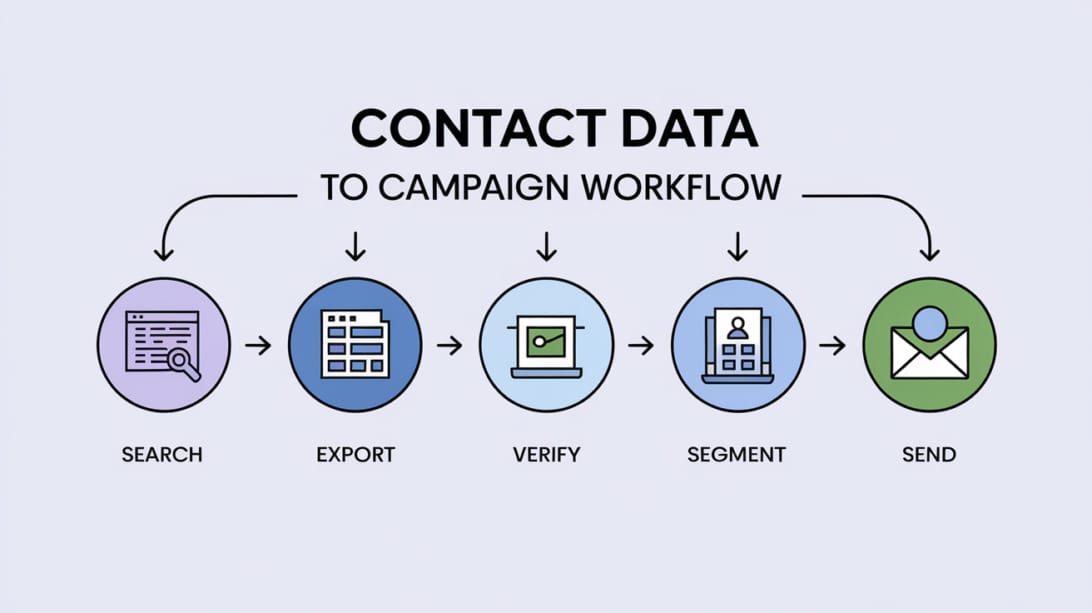
The safest workflow is to treat RocketReach as a data source, not as the final authority. Your campaign should move through search, export, verification, segmentation, infrastructure, sequencing, and monitoring.
Step 1: Define the ICP before searching
Do not start with a broad search like “VP Sales United States.” Start with constraints that reflect your best customers.
Good ICP criteria include:
1. Industry or sub-industry.
2. Company size range.
3. Region and language.
4. Buying trigger.
5. Current tool stack or technology.
6. Department ownership.
7. Seniority level.
8. Exclusion criteria.
Example:
| Weak search | Stronger search |
|---|---|
| Marketing managers | Heads of demand generation at B2B SaaS companies with 50 to 300 employees in North America. |
| Founders | Bootstrapped SaaS founders hiring sales reps and using HubSpot. |
| HR leaders | Talent acquisition directors at healthcare companies expanding into new regions. |
The tighter the search, the fewer credits you waste downstream.
Step 2: Build smaller lists by campaign angle
Do not export one giant mixed list. Build campaign-specific lists.
For example:
- Segment A: Heads of Sales at SaaS companies hiring SDRs.
- Segment B: Founders at product-led SaaS companies with recent funding.
- Segment C: RevOps managers at companies using Salesforce and Outreach.
- Segment D: Agency owners serving B2B clients.
Each segment should have its own pain point, proof point, subject line pattern, call to action, and follow-up logic.
Step 3: Export only what you can send safely
Export volume should follow sending capacity, not enthusiasm. If you can safely send 30 to 80 cold emails per day per matured mailbox, exporting 10,000 unverified contacts today may only create storage, compliance, and decay problems.
Before export, ask:
- Will we contact these people in the next 30 days?
- Do we know why this segment should care?
- Are these contacts net new?
- Do we have a suppression process?
- Do we have enough healthy mailboxes and domains?
- Can our team handle replies quickly?
Step 4: Verify with Filter Bounce
Run exported emails through Filter Bounce before importing them into your sequencer. Keep invalid and risky results out of your main campaign. Catch-all addresses need special caution because the address can appear syntactically valid while still creating deliverability risk.
A simple verification action table:
| Verification result | Recommended action |
|---|---|
| Valid | Eligible for small-batch campaign testing. |
| Invalid | Do not send. Remove or research manually. |
| Risky | Hold out or use only if the account value justifies manual review. |
| Catch-all | Segment separately and send cautiously, if at all. |
| Role-based | Avoid for personalized outbound unless relevant and compliant. |
| Unknown | Re-check later or research manually. |
Step 5: Prepare sending infrastructure
Cold outreach should not be sent from your primary company domain at high volume. Use dedicated sending domains, correct authentication, and gradual warmup.
Minimum setup:
- Dedicated outbound domains.
- SPF records.
- DKIM records.
- DMARC policy.
- Mailboxes configured with realistic names and signatures.
- Warmup before campaign sending.
- Daily volume limits per mailbox.
- Reply monitoring.
- Suppression list management.
DoYouMail can support the infrastructure side when you need separate domains and mailboxes for cold outreach. Mystrika can then manage warmup, sequencing, unibox replies, and campaign operations.
Step 6: Import clean lists into Mystrika
Once the list is verified and segmented, import it into Mystrika. Keep the campaign structure aligned with your RocketReach segments.
Recommended Mystrika campaign setup:
1. One campaign per segment.
2. One clear offer per campaign.
3. Short first email with a specific reason for relevance.
4. Follow-ups that add new context instead of repeating the same pitch.
5. Inbox rotation across healthy sending accounts.
6. Warmup active before meaningful sending volume.
7. Positive replies handled from a unified inbox.
8. Bounces and unsubscribes synced back into suppression logic.
For tool comparisons beyond contact databases, see this guide to the best cold email tools and separate database features from actual sending features.
RocketReach.co Pros and Cons
RocketReach can be valuable, but it should be evaluated with realistic expectations.
| Pros | Why it matters |
|---|---|
| Large contact and company database | Good starting point for prospect research. |
| Email and phone lookup | Supports multichannel sales teams. |
| Chrome extension | Useful for rep workflows around LinkedIn and company pages. |
| CSV enrichment | Helps improve partial lead lists. |
| CRM integrations on supported plans | Reduces manual transfer work. |
| API access | Useful for data operations and automated enrichment. |
| Public pricing for individual plans | Easier to evaluate than enterprise-only databases. |
| Cons | Why it matters |
|---|---|
| Data still needs verification | Database verification is not the same as deliverability-safe sending. |
| Exports can become the real limit | Unlimited lookup language can distract from export caps. |
| Higher-value features sit on higher plans | Phone data, intent, mapping, and advanced features may require upgrades. |
| Not a complete outbound system | You still need infrastructure, warmup, sequencing, reply management, and monitoring. |
| Vendor accuracy claims need validation | Your own bounce and reply data matters more than broad platform averages. |
| Broad searches waste credits | Poor ICP discipline makes any database expensive. |
RocketReach Alternatives and Stack Complements
Many articles compare RocketReach against other contact databases such as Apollo, ZoomInfo, Lusha, Hunter, Cognism, UpLead, LeadIQ, and Seamless.AI. Those comparisons are useful, but they often miss a critical point: not every tool in your outbound stack should do the same job.
There are two different decisions:
1. Which tool should source or enrich contact data?
2. Which tool should verify, send, warm, sequence, and manage replies?
Contact database alternatives
| Tool category | Examples | When to compare against RocketReach |
|---|---|---|
| Broad B2B databases | Apollo, ZoomInfo, Lusha, UpLead | When database coverage, enrichment, intent, CRM sync, or phone data is the main buying factor. |
| Email finder tools | Hunter, Skrapp, LeadIQ | When you need lower-cost email discovery rather than a broad sales intelligence suite. |
| Region or compliance-focused data | Cognism and similar tools | When phone compliance, regional data strength, or enterprise governance is central. |
| Manual research workflows | LinkedIn, company sites, conferences, directories | When quality matters more than speed and volume. |
Workflow complements
| Need after RocketReach | Better-fit tool type | Example |
|---|---|---|
| Verify exported emails | Email verification | Filter Bounce |
| Set up separate cold email infrastructure | Outbound email infrastructure | DoYouMail |
| Warm up and sequence campaigns | Cold email outreach platform | Mystrika |
| Manage replies across inboxes | Unibox and campaign operations | Mystrika |
| Improve copy and campaign testing | AI-assisted sequencing and analytics | Mystrika |
RocketReach can help you find who to contact. Mystrika helps you run the outreach motion after you have a clean list. Filter Bounce reduces the risk of bad email data. DoYouMail helps separate cold email infrastructure from your main business domain.
Decision Matrix: Should You Buy RocketReach.co?

Use this matrix before committing to a plan.
| Situation | Recommendation | Why |
|---|---|---|
| You need 100 to 250 targeted contacts per month | Consider Essentials or Pro | Public individual pricing may be enough if your targeting is tight. |
| You need phone numbers for sales calls | Consider Pro or Ultimate | Essentials is email-only based on the researched pricing page. |
| You need intent data or advanced mapping | Consider Ultimate or Custom | These features appear higher in the plan structure. |
| You need thousands of contacts across a team | Compare Custom against alternatives | Seat, export, API, and pooled-credit economics matter. |
| You have no deliverability process | Do not buy yet | Build verification, infrastructure, warmup, and suppression first. |
| You already have a clean ICP and healthy sending setup | RocketReach can be useful | Contact data can accelerate a working process. |
| You expect a contact database to fix poor outbound | Skip for now | Bad offer, bad targeting, and weak deliverability cannot be solved by more contacts. |
Buying checklist
Before you pay, confirm:
- Which plan includes the exact fields you need.
- Whether you need email only or email plus phone.
- How many exports you get per month or year.
- Whether annual “unlimited lookups” fits your workflow.
- How credits are charged and refunded.
- Whether CRM integrations you need are included on your plan.
- Whether API limits fit your expected usage.
- Whether your team needs shared lists, permissions, or pooled credits.
- Whether cancellation and renewal terms are acceptable.
- Whether you have a verification and suppression process ready.
Common Mistakes When Using RocketReach.co
Mistake 1: Exporting before segmenting
Large mixed exports create generic campaigns. Generic campaigns produce low replies, higher complaints, and unclear learning. Segment first, export second.
Mistake 2: Sending to every found email
A found email is not automatically safe. Verify it, check suppression, and confirm relevance before sending.
Mistake 3: Ignoring export limits
Some buyers focus on lookup limits and miss export limits. If your workflow depends on moving data out of RocketReach, exports are often the practical bottleneck.
Mistake 4: Treating phone data and email data the same
Phone outreach has different compliance, consent, and regional rules. Do not assume that having a phone number means you should call or text it.
Mistake 5: Using one campaign for every persona
A CFO, VP Sales, founder, and RevOps manager may all appear in the same search universe, but they should not receive the same message.
Mistake 6: Sending from an unprepared domain
Even a clean list can perform badly if sent from a new, unauthenticated, or overused domain. Review cold email warm up before ramping volume.
RocketReach.co Workflow Example
Suppose you sell a customer onboarding tool for B2B SaaS companies.
Goal
Book meetings with customer success leaders at SaaS companies that recently raised funding or are hiring implementation roles.
Search plan
| Filter | Example |
|---|---|
| Industry | B2B SaaS |
| Company size | 50 to 500 employees |
| Region | United States, Canada, United Kingdom |
| Titles | VP Customer Success, Head of Customer Success, Director of Implementation |
| Exclusions | Students, consultants, recruiters, agencies, existing customers |
| Trigger | Hiring onboarding roles, new funding, rapid headcount growth |
Campaign plan
1. Build a list in RocketReach.co for one title group at a time.
2. Export only 200 to 300 prospects for the first test.
3. Remove duplicates and suppressed contacts.
4. Verify the emails in Filter Bounce.
5. Split valid contacts into two or three tighter segments.
6. Prepare sending accounts through DoYouMail or your outbound infrastructure process.
7. Warm inboxes and domains before sending meaningful volume.
8. Launch a Mystrika sequence with a short first email and two to three follow-ups.
9. Monitor bounces, replies, spam signals, and mailbox health.
10. Feed learnings back into the next RocketReach search.
First-email example
“`text
Subject: onboarding bottlenecks after new sales hires
Hi {{first_name}},
Noticed {{company}} has been growing the customer-facing team. When SaaS teams add new customers quickly, onboarding handoffs often become the bottleneck before support tickets show it.
We help CS teams spot stalled onboarding accounts earlier and standardize the first 30 days without adding another heavy project layer.
Worth comparing notes next week?
“`
This works better than a generic “we help SaaS companies improve customer success” email because the list, trigger, and message align.
Compliance and Privacy Notes
This is not legal advice, but it is operationally important. Contact data tools do not remove your responsibility to follow applicable privacy, anti-spam, and calling rules.
When using RocketReach.co or any prospecting database:
- Keep a suppression list.
- Honor opt-outs quickly.
- Include accurate sender identity.
- Do not misrepresent why you are contacting someone.
- Avoid sensitive personal data in campaigns.
- Be careful with regional rules such as GDPR, CCPA, CAN-SPAM, and local telemarketing laws.
- Document your source and lawful basis where required.
- Do not keep stale exported data indefinitely.
- Restrict access to exported personal data inside your organization.
A practical compliance mindset is simple: source only what you need, contact only people with a plausible business reason, make opting out easy, and do not reuse stale data forever.
Key Takeaways
- RocketReach.co is a contact data and sales intelligence platform, not a complete cold email operating system.
- Its biggest value is helping teams find, enrich, export, and sync B2B contact data.
- Pricing should be evaluated by cost per usable prospect, not just monthly subscription price or lookup volume.
- Vendor-stated accuracy claims are useful signals, but your own verification, bounce rate, and reply data matter more.
- Always verify RocketReach exports before sending, especially for catch-all, risky, old, or broad lists.
- The safest workflow is RocketReach for sourcing, Filter Bounce for verification, DoYouMail for outbound infrastructure, and Mystrika for warmup, sequencing, unibox, and campaign operations.
- Do not export more contacts than you can safely contact within a short time window.
- Tight ICP filters, clean segmentation, and sender reputation management make RocketReach more valuable.
- If your outbound strategy is weak, buying more contact data will usually amplify the weakness rather than fix it.
Frequently Asked Questions
What is RocketReach.co used for?
RocketReach.co is used to find professional contact information, build prospect lists, enrich existing CSV files, research companies, and move contact data into sales workflows. It is mainly a B2B data and prospecting tool, not a full replacement for verification, deliverability infrastructure, or campaign management.
Is RocketReach.co accurate?
RocketReach states that it verifies data on demand and in real time, but no contact database should be treated as perfectly accurate for every export. The safest approach is to verify exported emails again with a dedicated validation tool, remove risky records, and monitor bounce rates after launch.
Is RocketReach.co good for cold email?
RocketReach can be good for sourcing cold email prospects, but it is only one part of the workflow. For cold email, you also need email verification, dedicated sending infrastructure, domain warmup, sequencing, inbox rotation, suppression management, and reply handling.
Does RocketReach.co send emails?
RocketReach includes messaging and sequence-related features on its platform, but many outbound teams still prefer a dedicated cold email platform for warmup, deliverability controls, campaign management, and unibox workflows. If deliverability is central, use RocketReach as the data source and Mystrika as the campaign engine.
How much does RocketReach.co cost?
During research, RocketReach public pricing showed Essentials at $33/month, Pro at $75/month, and Ultimate at $142/month, with annual options and a Custom plan starting at a vendor-stated $6K annually. Pricing can change, so confirm directly on RocketReach before buying.
What is the difference between lookups and exports in RocketReach?
A lookup is the act of finding or revealing contact information inside RocketReach, while an export moves that data out of RocketReach into a CSV, CRM, or workflow. Export limits can matter more than lookup limits if your team depends on moving contacts into campaigns.
Should I verify RocketReach emails before sending?
Yes. Even if RocketReach verifies contact data, you should run exported emails through a dedicated verification tool before sending. This reduces invalid emails, risky addresses, catch-all uncertainty, and bounce-rate problems that can hurt sender reputation.
What is the best RocketReach.co workflow for outbound sales?
The best workflow is to define a narrow ICP, build small segmented lists in RocketReach, export only near-term contacts, verify emails, remove suppressed contacts, prepare sending infrastructure, and launch controlled campaigns in Mystrika. Then use bounce, reply, and meeting data to refine the next list.
What are the best RocketReach alternatives?
Common RocketReach alternatives include Apollo, ZoomInfo, Lusha, Hunter, UpLead, Cognism, LeadIQ, Skrapp, and Seamless.AI. The best choice depends on whether you need broad database coverage, phone data, lower-cost email finding, regional compliance features, CRM sync, API access, or enterprise data governance.
Can Mystrika replace RocketReach.co?
Mystrika is not meant to replace RocketReach as a contact database. Mystrika is better understood as the outreach platform that helps you warm mailboxes, run sequences, manage replies, and operate campaigns after you already have a clean prospect list. Many teams use a data source plus Mystrika rather than expecting one tool to do everything.