
InboxKit Review: Quick Verdict
InboxKit is an inbox provider for teams that want faster mailbox provisioning, automated DNS setup, warmup support, and infrastructure management for outbound email. It is most useful if your bottleneck is creating and maintaining many Google Workspace or Microsoft 365-style inboxes, not if you need a complete cold email platform with sequencing, prospect management, replies, verification, and campaign analytics in one place.
If you are evaluating InboxKit, the most important question is not simply “Does InboxKit create inboxes?” The better question is: “Will InboxKit reduce operational work without creating hidden deliverability, cost, or workflow gaps?” InboxKit can help with the infrastructure layer, but you still need a full outbound operating system around it.
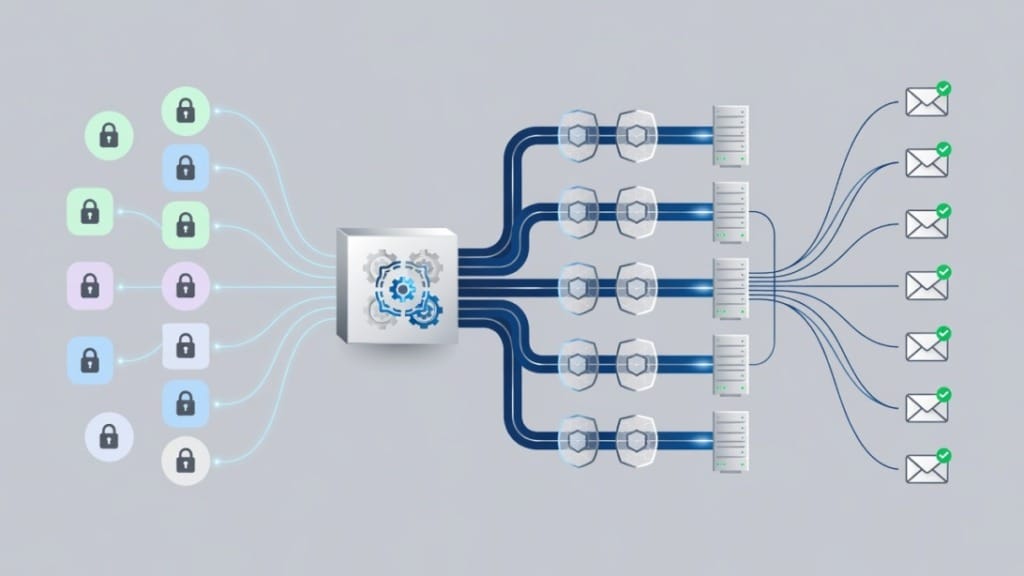
Here is the short version.
| Decision factor | Practical verdict |
|---|---|
| Best use case | Agencies, outbound teams, and operators who need many inboxes provisioned quickly |
| Not a fit for | Teams looking for a complete sequencer, CRM, lead database, verification tool, and reply workspace in one product |
| Main advantage | Faster setup and less manual DNS/mailbox administration |
| Main limitation | It is infrastructure-first, so you still need other tools for campaign execution |
| Biggest buying risk | Misreading base pricing as total cost and ignoring add-ons, domains, verification, warmup, and monitoring |
| Best complementary stack | Inbox provider plus Mystrika for sequencing and unibox, DoYouMail for sending infrastructure when needed, and Filter Bounce for list verification |
A good InboxKit review should cover more than pricing and feature lists. You need to understand the operational workflow: domain buying, inbox provisioning, authentication records, warmup, list verification, sending limits, reply management, bounce control, unsubscribe handling, and performance tracking. If any one of those layers is weak, a fast inbox setup will not save the campaign.
For buyers comparing InboxKit with alternatives, the simple rule is this: choose InboxKit if provisioning and mailbox administration are your pain. Choose a broader outbound platform if campaign execution, reply handling, and deliverability workflows are your pain. If you need both, pair infrastructure with a dedicated outreach tool rather than expecting the inbox provider to do everything.
What Is InboxKit?
InboxKit is an email inbox infrastructure provider built for cold email and outbound teams. Its core promise is to help users create and manage mailboxes with less manual setup, especially around domains, DNS records, warmup, and mailbox provisioning.
In plain English, InboxKit sits before your outreach tool. It helps you get the inboxes ready. Then a sequencer sends campaigns from those inboxes, a verification tool cleans your lists, a unibox handles replies, and reporting tells you whether the system is working.
Definition: Inbox provider
An inbox provider is a tool or service that helps create, configure, and maintain sending inboxes. For outbound email, that usually means handling domain setup, mailbox creation, authentication records, warmup, health monitoring, and sometimes integration with sending platforms.
That is different from a cold email platform. A cold email platform usually manages leads, sequences, personalization, sending schedules, follow-ups, replies, and campaign reporting. Mystrika, for example, is built for cold email outreach workflows with AI, warmup, sequencer, unibox, and white label options starting at $15/month. InboxKit is better understood as part of the infrastructure layer rather than the entire outreach system.
What InboxKit appears to focus on
Across competitor reviews and the vendor positioning, InboxKit is typically described around these capabilities:
- Mailbox provisioning for outbound teams
- Google Workspace and Microsoft 365-style inbox infrastructure
- Automated DNS configuration
- SPF, DKIM, and DMARC setup assistance
- Warmup support or warmup add-ons
- Domain and mailbox health monitoring
- Bulk mailbox creation
- Integrations or API access for larger workflows
- Free deliverability tools such as DNS, SPF, DKIM, DMARC, BIMI, blacklist, or spam checks
Those features make sense for agencies and sales teams that manage multiple client domains or multiple outbound brands. Manual mailbox setup becomes painful when you have dozens or hundreds of inboxes. A tool like InboxKit tries to remove that repeated work.
What InboxKit is not
InboxKit should not be judged as if it were a full sales engagement platform. It is not primarily a lead database, enrichment product, prospecting tool, CRM, reply assistant, or sequence-writing system. It may connect to tools in those categories, but that is not the same as replacing them.
This matters because many teams buy inbox infrastructure and then realize they still need:
- A campaign sequencer
- A reply management inbox
- List verification
- Personalization workflows
- Lead source management
- Bounce monitoring
- Unsubscribe management
- Deliverability diagnostics
- Campaign analytics
- Team permission controls
If you are building a cold email engine, InboxKit can be one layer. It should not be your only layer.
How InboxKit Works
InboxKit works by simplifying the steps that usually happen before cold email campaigns go live. Instead of manually buying domains, creating mailboxes, copying DNS records, checking authentication, waiting through warmup, and then connecting everything to a sequencer, the tool aims to compress that setup process.
A typical InboxKit-style workflow looks like this.
Step 1: Plan domains and mailbox volume
Before you create any inboxes, decide how many sending identities you actually need. More inboxes do not automatically mean better deliverability. They only help if each inbox is warmed, authenticated, monitored, and kept within reasonable sending limits.
Use this planning formula:
| Input | Example question |
|---|---|
| Target daily send volume | How many cold emails do we need to send per weekday? |
| Safe volume per inbox | How many emails can each inbox send without aggressive ramping? |
| Domain count | How many domains do we need to spread risk? |
| Persona count | How many senders need distinct names and roles? |
| Region focus | Are we targeting mostly US audiences or multiple regions? |
| Reply ownership | Who will handle replies from each identity? |
For example, a team sending 1,000 cold emails per weekday should not simply create ten inboxes and push 100 messages each from day one. A safer plan would ramp gradually, monitor bounces and replies, and avoid treating inbox count as a shortcut around sender reputation.
Step 2: Configure domains and DNS
DNS is where many cold email setups fail. SPF, DKIM, and DMARC need to align with the actual sending setup. If they are missing, duplicated incorrectly, or copied into the wrong DNS zone, inbox placement can suffer before the first campaign even starts.
A good inbox provider should help with:
- SPF record creation or validation
- DKIM key generation and publication
- DMARC policy setup
- MX records where needed
- Tracking domain configuration if used
- Domain verification
- DNS propagation checks
- Blacklist and reputation checks
For a deeper technical primer, see Mystrika’s guide to email deliverability. Authentication is only one part of deliverability, but it is the part you should never leave broken.
Step 3: Create mailboxes
Once the domain layer is ready, mailboxes can be created. This is where InboxKit can save time for teams that would otherwise create each inbox manually.
A mature mailbox provisioning workflow should include:
1. Sender name selection
2. Alias or role planning
3. Recovery and admin access setup
4. Mailbox authentication checks
5. Signature standards
6. Profile completeness
7. Connection to the sending platform
8. Warmup enrollment
9. Reply routing
10. Health monitoring
The mistake to avoid is treating a mailbox as ready just because it exists. A newly created inbox is not the same as a trusted sending identity.
Step 4: Warm up and ramp gradually
Warmup is the process of building a sending pattern before full campaign volume. Competitor and vendor pages commonly mention a 14-day warmup window for InboxKit-style setups, but you should treat any fixed warmup period as a starting assumption rather than a guarantee.
A practical warmup approach considers:
- Domain age
- Mailbox age
- Existing reputation
- Initial send volume
- Reply rate
- Bounce rate
- Spam complaints
- Authentication alignment
- Content quality
- Audience relevance
If your list quality is poor, no warmup tool can fully protect you. Use warmup as one input, then validate the rest of your sending system. Mystrika’s guide to email warmup explains why ramping and monitoring matter more than simply waiting a fixed number of days.
Step 5: Connect to your outreach workflow
After the inboxes are authenticated and warmed, you connect them to the rest of your outbound workflow. This usually means a sequencer, a list verification tool, a reply workspace, and campaign analytics.
That workflow is where Mystrika, DoYouMail, and Filter Bounce fit naturally:
- Use Mystrika when you need sequencing, AI-assisted outreach workflows, unibox management, warmup, and team campaign operations.
- Use DoYouMail when you need additional sending infrastructure for cold email workflows.
- Use Filter Bounce before sending to reduce invalid, risky, or low-quality addresses.
The goal is not to buy the most tools. The goal is to ensure every layer has an owner.
InboxKit Pricing and Total Cost of Ownership
InboxKit pricing is one of the most confusing parts of the buying process because different pages present different numbers. Some competitor pages describe monthly plan pricing around Professional, Agency, and Enterprise tiers. Others highlight lower annual or bulk mailbox pricing. Vendor pricing can also change, so treat any third-party number as directional and confirm the current price before buying.
The better way to evaluate InboxKit pricing is through total cost of ownership.
Total cost formula
Use this formula before comparing InboxKit with alternatives:
| Cost layer | What to include |
|---|---|
| Base plan | Monthly or annual subscription for the selected tier |
| Extra mailboxes | Per-mailbox add-ons above the included allowance |
| Warmup | Whether warmup is included or charged per mailbox |
| Monitoring | Domain, DNS, blacklist, bounce, or reputation monitoring add-ons |
| Domains | New domains, renewals, privacy, and DNS hosting |
| Sequencer | Mystrika or another tool used to actually run campaigns |
| Verification | Filter Bounce or another verification layer before sending |
| Reply handling | Unibox, shared inbox, routing, and team workflows |
| Compliance | Unsubscribe handling, suppression lists, consent records, legal review where needed |
| Operations time | Admin work, troubleshooting, reporting, and support coordination |
A cheap mailbox can become expensive if the workflow around it is fragmented. A higher monthly tool can be cheaper if it reduces operations time, prevents mistakes, and gives your team better campaign control.
Example pricing evaluation
Suppose you need 60 inboxes for three outbound brands. A simplistic calculation might look only at per-mailbox price. A better calculation asks:
- Are 60 inboxes included in one plan or split across tiers?
- Are warmup and monitoring included or added separately?
- How many domains are needed?
- How many sender identities need reply handling?
- Who monitors bounce rate and spam complaint signals?
- How much time does the team spend fixing DNS issues?
- What happens when one domain has deliverability problems?
- Does the inbox provider include campaign analytics, or do you need a separate sequencer?
This is where many InboxKit reviews stop too early. They compare plan price against plan price, but the buyer’s real cost is the operating system around the inboxes.
Pricing questions to ask before you buy
Before subscribing, ask these questions:
1. Is the displayed price monthly, annual, or volume-discounted?
2. How many mailboxes are included?
3. What does each extra mailbox cost?
4. Is warmup included or billed separately?
5. Is health monitoring included or billed separately?
6. Are Google Workspace or Microsoft 365 costs bundled or separate?
7. Are domains included, assisted, or entirely separate?
8. Are there setup fees?
9. Is there a free trial, refund period, or cancellation constraint?
10. What support level applies to your plan?
11. Are API and webhook features available on your plan?
12. What happens if a mailbox is suspended, limited, or flagged?
If the answer to any pricing question is unclear, get written confirmation before scaling. Ambiguity is manageable at 10 inboxes. It becomes expensive at 100.
InboxKit Features That Matter for Cold Email
Not every feature on an inbox provider’s website has equal value. For outbound teams, the features that matter are the ones that reduce setup errors, protect reputation, improve visibility, or integrate with the rest of your workflow.
Feature evaluation table
| Feature | Why it matters | What to verify |
|---|---|---|
| Automated DNS | Reduces setup mistakes across many domains | Confirm SPF, DKIM, DMARC, MX, and tracking records are correct |
| Mailbox provisioning | Saves time when creating many inboxes | Check whether accounts are created cleanly and consistently |
| Warmup | Helps build early sending patterns | Confirm ramp schedule and whether it adapts to risk signals |
| Health monitoring | Catches DNS, blacklist, bounce, or reputation issues | Confirm alert frequency and exact monitored signals |
| Bulk creation | Useful for agencies and multi-brand teams | Check CSV import, naming conventions, and admin controls |
| API access | Helps automate provisioning and reporting | Confirm endpoints, limits, logs, and permissions |
| Integrations | Connects inboxes to sequencers and CRMs | Confirm your exact outreach tool is supported |
| Analytics | Shows operational health | Separate inbox health from campaign performance analytics |
| Support | Matters when mailboxes fail or DNS breaks | Ask about response times and escalation paths |
| Security controls | Protects admin access and client accounts | Check 2FA, role permissions, audit logs, and offboarding |
Automated DNS setup
Automated DNS is one of the strongest reasons to consider an inbox provider. Manual DNS work is repetitive and error-prone. One wrong record can cause authentication failure, broken tracking, or inconsistent domain alignment.
But automated setup should still be verified. Automation can fail if the domain registrar, DNS host, or domain configuration has edge cases. Always check authentication after setup instead of assuming it worked.
A strong post-setup review should include:
- SPF exists and does not exceed lookup limits
- DKIM passes for the actual sending domain
- DMARC exists and aligns with the sending domain
- MX records are correct
- Tracking domain is configured if used
- Domain is not on major blacklists
- No old records conflict with new records
Warmup and ramping
Warmup is useful, but it is often misunderstood. It does not give you permission to send poor campaigns. It does not fix irrelevant targeting. It does not make invalid emails safe. It does not guarantee primary inbox placement.
Warmup is most effective when paired with:
- Clean targeting
- Verified email addresses
- Relevant copy
- Low bounce rates
- Low complaint rates
- Real replies
- Gradual send increases
- Consistent sending patterns
Use the cold email deliverability checklist before scaling. It is easier to catch setup problems at low volume than after a domain has already been damaged.
API and automation
API access is valuable for agencies and larger teams. If you create inboxes manually, you can tolerate a little friction. If you manage hundreds of inboxes across clients, workflow automation becomes a real advantage.
Useful API use cases include:
- Creating mailboxes from an internal order form
- Syncing inbox status into a dashboard
- Triggering alerts when setup fails
- Connecting provisioning to client onboarding
- Reporting mailbox health to account managers
- Deactivating mailboxes during offboarding
Before choosing InboxKit for API reasons, ask for documentation and test the exact workflow you need. API availability is not the same as API completeness.
Where InboxKit Fits in a Modern Outbound Stack
InboxKit fits in the inbox infrastructure layer. That layer is important, but it is not the whole outbound stack. A modern cold email system has several layers that must work together.

The outbound stack map
| Layer | Job | Example tool fit |
|---|---|---|
| Domains | Separate brands, protect reputation, support authentication | Domain registrar and DNS host |
| Inbox provider | Create and maintain mailboxes | InboxKit or similar inbox infrastructure provider |
| Sending infrastructure | Provide reliable sending paths | DoYouMail where extra infrastructure is needed |
| Verification | Remove invalid and risky addresses before sending | Filter Bounce |
| Sequencer | Run campaigns, steps, personalization, and schedules | Mystrika |
| Warmup | Build and maintain sending behavior | Mystrika warmup or inbox-provider warmup |
| Unibox | Manage replies across campaigns and senders | Mystrika unibox |
| Analytics | Track replies, bounces, conversions, and health | Outreach reporting plus deliverability checks |
This structure prevents tool confusion. InboxKit may help you create inboxes. It does not automatically solve list quality, message relevance, sequencing logic, or reply operations.
Recommended workflow if you use InboxKit
If InboxKit is your inbox provider, a practical workflow could look like this:
1. Buy and segment domains by offer, market, or client.
2. Provision inboxes through InboxKit.
3. Verify SPF, DKIM, DMARC, and MX records.
4. Warm mailboxes gradually.
5. Verify lead lists through Filter Bounce.
6. Load clean lists into Mystrika.
7. Build sequences with conservative sending limits.
8. Route replies into a unibox.
9. Monitor bounces, replies, spam complaints, and domain health.
10. Pause or reduce volume when risk signals rise.
This gives each tool a clear job. It also avoids the common mistake of solving infrastructure while ignoring campaign quality.
Recommended workflow if you skip InboxKit
You may not need InboxKit if your team is small, your domain count is low, or your technical team is comfortable setting up mailboxes directly.
A do-it-yourself workflow could look like this:
1. Buy domains manually.
2. Create Google Workspace or Microsoft 365 accounts directly.
3. Configure DNS records manually.
4. Verify authentication.
5. Set up warmup and sending schedules in Mystrika.
6. Verify leads with Filter Bounce.
7. Monitor performance manually or through reporting dashboards.
This can be cheaper at small scale, but it becomes harder as mailbox count grows. The tradeoff is simple: do you want to pay for automation or spend time managing operations?
InboxKit Pros and Cons
InboxKit has real strengths, especially for teams that need provisioning speed. It also has limitations that matter when you evaluate the full outbound workflow.
Pros
| Pro | Why it matters |
|---|---|
| Faster mailbox setup | Reduces repetitive admin work for multi-inbox teams |
| DNS automation | Helps avoid common authentication mistakes |
| Bulk provisioning | Useful for agencies and high-volume outbound teams |
| Warmup support | Helps new inboxes ramp more safely than immediate full-volume sending |
| Health monitoring options | Can catch technical issues earlier if configured well |
| API potential | Supports workflow automation for larger operators |
| Infrastructure focus | Keeps the product focused on mailbox operations rather than trying to do everything |
Cons
| Con | Why it matters |
|---|---|
| Not a complete cold email platform | You still need sequencing, replies, verification, and analytics elsewhere |
| Pricing can be hard to compare | Base plan, add-ons, billing cadence, and mailbox volume all affect total cost |
| Warmup is not instant deliverability | A warmed inbox can still fail with bad targeting or copy |
| Add-ons may change the cost picture | Monitoring, warmup, or extra mailboxes can increase monthly spend |
| US-oriented infrastructure may not fit every market | Teams targeting non-US regions should ask about regional fit and performance |
| Provider policy risk still exists | Google Workspace and Microsoft 365 accounts must be used carefully |
| Newer infrastructure brands require diligence | Ask for support, migration, cancellation, and recovery details before scaling |
Balanced verdict
InboxKit is strongest when the buyer already understands cold email operations and wants to reduce infrastructure friction. It is weaker when the buyer expects one tool to replace a full outbound stack.
If your team has a sequencer, verification process, reply workflow, and deliverability monitoring already in place, InboxKit can be evaluated as a provisioning accelerator. If you do not have those pieces, start with the workflow first. The best inbox provider cannot compensate for a broken sending process.
InboxKit vs Building Mailboxes Yourself
The most practical alternative to InboxKit is not always another inbox provider. Sometimes it is simply buying Google Workspace or Microsoft 365 accounts directly and configuring everything yourself.
Comparison table
| Factor | InboxKit-style provider | Build mailboxes yourself |
|---|---|---|
| Setup speed | Usually faster for many inboxes | Slower and more manual |
| DNS work | Often automated or guided | Fully manual unless you script it |
| Cost clarity | Can be bundled but add-ons need review | Direct software costs are clearer, labor is hidden |
| Control | Less low-level control | More direct control |
| Operations time | Lower if automation works | Higher as scale grows |
| Support | Provider support for the inbox layer | You rely on your team and platform support |
| Scalability | Better for agencies and many domains | Manageable only with strong internal process |
| Risk ownership | Shared operational responsibility, but your sending behavior still matters | Fully owned by your team |
| Best for | Teams that value speed and reduced admin | Small teams or technical operators with low volume |
When to use InboxKit
InboxKit makes sense when:
- You manage many domains or clients.
- You need repeatable mailbox creation.
- DNS setup is slowing your team down.
- You want fewer manual provisioning mistakes.
- You need API-based workflows.
- You can justify the operational cost savings.
- You already have a campaign tool like Mystrika.
When to build directly
Direct setup may be better when:
- You need only a few inboxes.
- You have technical staff who can configure DNS safely.
- You want maximum control over accounts and billing.
- You are testing outbound before committing to scale.
- You do not need bulk provisioning.
- Your workflow is simple enough to manage manually.
The hidden labor test
To decide, calculate the labor cost of doing it yourself:
1. How many hours does setup take per domain?
2. How often do DNS issues happen?
3. Who monitors blacklists and bounces?
4. Who creates or removes inboxes when people join or leave?
5. Who documents every account and recovery method?
6. Who fixes problems when a campaign stops sending?
If the answer is “nobody,” then you do not have a low-cost DIY setup. You have unmanaged risk.
InboxKit Alternatives and Complementary Tools
The right InboxKit alternative depends on what problem you are actually trying to solve. Some teams need cheaper inbox creation. Some need better sending infrastructure. Some need campaign execution. Some need verification. Some need all of the above.
Alternative decision table
| Need | Better-fit direction |
|---|---|
| Need many inboxes quickly | InboxKit or another inbox infrastructure provider |
| Need a cold email sequencer | Mystrika |
| Need reply management across campaigns | Mystrika unibox |
| Need AI-assisted campaign workflow | Mystrika |
| Need sending infrastructure | DoYouMail |
| Need list cleaning before sending | Filter Bounce |
| Need only a few inboxes | Direct Google Workspace or Microsoft 365 setup may be enough |
| Need compliance and suppression controls | Use a workflow that supports unsubscribe, suppression, and audit discipline |
| Need agency-scale provisioning | Inbox provider plus internal SOPs and reporting |
Mystrika as the outreach workflow layer
Mystrika fits after inbox provisioning. Once your inboxes exist, you still need to build campaigns, control sending schedules, manage replies, warm accounts, and track performance. Mystrika is designed for cold email outreach workflows, including AI, warmup, sequencer, unibox, and white label use cases.
If you are comparing inbox providers and sequencers together, read the guide to best cold email software. It will help you separate infrastructure decisions from campaign-execution decisions.
DoYouMail as sending infrastructure
DoYouMail is relevant when the issue is sending infrastructure rather than sequencing or reply management. Some teams want more control over sending infrastructure, especially when managing multiple campaigns or brands. In that case, DoYouMail can be part of the infrastructure conversation alongside or instead of an inbox provider, depending on the architecture.
Filter Bounce as the verification layer
Filter Bounce belongs before sending. If you push unverified lists into fresh inboxes, you are asking those inboxes to absorb avoidable risk. Verification helps reduce invalid addresses, hard bounces, and obvious list-quality problems.
Verification does not make a bad list good. It makes a sending decision less blind. You still need relevant targeting, clear messaging, and proper suppression handling.
Why complementary tools matter
A cold email stack fails when responsibilities are unclear. For example:
- InboxKit may create inboxes, but it does not decide who to contact.
- A sequencer may send follow-ups, but it does not guarantee the list is valid.
- A verifier may reduce bounces, but it does not make the copy relevant.
- Warmup may help reputation, but it does not prevent complaints from poor targeting.
- Analytics may show poor replies, but it does not fix the offer.
The strongest stack is not the biggest stack. It is the clearest stack.
Decision Matrix: Should You Use InboxKit?
Use this decision matrix to decide whether InboxKit belongs in your outbound setup.
| Scenario | Recommendation | Reason |
|---|---|---|
| You need 5 inboxes for one brand | Probably build directly or start simple | Inbox provider overhead may be unnecessary |
| You need 50+ inboxes across several domains | Consider InboxKit | Provisioning and DNS automation can save time |
| You run outbound for multiple clients | Consider InboxKit with strict SOPs | Agency workflows benefit from repeatability |
| You need campaign sequences and reply management | Use Mystrika, with or without InboxKit | InboxKit is not the full campaign layer |
| You have high bounce rates | Fix lists with Filter Bounce before adding inboxes | More inboxes will not solve bad data |
| You need better sending infrastructure | Evaluate DoYouMail | Infrastructure needs may go beyond mailbox provisioning |
| You target mostly non-US markets | Ask detailed regional questions before buying | US-oriented infrastructure may not be ideal everywhere |
| You lack deliverability expertise | Start with a checklist and conservative volume | Tools do not replace operating discipline |
| You need API-based provisioning | Test InboxKit’s API before committing | API claims should be validated against your workflow |
| You want instant full-volume sending | Do not rely on any inbox provider for that | Reputation needs gradual, monitored ramping |
The three-question buying test
Before choosing InboxKit, answer these three questions:
1. Is our main pain infrastructure setup or campaign execution?
2. Do we have a complete workflow for verification, sequencing, replies, and monitoring?
3. Can we explain total cost after add-ons, domains, and operations time?
If the answer to question one is “infrastructure setup,” InboxKit deserves a closer look. If the answer is “campaign execution,” start with Mystrika or another full outreach workflow. If the answer is “list quality,” fix verification first. If the answer is “we do not know,” slow down and map the system before buying.
Setup Checklist Before You Send from Any New Inbox
A new inbox should go through a checklist before it sends cold email. This applies whether you use InboxKit, direct Google Workspace, Microsoft 365, DoYouMail, or any other infrastructure setup.

Technical setup checklist
- [ ] Domain is registered and accessible to the admin team.
- [ ] DNS host is documented.
- [ ] SPF record is present and valid.
- [ ] DKIM is enabled and passing.
- [ ] DMARC record is present.
- [ ] MX records are correct.
- [ ] Tracking domain is configured if used.
- [ ] No conflicting legacy DNS records remain.
- [ ] Domain is checked against major blacklists.
- [ ] Mailbox login and recovery are documented.
- [ ] 2FA or secure access controls are enabled.
- [ ] Sender profile is complete and consistent.
- [ ] Signature includes required business details.
- [ ] Unsubscribe mechanism is ready.
- [ ] Suppression list process is ready.
Warmup and ramp checklist
- [ ] Inbox is warmed before meaningful volume.
- [ ] Daily send limits start conservatively.
- [ ] Increases happen gradually.
- [ ] Replies are monitored.
- [ ] Bounces are monitored daily during early sending.
- [ ] Spam complaints are treated as a stop signal.
- [ ] Low-performing inboxes are paused instead of pushed harder.
- [ ] Domains are not reused aggressively across unrelated offers.
- [ ] Campaign copy avoids misleading claims.
- [ ] Targeting is narrow enough to create real replies.
Campaign readiness checklist
- [ ] Lead list is verified with Filter Bounce or equivalent.
- [ ] Campaign is loaded into Mystrika or your sequencer.
- [ ] Sender limits are set per inbox.
- [ ] Follow-up spacing is reasonable.
- [ ] Personalization fields are tested.
- [ ] Reply routing is confirmed.
- [ ] Unsubscribe handling is tested.
- [ ] Suppression lists are applied.
- [ ] Bounce thresholds are defined.
- [ ] Campaign pause rules are documented.
Operating thresholds to define
Before sending, define the thresholds that trigger action. Do not wait until a campaign is already in trouble.
| Signal | What to decide in advance |
|---|---|
| Hard bounce rate | When to pause list source or campaign |
| Spam complaints | When to stop a sender or domain |
| Reply rate | When to rewrite targeting or offer |
| Positive reply rate | When to scale the campaign |
| DNS failure | Who fixes it and how fast |
| Blacklist detection | Whether to pause, investigate, or rotate |
| Account warning | Who owns recovery and whether sends stop |
| Low open signals | Whether to review content, domain, or audience |
This checklist is deliberately tool-neutral. InboxKit can help with parts of it, but your operating discipline determines whether the system stays healthy.
Common Risks and How to Reduce Them
InboxKit can reduce setup friction, but it cannot remove the core risks of cold email. Those risks come from sender reputation, recipient behavior, provider policies, list quality, message relevance, and compliance requirements.
Risk 1: Treating warmup as a guarantee
Warmup is not a guarantee of inbox placement. It is a reputation-building process. If you send irrelevant messages to unverified contacts, a warmed inbox can still produce bounces, complaints, and poor engagement.
Reduce the risk by:
- Starting with conservative volume
- Sending to verified contacts
- Targeting a narrow audience
- Writing relevant messages
- Monitoring bounces and replies
- Pausing quickly when negative signals rise
Risk 2: Misunderstanding total cost
Some buyers compare only the visible monthly plan. That misses add-on inboxes, warmup, monitoring, domains, verification, sequencing, and operations time.
Reduce the risk by building a spreadsheet with every layer. If you cannot explain the monthly cost at 10, 50, and 100 inboxes, you are not ready to choose a provider.
Risk 3: Over-scaling too early
Fast provisioning makes it tempting to create too many inboxes before proving the campaign. That can multiply mistakes. A bad offer sent from 100 inboxes is not 100 times better. It is 100 times more operationally noisy.
Reduce the risk by proving one audience, one offer, and one campaign before scaling infrastructure.
Risk 4: Ignoring list quality
Bad data damages inboxes. Even the best infrastructure cannot make invalid contacts safe. A verification layer such as Filter Bounce should be part of the workflow before new campaigns go live.
Reduce the risk by verifying lists, removing risky addresses, suppressing previous opt-outs, and avoiding scraped or stale data sources.
Risk 5: Weak compliance process
Cold email requires careful handling of identity, opt-outs, business contact rules, and regional requirements. Laws and platform rules differ by jurisdiction, and this article is not legal advice. Still, a serious outbound team should have a process for unsubscribe handling, suppression lists, sender identity, and truthful messaging.
Reduce the risk by:
- Including clear sender identity
- Honoring opt-outs quickly
- Maintaining suppression lists
- Avoiding deceptive subject lines
- Keeping records of list sources where appropriate
- Reviewing CAN-SPAM, GDPR, and other applicable rules with qualified counsel when needed
Risk 6: Assuming US-oriented infrastructure fits every market
Several InboxKit reviews highlight US-based infrastructure or US IP positioning. That can be helpful for some campaigns and less ideal for others. If you target Europe, Latin America, Asia, or other regions, ask how the infrastructure aligns with recipient geography and mailbox provider mix.
Reduce the risk by testing region-specific campaigns at low volume before scaling.
Risk 7: No owner for ongoing monitoring
Inboxes are not a one-time setup. They need ongoing monitoring. DNS can change, domains can be flagged, bounce rates can rise, and account warnings can appear.
Reduce the risk by assigning ownership. Someone should review inbox health, campaign performance, and deliverability signals on a schedule.
Key Takeaways
- InboxKit is best understood as an inbox infrastructure provider, not a complete cold email platform.
- It can be useful for teams that need faster mailbox provisioning, DNS automation, warmup support, and bulk operations.
- The main buying mistake is comparing base plan pricing without calculating total cost of ownership.
- A serious cost comparison should include base subscription, extra mailboxes, warmup, monitoring, domains, sequencing, verification, reply handling, and operations time.
- InboxKit can fit well with Mystrika when Mystrika handles sequencing, warmup workflows, unibox, AI support, and campaign operations.
- DoYouMail can be relevant when the problem is sending infrastructure rather than mailbox provisioning alone.
- Filter Bounce should be used before sending so fresh inboxes are not exposed to avoidable bounce risk.
- Warmup helps, but it does not guarantee inbox placement or compensate for poor targeting.
- Teams targeting non-US markets should ask detailed questions about regional infrastructure fit.
- If you need only a few inboxes, direct setup may be cheaper and simpler.
- If you manage many domains or clients, InboxKit-style provisioning can save operational time.
- The best outbound stack has clear ownership for domains, inboxes, verification, sequencing, replies, analytics, compliance, and monitoring.
Frequently Asked Questions
What is InboxKit used for?
InboxKit is used to provision and manage outbound email inboxes. Teams consider it when they need faster setup for domains, DNS records, mailboxes, warmup, and inbox health operations. It is most relevant for agencies, sales teams, and outbound operators managing multiple inboxes or brands.
It should not be confused with a complete cold email workflow. You will still need campaign sequencing, reply handling, list verification, and performance tracking through tools such as Mystrika, Filter Bounce, and other stack components.
Is InboxKit a cold email platform?
InboxKit is better described as an inbox infrastructure provider than a full cold email platform. It helps with the mailbox layer, while a cold email platform handles campaigns, sequences, follow-ups, replies, and reporting.
If you need to send campaigns, manage replies, and operate outbound workflows, pair inbox infrastructure with a sequencer and unibox. Mystrika is a natural fit for that workflow layer because it includes cold email sequencing, AI, warmup, and unibox capabilities.
How much does InboxKit cost?
InboxKit pricing can vary by plan, mailbox count, billing cadence, and add-ons. Competitor and vendor pages commonly describe Professional, Agency, and Enterprise-style tiers, but third-party numbers may not reflect the current price or your billing choice.
Before buying, calculate total cost of ownership. Include the base plan, extra mailboxes, warmup, monitoring, domains, verification, sequencing, reply management, and operations time. The cheapest visible plan is not always the cheapest working setup.
Does InboxKit include warmup?
InboxKit is commonly discussed alongside warmup, but you should confirm whether warmup is included in your selected plan or charged as an add-on. Do not assume that every mailbox includes every deliverability feature by default.
Also remember that warmup is not a guarantee. It should be paired with verified lists, relevant targeting, conservative sending limits, and active monitoring.
Can InboxKit replace Mystrika?
InboxKit does not replace Mystrika if you need a cold email campaign workflow. InboxKit focuses on inbox infrastructure, while Mystrika is built for outreach execution with sequencing, AI, warmup, unibox, and campaign operations.
A practical setup could use InboxKit for mailbox provisioning and Mystrika for campaign sending and reply management. The right choice depends on whether your pain is infrastructure, outreach execution, or both.
Can InboxKit replace Filter Bounce?
No. InboxKit and Filter Bounce solve different problems. InboxKit helps with inbox infrastructure. Filter Bounce helps verify email lists before you send.
You still need verification because invalid or risky email addresses can create hard bounces and damage sender reputation. Fresh inboxes should not be used as a testing ground for poor data quality.
Can InboxKit replace DoYouMail?
Not necessarily. InboxKit is primarily an inbox provider, while DoYouMail is relevant when you need sending infrastructure for cold email workflows. Depending on your architecture, you might use one, the other, or a combination with a sequencer.
The right comparison depends on your bottleneck. If you need mailbox provisioning, evaluate InboxKit. If you need sending infrastructure, evaluate DoYouMail. If you need campaign management, evaluate Mystrika.
Is InboxKit good for agencies?
InboxKit can be a good fit for agencies because agencies often manage many domains, inboxes, senders, and client workflows. Bulk provisioning, DNS automation, and API access can reduce repetitive work.
However, agencies also need strict operating procedures. Client separation, reply ownership, suppression lists, access control, reporting, and offboarding must be handled carefully. Infrastructure speed is useful only when paired with disciplined operations.
Should I use InboxKit or set up Google Workspace myself?
Use InboxKit if you value faster provisioning, DNS automation, and reduced admin work across many inboxes. Set up Google Workspace or Microsoft 365 yourself if you need only a few inboxes, have technical expertise, and want maximum direct control.
The decision is mostly about scale and labor. Manual setup can be fine at small volume. At higher volume, the hidden cost of operations can exceed the savings.
What should I check before sending from a new InboxKit inbox?
Check SPF, DKIM, DMARC, MX records, tracking domain setup, blacklist status, mailbox access, warmup status, sender profile, unsubscribe handling, and list verification before sending. Also confirm that the inbox is connected correctly to your sequencer and reply workflow.
Do not start full-volume sending immediately. Begin with conservative limits, monitor bounces and replies, and scale only when the campaign shows healthy signals.
Does InboxKit guarantee inbox placement?
No inbox provider can realistically guarantee inbox placement for every campaign. Inbox placement depends on infrastructure, domain reputation, sender history, authentication, list quality, message relevance, engagement, complaints, and recipient mailbox filtering.
If a page claims a specific inbox placement number, treat it as a marketing or benchmark claim unless independent testing is provided. Use your own seed tests, campaign metrics, bounce tracking, and reply data to judge performance.
What is the best InboxKit alternative?
The best InboxKit alternative depends on the job you need done. If you need campaign sequencing and reply management, consider Mystrika. If you need sending infrastructure, consider DoYouMail. If you need email verification, use Filter Bounce. If you only need a few inboxes, direct Google Workspace or Microsoft 365 setup may be enough.
A better question is not “Which single tool replaces InboxKit?” It is “Which stack gives us reliable inboxes, clean data, controlled sending, reply management, and measurable campaign performance?”