
MillionVerifier Review: What It Is and Who It Is For
MillionVerifier is an email verification tool built to clean email lists before you send campaigns. In practical terms, it helps you separate likely valid emails from invalid, risky, catch-all, disposable, role-based, and unknown addresses so you can reduce bounces and protect sender reputation.
If you are evaluating MillionVerifier, you are probably not asking whether email verification matters. You are asking a more specific question: is MillionVerifier accurate, affordable, and reliable enough for the type of sending you do?
The short answer is that MillionVerifier can make sense for teams that need high-volume list cleaning at a predictable cost, especially when they already have a separate outreach platform, sending infrastructure, and deliverability workflow. It is less compelling if you expect one tool to handle verification, sequencing, mailbox setup, warmup, inbox rotation, reply management, and campaign execution in the same place.

This review is deliberately workflow-focused. Instead of treating MillionVerifier as a magic deliverability fix, it looks at where email verification fits inside a complete outbound system. Clean lists help, but clean lists alone do not guarantee inbox placement. You still need authenticated domains, healthy mailboxes, throttled sending, safe copy, bounce monitoring, reply handling, and regular reputation checks.
That is why this article compares MillionVerifier on the factors that matter in actual use:
- What MillionVerifier does
- What it does not do
- How its pricing model works
- Which verification statuses matter
- How to use it before cold email campaigns
- When to pair it with tools like Mystrika, DoYouMail, and Filter Bounce
- Which questions to ask before trusting any verifier with a large list
If your only goal is to find the cheapest email checker, a pricing table may be enough. If your goal is to protect deliverability while running serious outbound, you need a deeper decision process.
Quick Verdict on MillionVerifier
MillionVerifier is best viewed as a focused email list verification service, not a full deliverability or cold outreach platform. It is useful when you need to clean raw lead data before importing it into a sequencer, but you should still use separate systems for campaign sending, warmup, blacklist monitoring, and bounce protection.
Here is the practical verdict:
| Evaluation area | Verdict |
|---|---|
| Core use case | Bulk email verification and list cleaning |
| Best fit | Teams with large lists and an existing sending workflow |
| Main advantage | Straightforward verification at scale |
| Main limitation | Verification is only one part of deliverability |
| Risk area | Over-trusting catch-all or unknown results |
| Recommended workflow | Verify first, segment second, send conservatively third |
| Best paired with | Mystrika for outreach execution, DoYouMail for sending infrastructure, Filter Bounce for extra bounce-risk filtering |
MillionVerifier deserves consideration if your lead database is large, your budget is sensitive, and your team is comfortable managing the rest of the deliverability stack separately. It is not the tool to choose if you want a single platform to manage the entire cold email lifecycle.
A clean list can reduce obvious bounces. It cannot fix weak targeting, poor copy, bad domain setup, spammy sending patterns, or damaged mailbox reputation. For that broader work, study the fundamentals of email deliverability before assuming any verifier will solve the problem by itself.
What MillionVerifier Does
MillionVerifier checks email addresses and returns a status that helps you decide whether to keep, suppress, retry, or segment each contact. Like most email verification tools, it typically evaluates syntax, domain records, mailbox-level signals, disposable domains, role accounts, and server responses.
The official MillionVerifier site positions the product around bulk verification, API verification, catch-all detection, integrations, and reputation protection. Public product messaging also highlights a credit-based model, non-expiring credits, free test credits, and a money-back style guarantee for certain risky outcomes. Treat those as vendor claims that should be checked on the live pricing and terms pages before purchase.
In a typical workflow, MillionVerifier helps with these tasks:
1. Uploading a CSV list for bulk verification.
2. Checking individual addresses before adding them to a campaign.
3. Using an API to validate emails at the point of capture.
4. Segmenting risky addresses before sending.
5. Removing clearly invalid or disposable addresses.
6. Reducing preventable hard bounces.
7. Preparing a cleaner import file for your outreach platform.
The important phrase is “preparing a cleaner import file.” MillionVerifier is upstream of sending. It is not the place where you should manage cadence, inbox rotation, personalization, replies, or warmup.
MillionVerifier in One Sentence
MillionVerifier is an email verification service that helps you clean email lists before sending by identifying addresses that are likely valid, invalid, risky, unknown, disposable, role-based, or catch-all.
That sentence matters because it keeps expectations grounded. The tool helps you make better decisions about who to email. It does not make every remaining contact safe to email at any volume, from any mailbox, with any message.
MillionVerifier Pricing and Credit Model
MillionVerifier uses a credit-based pricing model. The official site has publicly advertised pay-as-you-go credits, non-expiring credits, a free credit allowance, and volume pricing such as a 1 million verification package. Because pricing changes, always confirm the current cost directly before buying.
The main pricing question is not only “How much does it cost per email?” It is also “How many records will I need to re-check, suppress, or treat as risky after verification?” A verifier that looks inexpensive per credit can become less useful if your workflow still requires multiple secondary checks, manual cleanup, or conservative filtering elsewhere.
Use this pricing checklist before committing:
- Does one verification consume one credit for every status type?
- Are risky, unknown, or catch-all results charged differently?
- Do unused credits expire?
- Are there monthly minimums?
- Is API verification priced the same as bulk upload verification?
- Are refunds or recredits available for uncertain results?
- Are integrations included or gated by plan?
- Are support levels different by plan?
- Is there a data processing agreement if your team requires one?
Cost Is Not the Same as Campaign Value
A cheap verification run is not automatically a good campaign decision. The real cost of bad list hygiene includes bounced mail, mailbox throttling, damaged domain reputation, lower reply rates, wasted SDR time, and polluted campaign analytics.
For example, imagine you buy a list of 50,000 contacts. Verification removes 8,000 invalid or risky records. That seems like a win. But if the remaining 42,000 contacts include broad catch-all domains, generic role accounts, irrelevant personas, and unverified decision-maker data, your campaign can still underperform.
A verifier helps answer “Can this email receive mail?” It does not fully answer:
- Is this person a good fit?
- Is this mailbox safe for cold outreach?
- Is this domain likely to accept mail consistently?
- Is this lead still at the company?
- Is your message relevant enough to avoid spam complaints?
That is why the best MillionVerifier workflow includes verification, segmentation, enrichment review, and conservative sending controls.
Accuracy Claims: How to Read Them Without Getting Misled
MillionVerifier and its reviewers make accuracy-related claims, but accuracy in email verification is more complicated than a single percentage. A verifier can be accurate at identifying clearly invalid emails while still struggling with catch-all domains, greylisting, temporary server failures, or mailbox providers that block verification probes.
When you see an accuracy number, ask these questions:
| Question | Why it matters |
|---|---|
| Was the test performed on B2B, B2C, or mixed lists? | Business domains behave differently from consumer inboxes. |
| How old was the list? | Older lists usually produce more invalid and unknown results. |
| Were catch-all emails counted as valid, risky, or excluded? | Catch-all handling can dramatically change apparent accuracy. |
| Was success measured by SMTP response or real campaign bounce rate? | Verification output and real sending outcomes are not identical. |
| Were role accounts and disposable emails treated as failures? | Deliverability risk is broader than mailbox existence. |
| Was the methodology public? | Unsupported claims are harder to trust. |
A strong verification test should compare verifier output against actual campaign outcomes, but even that is imperfect. Sending behavior, mailbox reputation, copy, authentication, and recipient server rules can all affect bounces.
The safest interpretation is this: use MillionVerifier to reduce obvious risk, then use your own bounce data to calibrate how aggressively you trust each status category.
Verification Statuses You Need to Understand
The most important part of using MillionVerifier is not uploading a CSV. It is deciding what to do with each result. Many teams damage deliverability because they treat every non-invalid result as safe. That is too simplistic.
Use this status handling table as a starting point:
| Verification result | What it usually means | Recommended action |
|---|---|---|
| Valid | The address appears deliverable based on available checks | Safe to include, assuming targeting is relevant |
| Invalid | The address is malformed, nonexistent, or rejected | Suppress immediately |
| Catch-all | The domain may accept mail broadly without confirming mailbox-level validity | Segment separately and send cautiously, if at all |
| Unknown | The verifier could not confidently determine deliverability | Re-check later or suppress for cold outreach |
| Disposable | Temporary or throwaway mailbox provider | Suppress for B2B outbound |
| Role-based | Shared mailbox such as info@, support@, sales@ | Usually suppress for cold outbound unless intentionally targeted |
| Risky | Signals suggest elevated bounce or reputation risk | Suppress or run through secondary filtering |
The correct action depends on your use case. A newsletter reactivation campaign may tolerate more risk than a cold outbound sequence from a young domain. A transactional product workflow may treat role accounts differently from an SDR campaign.
For cold email, be conservative. Invalids, disposables, and risky addresses should usually be suppressed. Unknowns should not be treated as safe. Catch-all addresses need special care because they can look valid during verification and still create bounces or engagement problems later.
How to Use MillionVerifier Before a Cold Email Campaign
A good verification workflow is structured. Do not upload a messy list, download the “valid” file, and blast it. That skips the decisions that protect your sending system.
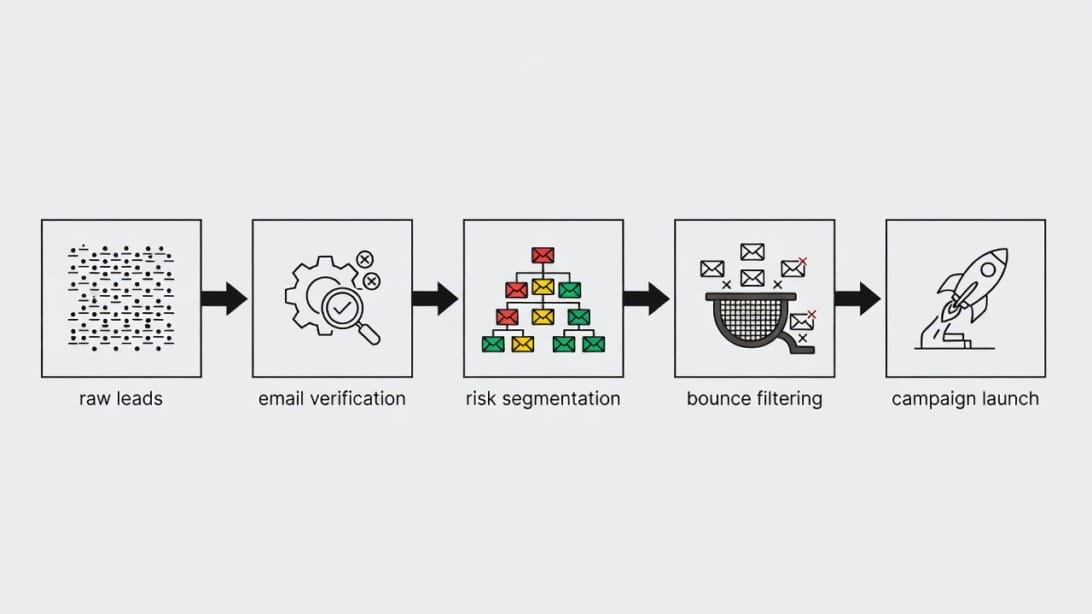
Use this step-by-step workflow instead.
Step 1: Clean the List Before Verification
Remove obvious junk before you spend credits. Standardize domains, remove duplicate emails, delete blank fields, and normalize capitalization. If your CRM contains multiple records for the same person, merge them first.
Pre-cleaning reduces wasted verification spend and makes your results easier to interpret. It also prevents false confidence from a large “verified” export that still contains duplicate contacts, irrelevant personas, and unusable company data.
Checklist before upload:
- Remove duplicate email addresses.
- Remove personal test records.
- Remove contacts without a clear source.
- Remove contacts outside your target market.
- Normalize company domains.
- Split high-risk purchased lists from first-party lists.
- Keep a copy of the original file for audit history.
Step 2: Run MillionVerifier on the Cleaned File
Upload the cleaned list or use the API, depending on your workflow. For large batches, keep exports organized by source, date, and campaign intent. Do not mix every list into one giant file unless you are comfortable losing source-level diagnostics.
A good file name might look like this:
`2026-06-saas-finance-directors-us-sourceA-prelaunch.csv`
That naming pattern makes it easier to compare bounce rates later. If one source produces more invalid or risky records, you can reduce spend there instead of blaming the verifier or the sending platform.
Step 3: Segment Results by Risk
After verification, create separate segments instead of one all-purpose export.
Recommended segments:
1. Valid and targeted.
2. Valid but low-fit.
3. Catch-all and high-fit.
4. Unknown.
5. Role-based.
6. Disposable.
7. Invalid.
8. Risky.
Only the first segment should move directly toward campaign preparation. The others need review, suppression, secondary checks, or a different communication strategy.
Step 4: Run Bounce-Risk Filtering Before Import
Verification is valuable, but many teams add a second safety layer before importing contacts into their sequencer. Filter Bounce is useful in this context because it focuses on bounce-risk filtering as part of a broader outbound safety process.
A layered process is especially helpful when your list includes catch-all domains, older records, scraped data, or multiple lead vendors. The goal is not to create busywork. The goal is to prevent preventable bounces before they hit your sending mailboxes.
Step 5: Import Only the Safest Segment Into Your Outreach Platform
Once the list is cleaned and segmented, import the safest contacts into your campaign platform. If you use Mystrika, this is where verification connects to the rest of the outbound workflow: sequence setup, personalization, inbox rotation, sending limits, warmup context, and reply management.
The platform you send from matters. A verified list sent too aggressively from new or poorly configured mailboxes can still damage reputation. Pair verification with cold email warmup, authentication checks, and gradual campaign scaling.
Step 6: Monitor Bounce Rate by Source
After sending, compare real bounce outcomes by lead source, domain type, and verification status. This closes the loop.
Track at minimum:
- Bounce rate by list source.
- Bounce rate by verification status.
- Bounce rate by sending domain.
- Bounce rate by mailbox.
- Reply rate by source.
- Spam complaint signals where available.
- Unsubscribe rate by segment.
If a source produces high bounces after verification, reduce or stop buying from that source. If catch-all records produce weak engagement, isolate them. If one mailbox bounces more than others, inspect sending setup and reputation.
Pros of MillionVerifier
MillionVerifier’s biggest strengths come from focus. It does not try to be everything in the email stack. For many teams, that is a benefit.
Straightforward Bulk Verification
The main use case is easy to understand: upload a list, verify it, and export results. That simplicity is useful for teams that do not want a complicated platform just to clean emails.
Bulk verification is especially relevant for agencies, sales teams, data providers, and growth teams that regularly process lead lists. If your team cleans thousands or millions of records, workflow clarity matters.
Useful for Pre-Campaign Hygiene
MillionVerifier fits naturally before campaign launch. It helps reduce the number of obviously bad addresses entering your outreach platform. That improves the quality of your starting dataset and can reduce avoidable hard bounces.
This is not a replacement for deliverability work, but it is one of the basic hygiene steps. Sending to unverified lists is like launching a campaign without checking whether the roads exist.
API Option for Ongoing Validation
An API is useful when you collect emails through forms, enrichment workflows, internal tools, or custom lead pipelines. Instead of cleaning lists only after they accumulate, you can validate addresses closer to the point of entry.
API verification is valuable for:
- Lead capture forms.
- Product signup flows.
- CRM enrichment workflows.
- Internal prospecting tools.
- Data vendor ingestion.
- Custom outbound operations.
For high-volume teams, API-based checks can prevent bad data from spreading through the CRM.
Integrations Reduce Manual Work
MillionVerifier’s public site lists many integrations with email marketing, CRM, and sending tools. Integrations matter because manual CSV work creates errors. The fewer times a human downloads, edits, renames, and reuploads a file, the fewer opportunities there are for mistakes.
Still, integration availability should be verified against your exact stack. A logo on a marketing page is not the same as a workflow that supports your permissions, fields, suppression logic, and sync direction.
Good Fit for Teams With an Existing Stack
If you already use Mystrika for campaign execution, DoYouMail for infrastructure, and other tools for enrichment or CRM management, MillionVerifier can serve as a dedicated verification layer. You do not need every tool to do every job.
The stack approach works when responsibilities are clear:
- MillionVerifier: initial list validation.
- Filter Bounce: extra bounce-risk filtering.
- DoYouMail: email infrastructure context.
- Mystrika: outbound sequencing, warmup, unibox, and campaign operations.
- Internal CRM: source of truth for account and contact data.
That separation prevents a common mistake: expecting a verifier to perform like a deliverability platform.
Cons and Limitations of MillionVerifier
MillionVerifier is useful, but it has limits. Understanding those limits is the difference between using it well and over-trusting it.
Verification Cannot Guarantee Inbox Placement
This is the biggest misconception. A verified email can still land in spam. It can still generate no reply. It can still belong to the wrong person. It can still be protected by aggressive filters. It can still be attached to a company that has no interest in your offer.
Inbox placement depends on many factors beyond address validity:
- Domain authentication.
- IP and domain reputation.
- Mailbox age.
- Sending volume.
- Engagement history.
- Message content.
- Link usage.
- Recipient relevance.
- Spam complaints.
- Bounce history.
Use an email blacklist check and other reputation diagnostics alongside verification if you are troubleshooting campaign performance.
Catch-All Results Require Judgment
Catch-all domains are difficult because the receiving server may accept mail for many addresses without confirming whether a specific mailbox exists. A verifier may not be able to determine the real user-level validity.
That does not mean every catch-all is bad. Some high-value business domains use catch-all behavior. But it does mean you should not dump catch-all records into the same campaign as confirmed valid emails.
A safer approach:
- Send catch-all contacts only if account fit is strong.
- Use lower daily volume.
- Avoid new domains or new mailboxes.
- Monitor bounces closely.
- Stop quickly if bounce rate rises.
- Suppress catch-all records from risky sources.
Vendor Claims Need Your Own Validation
MillionVerifier’s official claims and third-party reviews are useful starting points, not proof that your list will perform the same way. Your results depend on list source, geography, industry, age, domain mix, and sending setup.
Before processing a massive database, run a controlled sample:
1. Select a representative list sample.
2. Verify it with MillionVerifier.
3. Segment by status.
4. Send only to the safest segment.
5. Track real bounce rate.
6. Compare results to your previous process.
7. Decide whether to scale.
This is a better process than trusting any advertised accuracy number blindly.
It Is Not a Full Cold Email Platform
MillionVerifier does not replace sequencing, mailbox rotation, warmup, unibox management, or campaign analytics. If your team is doing outbound, you still need a system for those tasks.
Mystrika is relevant here because it is built for cold email outreach workflows, including sequencing, warmup, unified inbox handling, and campaign management. MillionVerifier can help clean the list before it reaches that stage, but the campaign still needs careful execution.
MillionVerifier vs Other Email Verification Tools
The email verification market includes tools such as ZeroBounce, Bouncer, NeverBounce, Kickbox, Emailable, Clearout, Hunter, EmailListVerify, and others. Many competitors claim high accuracy, fast processing, API support, and integrations.
Rather than asking “Which verifier is universally best?” ask which one fits your workflow.
| Selection factor | Why it matters | How to evaluate MillionVerifier |
|---|---|---|
| Price per verification | Affects large-list economics | Compare current credit tiers against your monthly volume |
| Accuracy methodology | Determines trust in claims | Look for transparent tests and validate with your own sample |
| Catch-all handling | Impacts B2B outbound risk | Review how catch-all results are labeled and exported |
| API reliability | Matters for real-time validation | Test latency, rate limits, documentation, and error handling |
| Integrations | Reduces CSV handling | Confirm your exact CRM or ESP workflow |
| Reporting | Helps diagnose data quality | Check whether exports explain reasons, not just final status |
| Compliance support | Needed for professional data handling | Review DPA, deletion, storage, and regional requirements |
| Support | Important during large imports | Test support before a critical campaign |
EmailVendorSelection’s broader tool comparison emphasizes criteria such as accuracy, speed, reporting, price, support, and integrations. Those are the right categories. For a MillionVerifier-specific decision, add two more: catch-all policy and downstream cold email workflow.
Decision Matrix: Should You Use MillionVerifier?
Use this matrix to decide whether MillionVerifier is a good fit for your situation.
| Scenario | Fit | Reason |
|---|---|---|
| You have large lists and need affordable pre-send cleaning | Strong fit | Bulk verification is the core use case |
| You need API validation for incoming leads | Good fit | API verification can reduce bad data at entry |
| You want an all-in-one outreach platform | Weak fit | You still need sequencing and sending tools |
| You send cold email from new domains | Conditional fit | Verification helps, but warmup and volume control matter more |
| Your lists contain many catch-all domains | Conditional fit | You need strict segmentation and monitoring |
| You need legal review, DPA, and data deletion clarity | Conditional fit | Confirm current terms with your team |
| You want independent benchmark proof | Conditional fit | Run your own test before full rollout |
| You only send to first-party opt-in lists | Moderate fit | Useful for hygiene, but less critical than for purchased or enriched data |
A simple rule: MillionVerifier is a list hygiene tool. Choose it if list hygiene is the job you need done. Do not choose it expecting it to replace the rest of your outbound system.

Practical Examples
Examples make the trade-offs clearer. Here are three common scenarios.
Example 1: Agency Cleaning 500,000 Cold Prospects
An outbound agency receives 500,000 contacts from multiple sources. Some come from enrichment, some from client CRM exports, and some from older prospecting files.
Recommended workflow:
1. Split records by source.
2. Remove duplicates and obvious junk.
3. Verify each source separately in MillionVerifier.
4. Compare invalid and risky rates by source.
5. Suppress invalids, disposables, and risky records.
6. Send only confirmed valid contacts first.
7. Put catch-all contacts into a separate low-volume campaign.
8. Track bounce rate by source and client.
This process helps the agency improve procurement decisions. If one source consistently produces poor verification outcomes, the agency has evidence to renegotiate or stop using it.
Example 2: SaaS Team Validating Demo Request Emails
A SaaS company receives demo requests, content downloads, and webinar registrations. Some form submissions contain typos, personal emails, or disposable domains.
Recommended workflow:
1. Use API verification at form submission or CRM entry.
2. Flag disposable and invalid emails.
3. Ask users to correct obvious typos.
4. Route valid business emails to sales.
5. Keep unknown results for manual review.
6. Avoid automatically rejecting high-value enterprise domains without review.
In this case, the goal is not cold outreach safety. It is CRM quality and sales routing accuracy.
Example 3: Founder Sending From a New Domain
A founder buys a list of 8,000 leads and wants to launch cold email next week. MillionVerifier can remove bad addresses, but the bigger risk may be sending too much too soon from a new domain.
Recommended workflow:
1. Verify the list.
2. Suppress invalid and risky emails.
3. Keep only highly relevant prospects.
4. Warm mailboxes gradually.
5. Start with very low daily volume.
6. Use Mystrika to manage conservative sequences and replies.
7. Monitor bounces and reputation.
8. Scale only after stable engagement.
The lesson: verification lowers one risk, but new-domain sending introduces several others.
Compliance, Privacy, and Data Handling Questions
Email verification involves uploading or processing personal data, so privacy and compliance questions matter. MillionVerifier’s public site has stated GDPR-related positioning and DPA availability, but your team should verify the current legal terms directly.
Before uploading a large list, ask:
- What data is stored?
- How long is uploaded data retained?
- Can data be deleted on request?
- Is a DPA available?
- Where is data processed?
- Are subprocessors listed?
- Are verification results used for model training, resale, or unrelated purposes?
- Does the tool support account-level access controls?
- Can you restrict who downloads exports?
- Are audit logs available?
This is not legal advice. It is an operational checklist. If your company handles regulated data or operates across multiple jurisdictions, involve your legal or privacy team before uploading prospect databases.
Common Mistakes When Using MillionVerifier
Most poor outcomes come from process mistakes, not from the act of verification itself.
Mistake 1: Sending to Every Non-Invalid Result
Do not treat valid, catch-all, unknown, and risky as one group. That destroys the value of verification. Segment outcomes and send only to the safest group first.
Mistake 2: Ignoring Lead Source Quality
If you mix all sources together, you cannot tell which vendor, scraper, event list, or CRM import created the problem. Always preserve source metadata.
Mistake 3: Verifying Too Early
Email data decays. If you verify a list and wait months to send, the result may no longer reflect reality. Verify close to launch, especially for cold outreach.
Mistake 4: Forgetting Suppression Lists
Your suppression list should include invalids, unsubscribes, bounced contacts, customers who should not be prospected, competitors, internal domains, and compliance exclusions. Verification does not replace suppression logic.
Mistake 5: Scaling Too Fast After Cleaning
A verified list can still cause problems if you suddenly increase volume. Ramp gradually and monitor bounce rate, replies, and reputation.
Mistake 6: Not Rechecking Risky Segments
Catch-all and unknown results may deserve a second pass later, especially if the contact is high value. Do not assume the first result is permanent.
Best Workflow With Mystrika, DoYouMail, and Filter Bounce
MillionVerifier fits best as one layer in a larger outbound workflow. Here is a practical stack pattern:
| Stage | Tool context | Purpose |
|---|---|---|
| Raw data cleanup | Spreadsheet, CRM, or enrichment tool | Remove duplicates and irrelevant records |
| Email verification | MillionVerifier | Identify invalid, risky, catch-all, unknown, disposable, and role-based emails |
| Extra bounce filtering | Filter Bounce | Add another safety layer before importing contacts |
| Sending infrastructure | DoYouMail | Support outbound sending setup and mailbox infrastructure |
| Campaign execution | Mystrika | Manage sequences, warmup, unibox, campaign controls, and replies |
| Reputation monitoring | Blacklist and deliverability checks | Detect issues before they compound |
This is a safer mental model than looking for one tool to solve every problem. Verification is a gate. It should stop bad contacts from entering the system. The sending platform then controls how approved contacts are messaged.
When using Mystrika after verification, keep these rules in mind:
- Import only the safest segment first.
- Keep catch-all contacts separate.
- Use conservative daily sending limits.
- Personalize by segment and persona.
- Watch bounce rates during the first few sends.
- Pause campaigns if bounces spike.
- Keep suppression lists synchronized.
- Avoid reimporting previously bounced contacts.
This process protects the long-term value of your domains and mailboxes.
MillionVerifier Alternatives and When to Compare Them
You should compare alternatives if MillionVerifier does not fit your requirements for accuracy transparency, integrations, API performance, reporting, support, or procurement.
Common alternatives in the broader market include Bouncer, ZeroBounce, NeverBounce, Kickbox, Emailable, Clearout, Hunter, EmailListVerify, and similar tools. The right comparison depends on your use case.
Compare alternatives when:
- You need a specific CRM integration.
- Your legal team needs stronger data controls.
- You need detailed reason codes in exports.
- You process extremely high API volume.
- Your lists contain many catch-all domains.
- You want delivery guarantees or recredit policies.
- You need team permissions and audit logs.
- You want more transparent test methodology.
A good comparison test uses the same sample list across tools. Do not compare one verifier on a fresh list and another on an older list. Use the same records, the same date, and the same scoring criteria.
Suggested test scorecard:
| Criterion | Weight | Notes |
|---|---|---|
| Invalid detection | 20% | Does it catch obvious bad addresses? |
| Catch-all handling | 20% | Does it separate uncertainty clearly? |
| Unknown rate | 15% | Too many unknowns reduce usefulness |
| Export clarity | 10% | Are reason codes actionable? |
| API usability | 10% | Documentation, latency, limits, errors |
| Price | 10% | Total cost at your real volume |
| Compliance fit | 10% | DPA, retention, deletion, access controls |
| Support | 5% | Responsiveness before and after purchase |
This scorecard is more useful than asking which tool has the loudest accuracy claim.
Final Recommendation
MillionVerifier is worth testing if you need a focused, scalable email verification tool and you already understand that verification is only one layer of deliverability. It is strongest as a pre-send list cleaning step and weakest when buyers expect it to replace campaign infrastructure, warmup, deliverability monitoring, or outreach execution.
The best way to evaluate MillionVerifier is simple:
1. Take a representative sample of your actual list.
2. Verify it with MillionVerifier.
3. Segment results by risk.
4. Send only the safest contacts through a controlled campaign.
5. Measure real bounce outcomes.
6. Compare the result against your current process.
If the sample lowers preventable bounces, preserves enough usable contacts, and fits your budget, MillionVerifier can earn a place in your stack. If the output leaves too many unknowns, catch-alls, or unclear reason codes, compare alternatives or add a second filtering layer before sending.
For cold outreach teams, the strongest recommendation is not “use MillionVerifier and send.” It is “verify, filter, segment, warm, send slowly, and monitor.” That workflow is what protects reputation.
Key Takeaways
- MillionVerifier is an email verification tool for cleaning lists before campaigns, not a complete deliverability platform.
- It is most useful for bulk verification, API validation, and pre-campaign hygiene.
- Pricing should be evaluated by total workflow cost, not just cost per credit.
- Accuracy claims should be tested against your own list and real bounce outcomes.
- Invalid, disposable, risky, unknown, and catch-all results should not be treated the same.
- Catch-all emails require separate segmentation and cautious sending.
- Verification does not guarantee inbox placement, replies, or campaign success.
- A strong workflow pairs MillionVerifier with Filter Bounce, Mystrika, DoYouMail, and reputation monitoring.
- Always preserve lead source metadata so you can identify bad data vendors or weak sources.
- Run a controlled sample before verifying and sending a massive database.
Frequently Asked Questions
What is MillionVerifier?
MillionVerifier is an email verification service that checks whether email addresses are likely valid, invalid, risky, disposable, role-based, catch-all, or unknown. Teams use it to clean lists before email marketing, cold outreach, CRM imports, or API-based lead validation.
It is best understood as a list hygiene tool. It helps reduce bad addresses before sending, but it does not replace deliverability strategy, mailbox warmup, domain authentication, sequencing, or reputation monitoring.
Is MillionVerifier accurate?
MillionVerifier publicly promotes high accuracy, and some third-party reviews describe it as strong enough for budget-conscious bulk verification. However, no advertised accuracy number should be treated as universal proof for your list.
Accuracy depends on list age, data source, domain mix, catch-all prevalence, and how success is measured. The safest approach is to test MillionVerifier on a representative sample, send only the safest segment, and compare real bounce outcomes.
Does MillionVerifier improve deliverability?
MillionVerifier can support deliverability by reducing obvious hard-bounce risk before a campaign. Fewer invalid addresses usually gives your sending system a cleaner starting point.
However, deliverability also depends on authentication, sender reputation, mailbox age, sending volume, content, engagement, spam complaints, and targeting. Verification helps with one part of the system, not the entire system.
Should I send to catch-all emails after using MillionVerifier?
You should not treat catch-all emails as automatically safe. A catch-all result means the domain may accept mail broadly without confirming whether the specific mailbox is valid.
For cold outreach, put catch-all contacts in a separate segment. Send only when account fit is strong, use lower volume, monitor bounces carefully, and suppress the segment quickly if performance looks risky.
How should I use MillionVerifier with Mystrika?
Use MillionVerifier before importing contacts into Mystrika. First verify the list, then suppress invalid and risky records, segment catch-all and unknown contacts, and import only the safest contacts into your Mystrika campaigns.
After import, use Mystrika for sequencing, warmup context, campaign controls, unibox management, and reply handling. The verifier cleans the input list, while Mystrika manages the outbound execution layer.
Is MillionVerifier enough for cold email?
No. MillionVerifier can clean your list, but cold email also needs safe sending infrastructure, warmed mailboxes, relevant targeting, good copy, controlled volume, reply management, and reputation monitoring.
A better cold email workflow is to verify with MillionVerifier, add bounce-risk filtering with Filter Bounce, use dependable sending infrastructure through DoYouMail, and manage campaigns through Mystrika.
How often should I verify an email list?
Verify close to the campaign launch date. Email data decays as people change jobs, domains expire, companies restructure, and mailboxes are disabled.
For cold outreach, avoid verifying a list months before sending and assuming it is still clean. If a list has been sitting for a while, re-check it before importing it into a campaign.
What should I do with unknown results in MillionVerifier?
Unknown results should be treated cautiously. They mean the verifier could not confidently determine whether the address is deliverable.
For cold outreach, unknown contacts are usually not safe enough for the first campaign wave. Re-check them later, validate through another method, or suppress them unless the account value justifies careful manual review.
Is MillionVerifier better than ZeroBounce, Bouncer, or NeverBounce?
It depends on your list, budget, API needs, integrations, compliance requirements, and tolerance for uncertain results. MillionVerifier may be attractive for teams focused on scalable list cleaning, but other tools may offer different reporting, support, integrations, or testing transparency.
The best comparison is to run the same sample list through multiple tools, segment the outputs, and compare real campaign bounce outcomes. Do not choose solely based on advertised accuracy claims.
Does MillionVerifier replace Filter Bounce?
No. MillionVerifier and Filter Bounce can be used together in a layered workflow. MillionVerifier performs email verification, while Filter Bounce adds another safety step focused on reducing bounce risk before sending.
This layered approach is useful for cold email teams dealing with older lists, catch-all domains, purchased data, or multiple lead sources. It is better to block risky contacts before they reach your sending mailboxes.
What is the safest MillionVerifier workflow for cold outreach?
The safest workflow is to clean the raw list, verify it with MillionVerifier, suppress invalid and risky records, segment catch-all and unknown contacts, run extra bounce filtering, then import only the safest contacts into your outreach platform.
After that, send slowly, monitor bounce rate by source, keep suppression lists updated, and pause campaigns if bounces spike. Verification is the first gate, not the final safety control.