
Every videographer knows the struggle. You spend hours crafting the perfect showreel, editing a client proposal, or following up on a high-value lead. Then your email bounces. Or worse, it lands in spam and the client never sees it.
The difference between landing a $10,000 video project and losing it to a competitor often comes down to something as simple as your email domain. A professional videographer sending from `@gmail.com` signals amateur. A custom domain like `@yourstudioname.com` signals established business. But the choice goes deeper than appearances. The domain you pick directly determines whether your emails reach inboxes, how much you pay for email hosting, and how scalable your outreach becomes.
This guide covers everything videographers need to know about selecting, setting up, and maintaining email domains that deliver. You will learn which domain extensions work best for video professionals, how to configure authentication so your emails land in inboxes, and what email hosting plans make sense for solo freelancers versus full production studios.
Why Videographers Need Professional Email Domains
The video production industry runs on email. You send proposals, contracts, invoices, project updates, delivery links, and follow-ups. Every one of those emails is a trust signal. When a potential client sees `@gmail.com` or `@yahoo.com`, they subconsciously register that you have not invested in your own infrastructure. It is a small signal, but in a competitive field where perception matters, it adds up.
Professional email domains serve three critical functions for videographers.
First, they build trust. A custom domain tells clients you are a legitimate business, not a hobbyist. When a wedding client receives a proposal from `[email protected]`, they feel confident handing over a deposit. When a corporate client sees `[email protected]`, they know you can handle their project.
Second, they control deliverability. Free email providers like Gmail and Outlook aggressively filter bulk sending. If you send more than a handful of identical emails per day from a free account, your messages get flagged. Custom domains with proper authentication give you control over your sender reputation. You can warm up the domain, set SPF and DKIM records, and build a reputation that keeps your emails in the inbox.
Third, they enable scalability. A single Gmail account caps at around 500 emails per day. For a videographer running cold outreach to wedding leads, corporate prospects, or real estate agents, that limit becomes a bottleneck. Custom domains let you scale to thousands of emails per day across multiple sending addresses, all under your own brand.
The videography industry has specific email needs that general advice often misses. You send large attachments, video links, and portfolio samples. You need deliverability that handles rich media content. You need a domain that looks professional when printed on a business card or displayed on a video intro slate.
How Email Domains Affect Deliverability for Video Professionals
Email deliverability is the measure of whether your messages reach the inbox instead of the spam folder. For videographers, this matters more than most industries because your emails often contain links to video hosting platforms, large attachments, or embedded media previews. These content types trigger additional spam filters.
The domain you choose is the foundation of your deliverability. Internet service providers (ISPs) like Gmail, Outlook, and Yahoo evaluate every incoming email based on the sending domain’s reputation. A brand new domain with no history starts at neutral. A domain that has been used for spam starts negative. A properly configured domain with authentication records starts with a fighting chance.
Here is how the domain choice cascades through deliverability.
Domain age matters. Older domains have built-in trust. If you registered `yourstudioname.com` five years ago and have been sending legitimate email from it, ISPs recognize that history. New domains require a warmup period where you gradually increase sending volume to build reputation.
Domain extension signals intent. `.com` domains carry the most trust. `.net` and `.org` are acceptable but slightly less trusted. Country-specific extensions like `.co.uk` or `.ca` work well for local businesses. Avoid free subdomains like `yourstudio.wordpress.com` or `yourstudio.wixsite.com` for professional email.
Domain matching matters. Sending from `@yourstudioname.com` and linking to `yourstudioname.com` creates a consistent brand signal that ISPs recognize. Sending from `@gmail.com` and linking to `yourstudioname.com` creates a mismatch that can trigger spam filters.
For videographers specifically, the content of your emails also affects deliverability. Video links from platforms like Vimeo, YouTube, or Wistia are generally safe. Direct video file attachments over 10MB are dangerous. Many videographers send portfolio links or demo reels, and those links need to come from a domain with good reputation.
Best Domain Extensions for Videography Businesses
Choosing the right domain extension (TLD) is the first decision in your email setup. Here is how the most common options perform for videography professionals.
.com Domains
The gold standard. `.com` is the most recognized and trusted domain extension worldwide. It works for every type of videography business, from wedding videography to corporate production to commercial work. If your first choice `.com` is available, register it immediately.
Pros: Maximum trust from ISPs, highest recognition from clients, best for deliverability.
Cons: High competition means many names are taken.
Best for: Every videography business.
.net and .org Domains
These are solid alternatives when your preferred `.com` is taken. `.net` originally stood for network companies but is now used broadly. `.org` carries a nonprofit connotation but works fine for creative businesses.
Pros: Widely recognized, good deliverability, often available when `.com` is taken.
Cons: Slightly lower trust signals than `.com`, `.org` can confuse clients expecting a nonprofit.
Best for: Videographers who cannot get their preferred `.com` name.
.io Domains
Popular in the tech and startup world, `.io` has gained mainstream acceptance. For videographers who work heavily with tech clients or position themselves as a modern digital studio, `.io` can work well.
Pros: Modern feel, widely used in tech, good availability.
Cons: Less recognized by general consumers, slightly lower deliverability than `.com`.
Best for: Tech-focused video production companies and modern creative studios.
.co Domains
`.co` is positioned as a `.com` alternative and has decent recognition. It works for videography businesses but requires more explanation than `.com`.
Pros: Short and memorable, good availability, reasonable trust.
Cons: Often confused with `.com`, some clients type `.com` by habit.
Best for: Videographers who want a short, brandable name.
Country-Specific Domains
Extensions like `.co.uk`, `.ca`, `.com.au`, or `.de` work well for videographers who serve a local market. A wedding videographer in London benefits from `.co.uk` because local clients trust it.
Pros: Strong local trust, good availability, clear geographic signal.
Cons: Limits perception to one country, may not work for international clients.
Best for: Videographers serving a specific geographic market.
Domain Extension Deliverability Comparison Table
| Extension | Trust Level | ISP Recognition | Client Recognition | Best For |
|---|---|---|---|---|
| .com | Highest | Excellent | Universal | Every videography business |
| .net | High | Good | Good | Alternative when .com is taken |
| .org | High | Good | Moderate | Creative studios, collectives |
| .io | Moderate | Good | Tech audiences | Tech-focused video production |
| .co | Moderate | Good | Moderate | Brandable short names |
| .co.uk / .ca | High (local) | Good | Strong (local) | Local market videographers |
| .studio | Low | Moderate | Niche | Portfolio sites (not email) |
| .video | Low | Low | Niche | Portfolio sites (not email) |
Recommendation: Register a `.com` domain for your primary email sending. If your preferred name is taken, add a descriptive word (like `yournamevideo.com` or `yourcityproduction.com`) rather than settling for a less trusted extension.
Top Email Hosting Providers for Videographers
Once you have a domain, you need email hosting. Here are the best options for videography professionals, compared across price, features, and deliverability.
Google Workspace
Google Workspace (formerly G Suite) is the most popular professional email hosting option. It gives you a custom domain email through Gmail’s interface, which means you get the familiar Gmail experience with your own domain.
Pricing: Starts at $6 per user per month (Business Starter), $12 per user per month (Business Standard).
Storage: 30GB per user on Starter, 2TB per user on Standard.
Deliverability: Excellent. Google’s infrastructure has high ISP trust.
Best for: Videographers who want Gmail’s interface with a custom domain.
Pros: Familiar interface, excellent spam filtering, integrates with Google Drive for sharing video files, strong mobile apps, reliable uptime.
Cons: Per-user pricing adds up for teams, limited automation for cold email, Google scans email content.
Microsoft 365 Business
Microsoft 365 offers professional email through Outlook with Exchange Online backend. It is the standard for corporate environments.
Pricing: Starts at $6 per user per month (Business Basic), $12.50 per user per month (Business Standard).
Storage: 50GB mailbox, 1TB file storage on Standard.
Deliverability: Excellent. Microsoft’s infrastructure is trusted by enterprise ISPs.
Best for: Videographers who work with corporate clients who use Outlook.
Pros: Strong calendar integration, excellent for B2B communication, familiar to corporate clients, robust security features.
Cons: Interface is less intuitive than Gmail for some users, per-user pricing, limited cold email capabilities.
Zoho Mail
Zoho Mail is a budget-friendly alternative that still offers professional features. It is popular among freelancers and small creative businesses.
Pricing: Free for up to 5 users (limited storage), $1 per user per month (Mail Lite), $4 per user per month (Mail Premium).
Storage: 5GB on free plan, 10GB on Lite, 50GB on Premium.
Deliverability: Good. Zoho has solid infrastructure but lower ISP trust than Google or Microsoft.
Best for: Solo videographers and small studios on a tight budget.
Pros: Affordable pricing, ad-free interface, good mobile apps, includes calendar and contacts.
Cons: Lower deliverability than Google or Microsoft, less brand recognition, limited integrations.
Namecheap Private Email
Namecheap offers affordable email hosting with good deliverability. It is a solid middle-ground option.
Pricing: Starts at $0.97 per month per mailbox (Starter), $2.49 per month (Professional).
Storage: 10GB on Starter, 30GB on Professional.
Deliverability: Good. Namecheap uses professional infrastructure.
Best for: Videographers who already use Namecheap for domain registration.
Pros: Affordable, easy integration with Namecheap domains, good support, simple setup.
Cons: Limited advanced features, smaller storage than competitors, fewer integrations.
Email Hosting Comparison Table for Videographers
| Provider | Starting Price | Storage | Deliverability | Best For |
|---|---|---|---|---|
| Google Workspace | $6/user/month | 30GB+ | Excellent | Gmail users, teams |
| Microsoft 365 | $6/user/month | 50GB+ | Excellent | Corporate clients |
| Zoho Mail | Free-$1/user/month | 5-50GB | Good | Budget-conscious freelancers |
| Namecheap Email | $0.97/month | 10-30GB | Good | Domain + email bundle |
| ProtonMail | $3.99/user/month | 15GB | Good | Privacy-focused users |
| Fastmail | $5/user/month | 30GB | Good | Simple, fast setup |

Domain Authentication Setup for Videographers
Authentication is the technical foundation of email deliverability. Without proper authentication, your emails look like spam to ISPs regardless of your domain choice. Here is what every videographer needs to set up.
SPF Records
Sender Policy Framework (SPF) tells ISPs which servers are authorized to send email from your domain. If you only send from Google Workspace, your SPF record should list Google’s servers. If you also use a cold email platform, that platform’s servers need to be in your SPF record.
A basic SPF record for Google Workspace looks like this:
v=spf1 include:_spf.google.com ~allIf you use Mystrika for cold email outreach, your SPF record would include both:
v=spf1 include:_spf.google.com include:spf.mystrika.com ~allThe `~all` at the end tells ISPs to soft-fail emails from unauthorized servers. Use `-all` for strict enforcement once you are confident all legitimate senders are listed.
DKIM Signatures
DomainKeys Identified Mail (DKIM) adds a digital signature to every email you send. ISPs verify this signature against a public key published in your DNS records. If the signature matches, the email is verified as coming from your domain.
DKIM setup varies by email provider. Google Workspace generates a DKIM key in the admin console. You copy the TXT record value and add it to your domain’s DNS settings. The process takes about 10 minutes and dramatically improves deliverability.
DMARC Policies
Domain-based Message Authentication, Reporting, and Conformance (DMARC) tells ISPs what to do when an email fails both SPF and DKIM checks. It also sends you reports about who is sending email from your domain.
A basic DMARC record:
v=DMARC1; p=none; rua=mailto:[email protected]Start with `p=none` to monitor without blocking. After a few weeks of reviewing reports, move to `p=quarantine` (send suspicious emails to spam) and eventually `p=reject` (block them entirely).
Authentication Setup Checklist for Videographers
- [ ] SPF record published with all legitimate sending sources
- [ ] DKIM key generated and published for each sending domain
- [ ] DMARC record published starting with p=none
- [ ] DMARC reports monitored for unauthorized sending
- [ ] BIMI record (optional) for brand logo in supported email clients
- [ ] MX records configured for your email hosting provider
- [ ] Reverse DNS (PTR record) set up for dedicated sending IPs
Best Email Domains for Different Types of Videography
Different videography niches have different email needs. Here is how to choose the right domain structure for your specific type of video work.
Wedding Videographers
Wedding videographers send emails to engaged couples, wedding planners, and venues. Trust is critical because couples are making one of the biggest financial decisions of their wedding.
Recommended domain format: `firstnamelastnameweddings.com` or `yourstudioweddings.com`
Email addresses: `hello@`, `info@`, `bookings@`
Key considerations: Warm, personal tone. Couples respond to professionalism. A `.com` domain is essential.
Corporate and Commercial Videographers
Corporate videographers communicate with marketing managers, agency producers, and C-suite executives. These clients expect enterprise-grade professionalism.
Recommended domain format: `yourcompanyproductions.com` or `yournamecreative.com`
Email addresses: `hello@`, `production@`, `proposals@`
Key considerations: Corporate clients notice domain quality. Avoid creative extensions. Use Google Workspace or Microsoft 365 for maximum deliverability.
Real Estate Videographers
Real estate videographers send to agents, brokers, and property managers. Speed matters because properties move fast.
Recommended domain format: `yourcityrealestatevideo.com` or `yournamepropertymedia.com`
Email addresses: `hello@`, `listings@`, `tours@`
Key considerations: Include your city or region in the domain for local SEO. Real estate agents receive hundreds of emails daily, so deliverability is critical.
Freelance Videographers
Freelance videographers need a domain that works across multiple client types. Flexibility is key.
Recommended domain format: `yournamevideo.com` or `yournamecreative.com`
Email addresses: `hello@`, `studio@`, `work@`
Key considerations: Keep it broad enough to handle weddings, corporate, and creative work. A single professional domain covers all your bases.
Video Production Agencies
Agencies with multiple team members need a domain structure that scales. Each team member should have their own email address under the agency domain.
Recommended domain format: `youragency.com`
Email addresses: `firstname@`, `hello@`, `projects@`, `careers@`
Key considerations: Use a team email hosting plan. Set up aliases for departments. Consider subdomains for different service lines.
Domain Structure Decision Matrix
| Business Type | Domain Format | Email Hosting | Monthly Cost | Deliverability Priority |
|---|---|---|---|---|
| Solo wedding videographer | firstnamelastnameweddings.com | Zoho Mail (free) | $0-1 | Medium |
| Freelance corporate shooter | yournamevideo.com | Google Workspace | $6 | High |
| Real estate video specialist | yourcityrealestatevideo.com | Google Workspace | $6 | High |
| 3-person production agency | youragency.com | Google Workspace | $18 | High |
| 10-person video studio | youragency.com | Microsoft 365 | $60 | Critical |
| Drone videography specialist | yournamedrone.com | Namecheap Email | $1-3 | Medium |
Cold Email Outreach for Videographers
Many videographers use cold email to find clients. Wedding videographers email recently engaged couples. Corporate shooters email marketing directors. Real estate videographers email property managers. Cold email works, but it requires proper domain setup to avoid spam folders.
Domain Warmup for Cold Email
A brand new domain cannot send cold email immediately. ISPs have no reputation data for the domain, so they treat all outgoing email with suspicion. Domain warmup is the process of gradually increasing sending volume to build reputation.
Week 1: Send 5-10 emails per day to personal contacts who will reply. This establishes initial engagement signals.
Week 2: Increase to 15-25 emails per day. Mix in replies to your existing conversations.
Week 3: Increase to 30-50 emails per day. Start adding cold prospects.
Week 4: Ramp to 50-100 emails per day. Monitor open rates and bounce rates closely.
Week 5+: Gradually increase to your target volume. Never exceed 200 emails per day from a single domain in the first 60 days.
Mystrika includes automated domain warmup that handles this process for you. The warmup feature sends and receives emails from a network of real mailboxes to build your domain’s reputation before you start cold outreach.
Sending Volume Limits for Videographers
Even after warmup, each domain has practical sending limits. Exceeding these limits triggers spam placement or temporary blocks.
Per domain per day: 200-500 emails maximum for a fully warmed domain.
Per email address per day: 50-100 emails maximum.
Bounce rate threshold: Keep under 2%. Every bounce damages your domain reputation.
Spam complaint rate: Keep under 0.1%. A single spam complaint from 1000 emails is acceptable. Two is dangerous.
For videographers running cold email campaigns, these limits mean you need multiple domains to scale. A wedding videographer targeting 5000 engaged couples per month needs at least 3-5 properly warmed domains.
Email Verification Before Sending
Sending to invalid addresses damages your domain reputation. Every bounce signals to ISPs that you are sending indiscriminately. Email verification tools check each address before you send.
Filter Bounce is a budget-friendly email verification service that checks your prospect lists before sending. At $0.01 per verification, it catches invalid, disposable, and role-based email addresses that would otherwise bounce and hurt your deliverability.
Cold Email Domain Strategy for Videographers
- Register 3-5 domains for cold outreach (e.g., `yournamevideo.com`, `yournameproductions.com`, `yournamecreative.com`)
- Warm each domain for 30 days before sending cold email
- Send no more than 50 emails per day per domain in the first 60 days
- Verify every email address before sending
- Monitor bounce rates daily and pause sending if they exceed 2%
- Use a different domain for personal correspondence than cold outreach
Common Email Domain Mistakes Videographers Make
Avoid these mistakes that hurt deliverability and professional perception.
Using Free Email Providers
`@gmail.com`, `@yahoo.com`, and `@outlook.com` signal amateur. They also limit your sending volume and give you no control over deliverability. A custom domain costs as little as $10 per year and pays for itself in the first client it helps you land.
Choosing Unusual Domain Extensions
Extensions like `.xyz`, `.top`, `.club`, or `.work` are associated with spam. ISPs treat them with suspicion. Stick to `.com`, `.net`, `.org`, or your country’s TLD.
Skipping Authentication Setup
SPF, DKIM, and DMARC are not optional. Without them, your emails are more likely to land in spam. The setup takes 30 minutes and permanently improves your deliverability.
Sending Too Much Too Fast
New domains need warmup. Sending 200 cold emails from a brand new domain guarantees spam placement. Start slow and build reputation gradually.
Ignoring Bounce Rates
A 5% bounce rate on a 100-email campaign means 5 bounces. ISPs track this. Keep bounce rates under 2% by verifying addresses before sending.
Using the Same Domain for Everything
Your personal email, client correspondence, and cold outreach should use different domains. If your cold email domain gets flagged, your client communication domain stays clean.
Not Monitoring Deliverability
Deliverability changes over time. ISPs update their filters. Your domain reputation fluctuates. Monitor your open rates, bounce rates, and spam placement monthly. Tools like Mystrika’s Unibox give you a centralized view of all your email performance metrics.
How to Set Up Your Videography Email Domain Step by Step
Follow this process to set up a professional email domain for your videography business.
Step 1: Register Your Domain
Choose a domain name that reflects your business. Include your name, your service, or your location. Register through a reputable registrar like Namecheap, Google Domains, or Cloudflare.
Cost: $10-15 per year for a `.com` domain.
Step 2: Choose Your Email Hosting
Select an email hosting provider based on your budget and needs. Google Workspace at $6 per month is the best balance of cost and deliverability for most videographers.
Step 3: Configure DNS Records
Your email hosting provider gives you DNS records to add to your domain. These include MX records (direct email to your provider), SPF records (authorize sending servers), and DKIM keys (sign your emails).
Step 4: Set Up DMARC
Add a DMARC record to monitor unauthorized email sending. Start with `p=none` and review reports for 30 days before tightening the policy.
Step 5: Create Email Addresses
Create the email addresses you need. At minimum, set up `[email protected]` for general inquiries and `[email protected]` for your personal correspondence.
Step 6: Warm Up Your Domain
If you plan to send cold email, warm your domain for 30 days before starting outreach. Use Mystrika’s automated warmup to build reputation without manual effort.
Step 7: Monitor Deliverability
Check your deliverability weekly for the first 90 days. Watch for bounce rate increases, open rate drops, or spam complaint notifications. Adjust your sending practices based on the data.
Email Deliverability Monitoring for Videographers
Once your domain is set up, you need to monitor its health. Here is what to track and how to fix problems.
Key Metrics to Monitor
Bounce rate: The percentage of emails that are returned as undeliverable. Keep under 2%. If it rises above 2%, pause sending and verify your list.
Open rate: The percentage of delivered emails that are opened. A healthy cold email open rate is 30-50%. A sudden drop signals deliverability problems.
Reply rate: The percentage of recipients who reply. For videographers, a 5-15% reply rate on cold email is good. Low reply rates may indicate your emails are landing in spam.
Spam complaint rate: The percentage of recipients who mark your email as spam. Keep under 0.1%. Google’s threshold is 0.1% before they start filtering your domain.
Blacklist status: Check if your domain or IP is on any email blacklists. Use Mystrika’s blacklist check tool to monitor this.
How to Fix Deliverability Problems
If your deliverability drops, take these steps in order:
1. Pause all cold email sending. Continuing to send from a damaged domain makes the problem worse.
2. Check blacklists. Find out if your domain is listed and follow their removal process.
3. Review your email content. Remove spam trigger words, excessive links, and large attachments.
4. Verify your list. Remove invalid addresses and old contacts.
5. Check authentication. Ensure SPF, DKIM, and DMARC are correctly configured.
6. Reduce sending volume. Cut your daily volume by 50% and gradually increase.
7. Warm up again. Use Mystrika’s warmup to rebuild your domain reputation.
Email Domain Security for Videographers
Your email domain is a valuable asset. If it gets compromised, someone can send emails that look like they come from you. Here is how to protect it.
Enable Domain Lock
Domain lock prevents unauthorized transfers of your domain to another registrar. Enable it in your domain registrar’s settings. This is the single most important security measure for your domain.
Use Strong DNS Security
Enable DNSSEC (DNS Security Extensions) on your domain. This prevents attackers from redirecting your email traffic to their servers.
Monitor DMARC Reports
DMARC reports show you who is sending email from your domain. Review them monthly to catch unauthorized sending early. If you see emails from unknown sources, investigate immediately.
Use Separate Domains for Different Purposes
Keep your personal email domain, client communication domain, and cold email domain separate. If one gets compromised or blacklisted, the others remain unaffected.
Set Up Two-Factor Authentication
Enable two-factor authentication on your email hosting account and domain registrar. This prevents unauthorized access even if your password is compromised.
Email Templates for Videographers
Here are email templates designed for videography professionals. These templates work with any properly configured domain.
Cold Email Template for Wedding Videographers
Subject: [Couple Name] - Your wedding date at [Venue]

Hi [Couple Name],

I saw your wedding is coming up on [Date] at [Venue]. Congratulations.

I am a wedding videographer based in [City] and I specialize in cinematic wedding films that capture the emotion of your day without the awkward posing.

I have availability on your date and would love to send over my portfolio and pricing.

Would you be open to a quick call this week?

Best,
[Your Name]
[Your Studio Name]
[Your Website]
Cold Email Template for Corporate Videographers
Subject: Video content for [Company Name]

Hi [First Name],

I noticed [Company Name] has been producing [type of content] for your marketing. I work with B2B companies in [Industry] to create video content that drives engagement.

My recent work with [Client Name] increased their LinkedIn video engagement by [X]%.

I have attached a link to my portfolio. Would you have 15 minutes next week to discuss how video could support your [Q3/Q4] marketing goals?

Best,
[Your Name]
[Your Company]
[Your Website]
Follow-Up Template
Subject: Re: Video content for [Company Name]

Hi [First Name],

Following up on my previous email. I know you are busy.

I wanted to mention that I have availability in [Month] and can accommodate tight production timelines.

Here is a direct link to my portfolio: [Link]

Happy to jump on a quick call if that is easier.

Best,
[Your Name]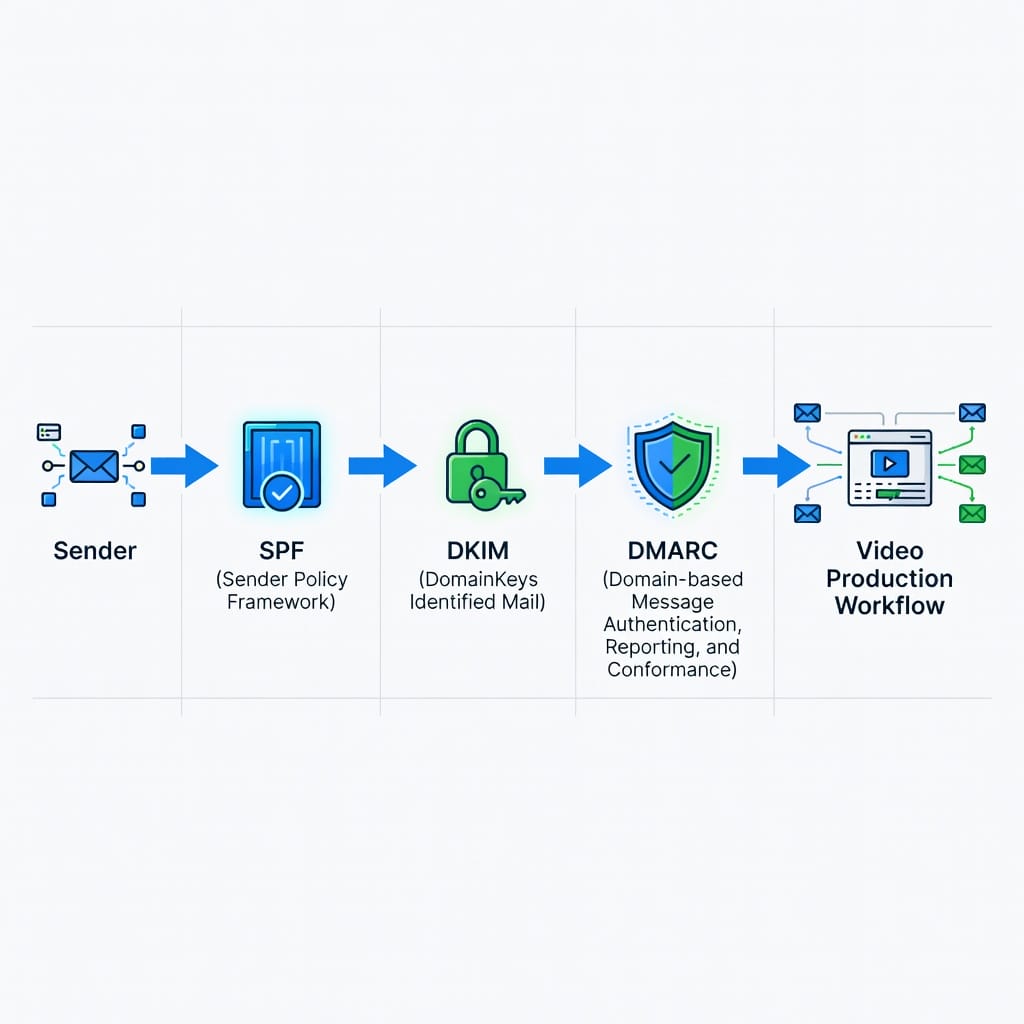
Key Takeaways
- Register a `.com` domain for your primary videography email. It has the highest trust from ISPs and clients. If your preferred name is taken, add a descriptive word rather than using a less trusted extension.
- Configure SPF, DKIM, and DMARC authentication on every domain you use for email. Without these records, your emails are more likely to land in spam regardless of your domain choice.
- Google Workspace at $6 per month is the best email hosting for most videographers. It combines excellent deliverability with the familiar Gmail interface. Budget-conscious freelancers can start with Zoho Mail’s free plan.
- Warm new domains for 30 days before sending cold email. Start with 5-10 emails per day and gradually increase. Never exceed 200 emails per day from a single domain in the first 60 days.
- Use separate domains for personal correspondence, client communication, and cold outreach. If one domain gets flagged, your other email streams remain unaffected.
- Verify every email address before sending cold email. Filter Bounce provides budget-friendly verification at $0.01 per address and helps keep your bounce rate under the critical 2% threshold.
- Monitor your deliverability metrics weekly. Track bounce rate, open rate, spam complaint rate, and blacklist status. Address problems immediately by pausing sending and fixing the root cause.
- Mystrika’s automated warmup and Unibox give videographers a complete email infrastructure solution. The platform handles domain warmup, sending infrastructure, and deliverability monitoring so you can focus on creating great video content.
Frequently Asked Questions
What is the best email domain for a wedding videographer?
The best email domain for a wedding videographer is a `.com` domain that includes your name and the word weddings. For example, `firstnamelastnameweddings.com` or `yourstudioweddings.com`. This format signals your specialty to couples searching for wedding vendors. Use Google Workspace for hosting to ensure maximum deliverability to wedding clients who often use Gmail or Outlook.
Can I use a Gmail account for my videography business?
You can use Gmail, but it limits your professional image and deliverability. A `@gmail.com` address signals amateur to potential clients and restricts your sending volume to approximately 500 emails per day. Custom domains cost as little as $10 per year and immediately improve how clients perceive your business. The return on investment is clear when a single client project is worth thousands of dollars.
How many email domains do I need for cold email outreach?
You need at least 3-5 domains for serious cold email outreach. Each domain should be warmed for 30 days and limited to 50-100 emails per day. With 5 domains, you can send 250-500 cold emails daily while staying within safe limits for each domain. This protects your deliverability and gives you redundancy if one domain gets flagged.
What happens if my email domain gets blacklisted?
If your domain gets blacklisted, pause all email sending immediately. Check which blacklist has listed your domain and follow their removal process. Common causes include high bounce rates, spam complaints, or sending to purchased email lists. After removal, warm the domain again gradually. Mystrika’s blacklist check tool helps you monitor your domain status and catch problems early.
Do I need separate domains for different types of videography work?
Separate domains are recommended if you serve distinctly different markets. A wedding videographer who also shoots corporate content benefits from `yournameweddings.com` for wedding prospects and `yournameproductions.com` for corporate clients. This keeps your brand messaging focused and prevents cross-contamination if one domain’s deliverability suffers.
How long does it take to warm up a new email domain?
Domain warmup takes 30-60 days for cold email readiness. The first 30 days build baseline reputation through low-volume sending to engaged recipients. The next 30 days gradually increase volume while monitoring deliverability metrics. Mystrika’s automated warmup accelerates this process by simulating natural email patterns from a network of real mailboxes.
What is the most important email authentication record?
SPF is the most important authentication record because it directly prevents spammers from sending email that appears to come from your domain. Without SPF, ISPs have no way to verify that your email is legitimate. DKIM and DMARC are also essential, but SPF is the foundation. Configure all three for maximum deliverability.
Should I use my videography website domain for email?
Yes, using your website domain for email creates a consistent brand signal. Sending from `[email protected]` and linking to `yourstudioname.com` tells ISPs and clients that you are a legitimate business. This consistency improves deliverability and reinforces your brand every time you send an email.
How does email deliverability affect my video hosting links?
Email deliverability directly affects whether clients see your video hosting links. If your emails land in spam, clients never click through to Vimeo, YouTube, or Wistia links. Professional domains with proper authentication ensure your video delivery emails reach inboxes. Learn more about email deliverability best practices to optimize your video link distribution.
What is the relationship between domain reputation and video file attachments?
Domain reputation determines whether ISPs allow large video file attachments through their filters. New domains or domains with poor reputation face stricter attachment size limits. Well-established domains with authentication records can send larger attachments without triggering spam filters. Always verify attachment sizes against ISP limits before sending client deliverables.
Can I change my email domain later without losing deliverability?
Changing domains requires starting the warmup process over. Your new domain begins with neutral reputation regardless of your previous domain’s performance. Plan domain changes carefully and maintain your old domain for at least 90 days to ensure smooth transition for existing clients. Use separate domains for cold outreach to protect your primary client communication domain from deliverability risks.
How do email authentication records affect video thumbnail previews?
Email authentication records (SPF, DKIM, DMARC) influence whether email clients generate video thumbnail previews. Authenticated domains are more likely to trigger thumbnail generation in Gmail, Outlook, and other clients. This improves engagement rates because recipients see your video content immediately without clicking through to a hosting platform.
What email sending tools work best with videography domains?
Cold email platforms like Mystrika integrate seamlessly with professional videography domains. The platform handles domain warmup, sending infrastructure, and deliverability monitoring. For videographers sending portfolio links and proposal emails, Mystrika’s Unibox provides centralized inbox management across multiple domains. Filter Bounce complements this by verifying prospect email addresses before sending to maintain low bounce rates.
How often should I check my domain’s blacklist status?
Check your domain’s blacklist status weekly during active sending periods. Monthly checks are sufficient for low-volume senders. Use Mystrika’s blacklist check tool to monitor your domain across 50+ blacklists. Early detection of blacklist placement allows faster remediation before deliverability drops significantly.
What is the best practice for email signature design for videographers?
Email signatures for videographers should include your name, title, studio name, phone number, website link, and a small portfolio link. Keep the signature under 5 lines to avoid triggering spam filters. Include your professional domain email prominently. Avoid embedding images or complex HTML that can break across email clients.
Should videographers use role-based email addresses like info@ or hello@?
Role-based addresses like `info@`, `hello@`, and `bookings@` work well for initial contact points. They route inquiries to the right team member without exposing personal addresses. However, cold email campaigns should use personal addresses like `firstname@` because role-based addresses have lower reply rates and higher spam placement. Use role-based addresses for website contact forms and personal addresses for direct outreach.