
Email verification protects your sender reputation by catching invalid addresses before they damage your deliverability metrics. B2B sales teams that skip verification face hard bounce rates above 5%, spam folder placement, and IP blacklisting that can take months to recover from.
The techniques in this guide address the specific challenges of verifying B2B email addresses at scale: corporate catch-all domains, role-based addresses, and mailbox providers that actively block automated verification attempts. You will learn the protocol-level mechanics, method tradeoffs, integration patterns, and compliance requirements needed to maintain clean lists without losing valid prospects.
How Email Verification Actually Works at the Protocol Level
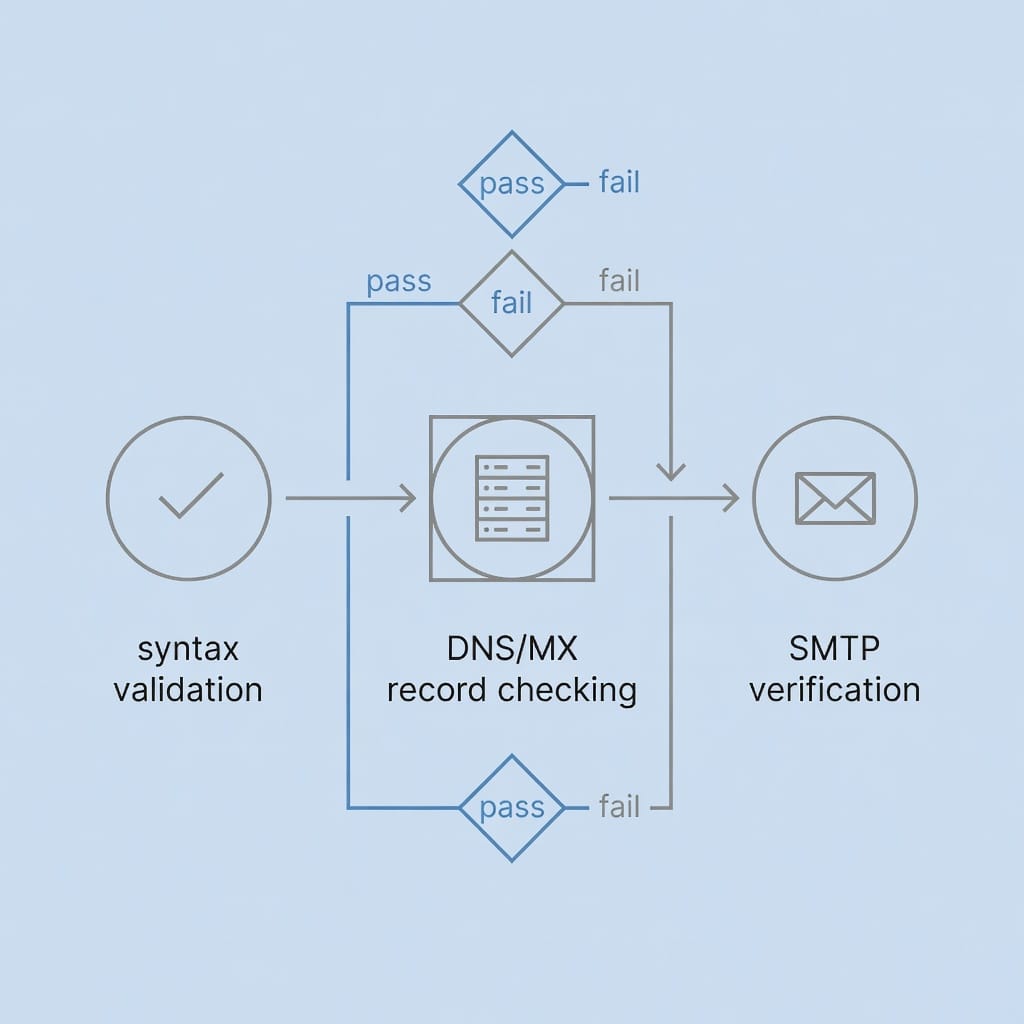
Email verification operates at three distinct layers, each catching different categories of invalid addresses. Understanding these layers helps you choose the right verification strategy and interpret results correctly when automated tools return unexpected outcomes.
Syntax validation: the first filter
Syntax validation uses regular expression pattern matching to verify email address format. The standard pattern checks for a local part before the @ symbol, a domain part after it, and valid characters throughout. A typical regex pattern looks like this:
^[a-zA-Z0-9._%+-]+@[a-zA-Z0-9.-]+.[a-zA-Z]{2,}$This layer catches obvious formatting errors like missing @ symbols, consecutive dots, or invalid characters. Syntax validation processes thousands of addresses per second with minimal computational overhead.
However, syntax validation cannot detect non-existent domains, deactivated mailboxes, or typosquatted domains that follow valid formatting rules. An address like `[email protected]` passes syntax validation despite the misspelled domain. Most verification workflows use syntax validation as a fast first pass before investing resources in deeper checks.
DNS and MX record checking explained
DNS verification queries mail exchanger (MX) records to confirm a domain can receive email. Every domain that accepts email must publish MX records pointing to its mail servers. When verification tools check `[email protected]`, they query DNS for the MX records of `company.com`.
This layer catches several categories of invalid addresses:
- Typosquatted domains like `gnail.com` or `outlok.com` that have no MX records
- Expired domains that once existed but no longer resolve
- Domains configured to reject all email through null MX records
- Misconfigured domains where MX records point to non-existent servers
DNS verification adds minimal latency compared to SMTP verification while catching domain-level issues that syntax validation misses. The process typically completes in 100-500 milliseconds per domain when using cached DNS resolvers.
SMTP verification: the real conversation with mail servers
SMTP verification establishes an actual connection with the recipient’s mail server using the Simple Mail Transfer Protocol. The verification tool initiates an SMTP conversation, presents the target email address, and interprets the server’s response to determine mailbox existence.
A typical SMTP verification conversation follows this pattern:
220 mail.company.com ESMTP ready
EHLO verifier.example.com
250-mail.company.com Hello
250-PIPELINING
250-SIZE 104857600
MAIL FROM:<[email protected]>
250 OK
RCPT TO:<[email protected]>
250 OK
QUIT
221 Bye
The critical response comes at the `RCPT TO` command. A `250 OK` response indicates the mailbox likely exists. A `550 Mailbox not found` response indicates the address does not exist. Other response codes indicate temporary issues or policy restrictions.
SMTP verification provides the highest accuracy of the three layers but introduces several complications. Mailbox providers implement rate limiting that blocks verification attempts from IPs making too many connections. Corporate mail servers may require authenticated connections. Some providers return ambiguous responses that neither confirm nor deny mailbox existence.
Understanding catch-all domains and why they complicate verification
Catch-all domains accept email sent to any address at that domain, regardless of whether the specific mailbox exists. When you send to `[email protected]`, the mail server accepts the message and either delivers it to a default mailbox or discards it silently.
Catch-all configurations break traditional SMTP verification. The server returns `250 OK` for every address, creating false positives that appear valid but may not reach any actual recipient. B2B sales teams encounter catch-all domains frequently at smaller companies that lack dedicated IT resources to configure granular mailbox policies.
Detecting catch-all domains requires sending verification attempts to multiple non-existent addresses at the same domain. If the server accepts several random addresses, it likely operates in catch-all mode. Some verification providers maintain databases of known catch-all domains, though these databases require constant updates as configurations change.
Verification Methods Compared: Accuracy, Speed, and Cost Tradeoffs
Different verification methods offer distinct accuracy, speed, and cost profiles. Choosing the right method requires understanding these tradeoffs and matching them to your specific use case.
| Verification Method | Accuracy Range | Speed | Relative Cost | Best Use Case |
|---|---|---|---|---|
| Syntax Only | 60-70% | <1ms per address | Free | Initial filtering of obvious typos |
| DNS/MX Checking | 75-85% | 100-500ms per domain | Low | Catching domain-level issues at scale |
| SMTP Verification | 85-95% | 1-5 seconds per address | Medium | High-value prospect verification |
| Third-Party Services | 90-97% | Varies by provider | High | Large-scale list cleaning with compliance needs |
Syntax-only verification: fast but limited
Syntax-only verification processes email addresses through pattern matching without any network requests. The speed advantage makes it ideal for initial filtering during list import or form submission. You can process millions of addresses in minutes rather than hours.
The limitation becomes apparent when you examine what syntax verification misses. It cannot detect:
- Typosquatted domains that follow valid formatting
- Expired domains that no longer receive email
- Deactivated mailboxes at valid domains
- Role-based addresses that may not reach decision-makers
Use syntax verification as a first-pass filter, then apply deeper verification methods to addresses that pass the syntax check. This staged approach minimizes computational cost while maintaining accuracy on the addresses that matter.
DNS/MX verification: catching domain-level issues
DNS/MX verification adds domain existence checking to the syntax validation layer. The verification tool queries DNS for MX records before attempting any SMTP connection. Addresses at domains without valid MX records get filtered without the latency cost of SMTP verification attempts.
This method catches several categories of invalid addresses that syntax verification misses:
- Typosquatted domains like `outlok.com` instead of `outlook.com`
- Expired domains that once received email but no longer resolve
- New domains that have not yet propagated MX records
- Misconfigured domains where MX records point to unreachable servers
DNS verification typically completes in 100-500 milliseconds per unique domain when using efficient DNS caching. The per-domain timing means verifying 10,000 addresses across 500 domains costs roughly the same as verifying 500 addresses across 500 domains.
SMTP verification: the gold standard with caveats
SMTP verification establishes direct connections with recipient mail servers to confirm mailbox existence. This method provides the highest accuracy for domains that permit verification connections, typically achieving 85-95% accuracy on standard corporate domains.
The caveats arise from mailbox provider policies that restrict automated verification:
- Gmail allows approximately 10-20 verification connections per minute per IP before temporary blocking
- Microsoft 365 may return permanent error codes for verification attempts from untrusted IPs
- Yahoo requires authenticated connections for verification attempts
- Corporate mail servers may implement custom policies that block external verification
Successful SMTP verification at scale requires distributed IP pools, proper connection throttling, and fallback strategies when providers block direct verification attempts. Many organizations combine SMTP verification with third-party services that have established trust relationships with major providers.
Third-party verification services: what they add and what they cost
Third-party verification services operate distributed verification infrastructure with established relationships with mailbox providers. They handle rate limiting, IP rotation, and provider-specific policies so you do not need to manage these complexities.
Services typically offer several value-adds beyond raw verification accuracy:
- Compliance documentation for GDPR and CCPA requirements
- Audit logging of all verification activities
- Verification result caching to reduce redundant checks
- Catch-all domain detection and handling
- Disposable email provider databases updated in real-time
- API integrations with popular CRMs and sequencers
Pricing in 2026 ranges from $0.001 to $0.02 per verification depending on volume and features. High-volume batch verification often costs $0.002-$0.005 per contact. Real-time API verification commands premium pricing at $0.01-$0.02 per verification. Subscription models typically start at $50-200/month for 10,000-50,000 monthly verifications.
Real-time vs batch verification: when to use each approach
Real-time verification processes addresses individually as they enter your system, typically at form submission or lead import. This approach prevents bad data from entering your database in the first place.
Batch verification processes addresses in bulk, typically during periodic database cleanup or before high-stakes campaigns. Batch APIs often offer lower per-unit pricing and can process millions of addresses overnight when timing is less critical.
Most mature operations use both approaches at different workflow stages:
- Real-time verification at lead capture forms and manual entry points
- Batch verification for imported databases and periodic re-verification
- Real-time verification for small lists under 1,000 contacts where speed matters
- Batch verification for large database cleanups where cost efficiency matters
The decision framework depends on list size, time sensitivity, budget constraints, and risk tolerance for bad data entering your CRM.
Building Your Verification Workflow: Integration Patterns That Work
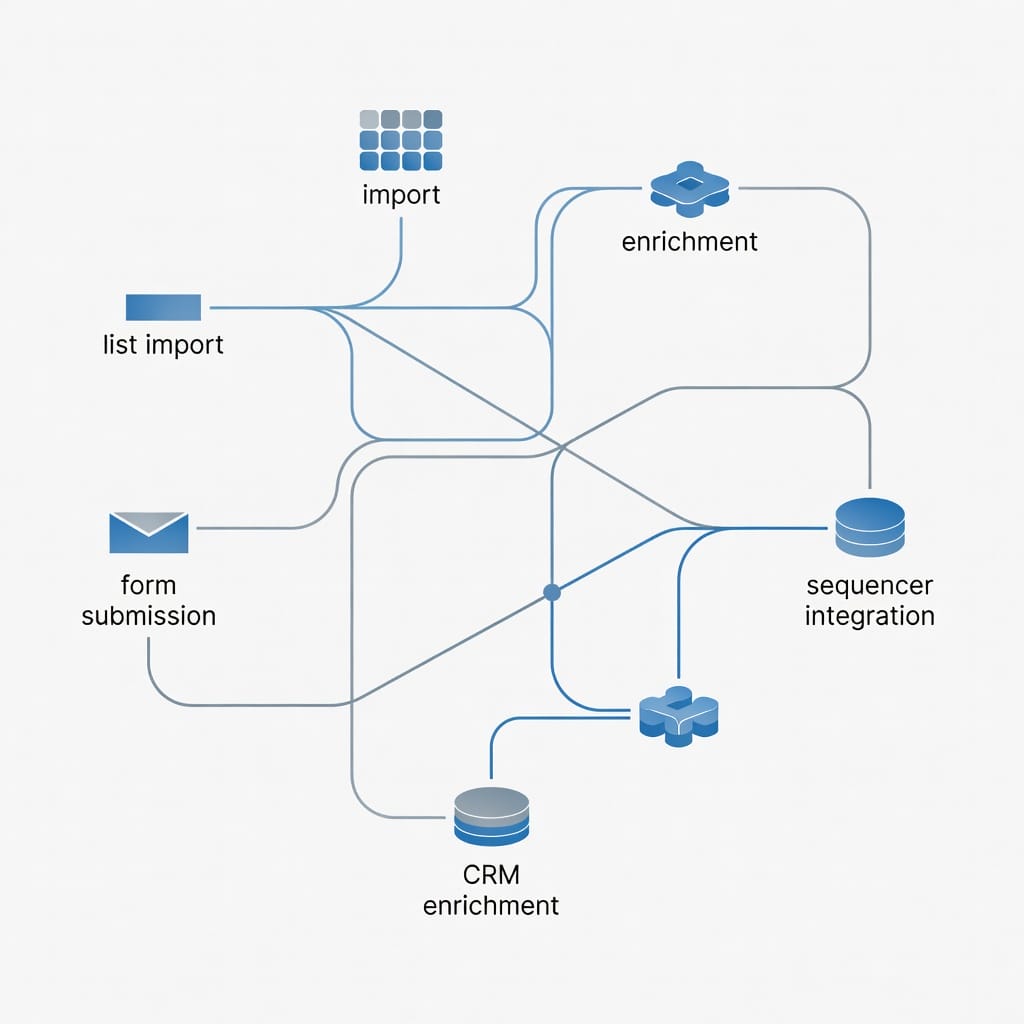
Effective verification requires integration at multiple touchpoints in your sales workflow. The patterns below address the most common integration scenarios B2B sales teams encounter.
Pre-list-building verification: catching issues at the source
When sourcing leads from third-party databases, scraping tools, or manual research, verify addresses before adding them to your CRM. This prevents database pollution and reduces the volume of addresses requiring later cleanup.
Pre-list-building verification typically uses batch verification APIs that offer lower per-unit pricing. You can verify thousands of addresses overnight and import only the verified results the next morning. This pattern works well for:
- Building initial prospecting lists from multiple sources
- Enriching existing accounts with additional contacts
- Periodic database expansion campaigns
The tradeoff is that verification happens before you know which addresses will actually receive outreach. Some verified addresses may never enter active sequences if they do not match your ideal customer profile.
Post-list-building batch verification: cleaning existing databases
Existing databases accumulate invalid addresses over time through data decay, job changes, and domain expirations. Periodic batch verification catches these issues before they damage your sender reputation.
Recommended re-verification cadence:
- Active prospect segments: every 90-180 days
- Cold outreach lists older than 6 months: before any new campaign
- Engaged contact segments: annually or when engagement drops
- Dormant segments: before reactivation campaigns
Batch verification of existing databases requires careful segmentation to avoid verifying contacts you no longer plan to contact. Focus verification resources on segments with upcoming outreach activity.
Real-time verification at form submission: preventing bad data entry
Forms on your website, landing pages, and content offers represent high-intent prospects who have explicitly provided their contact information. Verifying these addresses at submission time prevents invalid data from entering your system.
Real-time verification at form submission requires API calls that complete within the form submission workflow, typically under 2 seconds. This constraint favors providers with low-latency APIs and may require fallback logic if the verification service experiences delays.
The implementation typically follows this pattern:
1. User submits form with email address
2. Client-side syntax validation provides immediate feedback
3. Server receives submission and initiates verification API call
4. Form submission completes with verification status recorded
5. Invalid addresses get flagged for review or blocked entirely
CRM integration: keeping your database clean over time
CRM platforms like HubSpot, Salesforce, and Pipedrive support verification integration through native APIs and middleware platforms. The integration points typically include:
- Webhook triggers on new contact creation that initiate verification
- Scheduled jobs that re-verify contacts based on age or engagement status
- Field-level validation rules that flag or block invalid email formats
- Custom fields that store verification status, timestamp, and method
Verification status becomes a first-class field that influences segmentation and outreach eligibility. Contacts with invalid verification status get excluded from active sequences until re-verified or manually reviewed.
Sequencer integration: verifying before every send
Cold email sequencers benefit from verification integration that checks addresses immediately before sending. This final verification layer catches addresses that passed earlier checks but have since become invalid.
Sequencer verification typically uses cached results for addresses verified within the past 30-90 days, falling back to fresh verification only for older results or previously unverified addresses. This caching strategy balances accuracy against verification costs and rate limiting constraints.
Integration with sequencers like Mystrika allows verification status to influence sequence enrollment, with invalid addresses held for review rather than sent to non-existent mailboxes. For teams seeking a dedicated email verification service, Filter Bounce provides budget-friendly verification that integrates with popular CRM and sequencer workflows.

Handling Edge Cases Without Losing Valid Prospects
Automated verification produces ambiguous results for certain address categories. The techniques below help you handle these edge cases without systematically excluding valid prospects.
Role-based addresses: when to include or exclude
Role-based addresses like `[email protected]`, `[email protected]`, and `[email protected]` route to shared mailboxes rather than individual decision-makers. These addresses often produce verification results that differ from personal addresses.
Verification tools may flag role-based addresses as lower quality because:
- They often route to generic inboxes with lower engagement rates
- Multiple people may access the same address, complicating engagement tracking
- Some organizations configure role-based addresses to auto-reply or discard messages
The decision to include or exclude role-based addresses depends on your outreach goals:
- For broad awareness campaigns, role-based addresses may effectively reach decision-makers
- For personalized sequences targeting specific individuals, role-based addresses reduce relevance
- For compliance-sensitive outreach, role-based addresses may lack the consent documentation attached to individual contacts
Many teams maintain separate segments for role-based and individual addresses, applying different messaging and verification standards to each.
Catch-all domains: verification strategies that reduce false negatives
Catch-all domains accept all email addresses at that domain, making traditional SMTP verification return false positives. The server confirms delivery for addresses that may not reach any actual recipient.
Strategies for handling catch-all domains:
Probabilistic verification: Check multiple non-existent addresses at the domain. If several random addresses verify successfully, the domain likely operates in catch-all mode.
Domain reputation signals: Newer domains, domains with low web presence, and domains registered through privacy services show higher catch-all rates. Weight verification confidence based on these signals.
Quarantine lists: Maintain a list of suspected catch-all domains requiring manual review before high-volume outreach. This prevents automated exclusion of potentially valid prospects while flagging the risk.
Engagement-based validation: Send low-risk emails to catch-all addresses first, measuring engagement before scaling volume. This approach treats verification as one signal among many rather than a binary gate.
Disposable and temporary email detection
Disposable email providers offer temporary addresses that expire within hours or days. These addresses serve legitimate privacy purposes but create problems for B2B outreach where long-term engagement matters.
Verification providers maintain databases of known disposable email domains, updated as new providers emerge. The detection typically checks the domain against curated lists rather than attempting mailbox verification.
B2B sales teams generally exclude disposable addresses from outreach because:
- The address will likely expire before follow-up sequences complete
- Engagement tracking becomes unreliable when addresses disappear
- The privacy-conscious users who choose disposable addresses rarely engage with sales outreach
Some teams maintain a middle ground, allowing disposable addresses for initial contact while requiring permanent addresses for active pipeline stages.
International email formats and special characters
Email addresses outside the ASCII character set require internationalized email address (IEA) handling. Verification tools must properly encode these addresses according to IDNA2008 standards before querying mail servers.
Common international email scenarios include:
- Domains with non-Latin characters like `münchen.de`
- Local parts with accented characters like `[email protected]`
- Right-to-left script domains requiring proper bidirectional handling
Verification accuracy for international addresses depends on the verification provider’s IDNA support. Test verification results on a sample of international addresses before relying on automated filtering for global outreach.
Corporate email forwarding and alias handling
Corporate environments often implement email forwarding and aliasing that creates multiple valid addresses pointing to the same mailbox. A verification tool may successfully verify `[email protected]` while failing to verify `[email protected]`, even though both addresses reach the same person.
Alias handling requires understanding organizational email policies:
- Some organizations configure catch-all forwarding for all addresses at a domain
- Others implement specific alias rules documented in their email policies
- Forwarding chains may route through multiple servers before final delivery
Verification tools cannot always distinguish between aliases and independent mailboxes. When verification returns inconsistent results for similar addresses at the same domain, manual review or engagement testing helps determine which addresses actually reach decision-makers.
Compliance Requirements for Email Verification
Email verification involves processing personal data and must comply with applicable data protection regulations. The requirements below address the most common compliance considerations for B2B sales teams.
GDPR considerations when verifying EU contacts
The General Data Protection Regulation applies to verification of email addresses belonging to EU residents. Key requirements include:
Lawful basis: You must have a lawful basis for processing each contact’s data, typically legitimate interest for B2B sales outreach. Verification itself constitutes processing that requires documentation of this basis.
Data minimization: Verify only the data necessary for your outreach purposes. Do not verify entire purchased databases if you only plan to contact a subset of those contacts.
Processor agreements: When using third-party verification providers, execute data processing agreements that specify the purposes, duration, and security measures for the processing.
Documentation: Maintain records of verification activities including timestamps, methods, and results. These records demonstrate compliance during regulatory inquiries.
Right to erasure: If a contact exercises their right to erasure, you must delete not only their contact record but also any verification metadata associated with that record.
CCPA requirements for California residents
The California Consumer Privacy Act applies to verification of email addresses belonging to California residents. Key requirements include:
Notice at collection: Provide notice that you collect email addresses and the purposes for collection. This notice must appear before or at the point of collection.
Right to know: California residents can request disclosure of the personal information you have collected about them, including any verification metadata.
Right to delete: California residents can request deletion of their personal information, which extends to verification records and logs.
Opt-out rights: While B2B sales outreach generally qualifies for the B2B exemption under CCPA, documenting opt-out requests and honoring them prevents compliance issues.
CAN-SPAM Act implications for verification practices
The CAN-SPAM Act regulates commercial electronic messages in the United States. While CAN-SPAM does not directly regulate email verification, several provisions affect verification practices:
Accurate header information: Verification emails or confirmation messages must contain accurate header information. Using deceptive subject lines or from addresses to improve verification success violates CAN-SPAM.
Physical postal address: Commercial messages must include a valid physical postal address. This requirement applies to confirmation emails sent as part of verification workflows.
Unsubscribe mechanisms: If verification workflows send confirmation emails, those emails must include functional unsubscribe mechanisms.
Data retention and audit logging requirements
Compliance requires maintaining audit logs of verification activities while respecting data retention limitations:
What to log: Verification timestamp, method used, result status, provider if applicable, and error codes. Use hashed identifiers rather than storing email addresses in logs when possible.
Retention period: Align retention with your jurisdiction’s requirements, typically 3-7 years for compliance records. Delete verification logs when they exceed the required retention period.
Security requirements: Encrypt verification metadata at rest. Log and restrict access to verification records. Implement access controls that limit verification data exposure.
Third-party processor requirements: Ensure verification providers meet your security standards and maintain appropriate certifications. Review their security documentation before integrating their services.
Third-party processor agreements with verification providers
When using third-party verification services, execute agreements that specify:
- The purposes for which the provider processes verification data
- The types of data processed and categories of data subjects
- The duration of processing and deletion requirements
- Security measures implemented by the provider
- Subprocessor notification and approval requirements
- Data subject request handling procedures
- Breach notification timelines and responsibilities
- Audit rights and compliance demonstration requirements
Review these agreements annually and when providers change their service terms or security certifications.
Calculating Verification ROI: Cost Models and Break-Even Analysis
Email verification requires investment in tools, integration, and ongoing operations. The return on this investment comes from prevented bounces, protected sender reputation, and improved engagement rates.
Per-verification pricing: what to expect in 2026
Verification pricing varies by method, volume, and provider:
- Syntax-only verification: Free or included in list-building tools
- DNS/MX verification: $0.0005-$0.002 per unique domain checked
- SMTP verification: $0.002-$0.01 per address verified
- Third-party verification services: $0.001-$0.02 per verification
- Real-time API verification: $0.01-$0.02 per verification
- Batch verification APIs: $0.002-$0.005 per verification at volume
Subscription models typically offer 10,000-50,000 verifications monthly for $50-200, with overage charges for additional volume. Enterprise agreements may include dedicated infrastructure, compliance documentation, and SLA guarantees.
Subscription vs pay-as-you-go: choosing the right model
Subscription models provide predictable costs and often include features not available in pay-as-you-go pricing:
- Compliance documentation and audit support
- Higher rate limits and dedicated infrastructure
- Priority support and dedicated account management
- Advanced features like catch-all detection and disposable email databases
Pay-as-you-go models offer flexibility for variable verification volumes:
- No monthly minimum commitments
- Pay only for verifications actually performed
- Ability to switch providers without contract constraints
- Lower entry cost for testing verification workflows
Most organizations start with pay-as-you-go for initial testing, then move to subscription models once verification volume stabilizes and compliance requirements become clear.
Hidden costs: API rate limits, false positive handling, re-verification
The per-verification price represents only part of the total cost of ownership:
Rate limiting costs: When providers block verification attempts due to rate limits, you may need additional IP infrastructure or fallback providers. These costs add to the effective per-verification expense.
False positive handling: Addresses incorrectly flagged as invalid require manual review or engagement testing. The labor cost of this review should factor into verification ROI calculations.
Re-verification cycles: Addresses verified 6 months ago may require re-verification before new outreach. Factor re-verification volume into your annual verification budget.
Integration and maintenance: Building and maintaining verification integrations requires developer time. Estimate 40-80 hours for initial integration and 10-20 hours annually for maintenance and updates.
ROI framework: bounces prevented vs verification spend
A simple ROI framework compares verification costs against the costs of unverified bounces:
Cost per hard bounce: Include the direct cost of wasted outreach plus the reputation damage that affects future deliverability. A conservative estimate places hard bounce costs at $5-20 per incident when including reputation effects.
Verification cost per address: Include the direct verification cost plus amortized integration, maintenance, and false positive handling costs. A typical fully-loaded cost ranges from $0.01-$0.05 per address.
Break-even calculation: If verification costs $0.02 per address and prevents hard bounces that cost $10 each, you break even by preventing bounces on 1 in 500 verified addresses. Most lists contain invalid addresses at much higher rates than 0.2%.
When verification pays for itself: the math
Consider a list of 10,000 contacts with an estimated 8% invalid address rate:
- Invalid addresses: 800
- Hard bounces prevented: 800
- Cost per hard bounce avoided: $10
- Total value from bounce prevention: $8,000
Verification costs at $0.02 per address:
- Total verification cost: $200
Net ROI: $8,000 – $200 = $7,800 savings
This calculation assumes all invalid addresses would have produced hard bounces. In practice, some invalid addresses may produce soft bounces or spam folder placement rather than immediate hard bounces. Adjust bounce cost estimates based on your actual bounce patterns and reputation sensitivity.
Measuring Verification Accuracy and Managing False Positives
Verification tools produce imperfect results. Understanding accuracy limitations and implementing feedback loops helps you maximize the value of verification investments while minimizing the risk of excluding valid prospects.
Understanding verification result taxonomy
Verification tools typically return standardized result categories:
Valid: The verification process successfully confirmed mailbox existence through SMTP verification or equivalent high-confidence signals.
Invalid: The verification process received a definitive negative response indicating the mailbox does not exist.
Catch-all: The domain accepts email to any address, making individual mailbox verification impossible.
Unknown: The verification process could not complete due to rate limiting, server errors, or ambiguous responses.
Disposable: The address belongs to a known temporary email provider.
Role-based: The address follows a role-based pattern like `info@` or `sales@`.
Timeout: The verification connection timed out without receiving a definitive response.
Understanding these categories helps you interpret verification results and apply appropriate handling to each result type.
False positive rates: why they happen and how to reduce them
False positives occur when verification incorrectly flags valid email addresses as invalid. Common causes include:
- Aggressive mailbox provider rate limiting that returns temporary errors interpreted as permanent failures
- Catch-all domains that accept all addresses making existence verification impossible
- Temporary mail server outages during verification attempts
- Strict security policies that block automated verification connections
- Outdated verification provider databases that have not indexed recently created mailboxes
Reducing false positives requires combining multiple verification signals, implementing retry logic with exponential backoff, maintaining verification result caches, and periodically spot-checking verification decisions against actual deliverability results.
False negative risks: losing valid prospects
False negatives occur when verification incorrectly identifies invalid addresses as valid. While less damaging than false positives from a deliverability perspective, false negatives waste outreach resources on addresses that will never engage.
False negatives typically result from:
- Catch-all domains that verify successfully for non-existent addresses
- Role-based addresses that verify but route to generic inboxes
- Forwarding chains that verify at intermediate hops but fail at final delivery
- Recently deactivated mailboxes that have not yet been purged from mail server databases
Managing false negatives requires engagement testing on a sample of verified addresses and adjusting verification confidence thresholds based on actual engagement patterns.
Building a verification audit process
Regular audits help you measure verification accuracy and identify systematic issues:
1. Select a random sample of 100-500 addresses from each verification result category
2. Attempt manual verification through alternative methods for the sample
3. Compare manual results against automated verification results
4. Calculate accuracy rates for each result category
5. Identify patterns in incorrect verifications
6. Adjust verification workflows based on audit findings
Conduct audits quarterly or after significant changes to your verification providers or processes.
When to override automated verification decisions
Automated verification provides one signal among many for list quality decisions. Override automated decisions when:
- Manual verification through alternative methods confirms a different result
- Engagement history contradicts verification results
- Domain-level signals suggest verification errors
- Compliance requirements mandate inclusion despite verification status
Document overrides with the rationale and verification method used. This documentation helps refine automated verification rules over time.
Key Takeaways
- Email verification operates at three layers: syntax validation catches formatting errors, DNS/MX checking detects domain-level issues, and SMTP verification confirms mailbox existence with highest accuracy.
- Method selection depends on accuracy requirements, speed constraints, and budget: syntax verification processes thousands of addresses per second at no cost, while third-party services offer 90-97% accuracy at $0.001-$0.02 per verification.
- Integration at multiple workflow touchpoints maximizes verification value: pre-list-building verification prevents database pollution, real-time verification at forms blocks bad data entry, and sequencer integration provides final checks before send.
- Edge cases require specialized handling: catch-all domains need probabilistic verification and quarantine lists, role-based addresses need segmentation strategies, and disposable addresses generally warrant exclusion from B2B outreach.
- Compliance requirements vary by jurisdiction: GDPR requires lawful basis documentation and processor agreements, CCPA mandates notice and deletion rights, and CAN-SPAM affects confirmation email practices.
- ROI calculations show verification typically pays for itself by preventing hard bounces that cost $5-20 each in wasted outreach and reputation damage, with break-even occurring at bounce prevention rates as low as 0.2%.
- Verification accuracy requires ongoing measurement: false positives from rate limiting and catch-all domains, false negatives from forwarding chains, and systematic audit processes help maintain verification quality over time.
Frequently Asked Questions
How does email verification actually work at the protocol level?
Email verification operates at three layers: syntax validation checks email format using regex patterns, DNS/MX record checking confirms the domain can receive email by querying mail server records, and SMTP verification establishes an actual connection with the recipient’s mail server to confirm the mailbox exists. Each layer catches different types of invalid addresses, with SMTP verification providing the highest accuracy at the cost of slower processing and potential rate limiting from mailbox providers.
What is the difference between syntax, DNS, and SMTP verification?
Syntax verification validates email format using pattern matching – it catches obvious typos like missing @ symbols or invalid characters but cannot detect non-existent domains or mailboxes. DNS verification queries MX records to confirm the domain accepts email, catching typosquatted domains and non-existent domains. SMTP verification connects directly to mail servers using the SMTP protocol to check if a specific mailbox exists, providing the highest accuracy but requiring careful rate limiting to avoid provider blocks.
How do I handle catch-all domains without false negatives?
Catch-all domains accept email to any address at that domain, making traditional SMTP verification return false positives for non-existent mailboxes. The solution is to use probabilistic verification that checks for common patterns, combine multiple verification signals including domain age and reputation, implement a quarantine list for catch-all addresses requiring manual review, and use engagement-based validation where you send low-risk emails first to test deliverability before scaling volume.
When should I use real-time verification vs batch processing?
Use real-time verification at form submission points to prevent bad data entry, during lead import workflows to catch issues immediately, and when processing small lists under 1,000 contacts where speed matters more than cost. Use batch processing for large database cleanups, periodic re-verification of existing contacts, and when cost per verification is a primary concern since batch APIs typically offer lower per-unit pricing. Most mature operations use both approaches at different stages of their workflow.
What verification accuracy should I realistically expect?
Realistic accuracy expectations vary by method: syntax-only verification catches approximately 60-70% of invalid addresses, DNS/MX verification improves this to 75-85%, and full SMTP verification achieves 90-95% accuracy for most domains. However, catch-all domains, role-based addresses, and aggressive mailbox provider rate limiting can reduce effective accuracy. Third-party services typically advertise 95%+ accuracy but this varies significantly by domain type and list quality. Always test verification accuracy on your specific list before relying on results.
How does email verification integrate with my CRM workflow?
Email verification integrates with CRMs through API connections at multiple touchpoints: form submission webhooks that verify emails before creating new contacts, scheduled batch jobs that re-verify contacts based on age or engagement status, field-level validation rules that flag or block invalid emails, and enrichment workflows that add verification status as custom fields. Popular CRMs like HubSpot, Salesforce, and Pipedrive all support these integration patterns through native APIs or middleware like Zapier. The key is establishing verification status as a first-class field that influences segmentation and outreach eligibility.
What are the compliance requirements for email verification?
Email verification must comply with GDPR for EU contacts requiring lawful basis for processing, data minimization, and documented processor agreements with verification providers. CCPA requires California residents to receive notice of data collection and opt-out rights. CAN-SPAM requires accurate header information and physical postal addresses in commercial emails. All jurisdictions require maintaining audit logs of verification activities, documenting consent where applicable, and ensuring verification providers meet security requirements. Store only necessary verification metadata and establish data retention policies aligned with your jurisdiction’s requirements.
How much should email verification cost per contact?
Email verification pricing in 2026 typically ranges from $0.001 to $0.02 per verification depending on volume, method, and provider. High-volume batch verification through established providers often costs $0.002-$0.005 per contact. Real-time API verification commands premium pricing at $0.01-$0.02 per verification. Subscription models start around $50-200/month for 10,000-50,000 verifications. The break-even point typically occurs when preventing 2-3 hard bounces justifies the verification cost, since each hard bounce damages sender reputation and wastes outreach resources. Factor in re-verification needs and false positive handling when calculating total cost of ownership.
What are the common causes of verification false positives?
False positives occur when verification incorrectly flags valid email addresses as invalid. Common causes include aggressive mailbox provider rate limiting that returns temporary errors interpreted as permanent failures, catch-all domains that accept all addresses making existence verification impossible, temporary mail server outages during verification attempts, strict security policies that block automated verification connections, and outdated verification provider databases that have not indexed recently created mailboxes. Reducing false positives requires combining multiple verification signals, implementing retry logic with exponential backoff, maintaining verification result caches, and periodically spot-checking verification decisions against actual deliverability results.
How do mailbox providers handle verification attempts?
Major mailbox providers like Gmail, Microsoft 365, and Yahoo implement rate limiting, connection throttling, and behavioral analysis to detect automated verification attempts. Gmail typically allows 10-20 SMTP verification connections per minute per IP before temporary blocking. Microsoft 365 may return 550 errors for verification attempts from untrusted IPs. Yahoo has implemented strict policies requiring authenticated connections. Providers also analyze connection patterns, checking for rapid sequential verifications that indicate automated tools. Successful verification strategies use distributed IP pools, implement proper delays between connections, authenticate where possible, and fall back to less invasive methods when providers block direct SMTP verification.
Should I verify emails before or after list building?
The optimal approach combines both strategies at different stages. Verify during list building when sourcing from third-party databases, scraping tools, or manual research to prevent adding invalid addresses to your CRM. Verify after list building when importing existing databases, after significant time has passed since original collection, or when preparing for high-stakes campaigns where bounce rates must stay below 1%. The decision depends on your list source quality, time sensitivity, budget constraints, and risk tolerance. High-quality sources may only need periodic re-verification, while lower-quality sources benefit from pre-import verification to prevent database pollution.
What verification data should I store for compliance?
Store verification timestamp, verification method used, verification result status, the verification provider or service if applicable, and any error codes or messages returned. Do not store the actual email addresses in verification logs if they can be linked to individuals without consent – instead use hashed identifiers. Maintain records of your lawful basis for processing each contact’s data. Document your verification provider’s data processing agreement. Keep audit logs for the retention period required by your jurisdiction, typically 3-7 years for compliance records. Ensure verification metadata is encrypted at rest and access is logged and restricted to authorized personnel.