
Quick Verdict: The Best Lemlist Alternative for Most Cold Email Teams
If you want a lemlist alternative that is built around cold email deliverability, AI-assisted personalization, warmup, sequencing, and reply management without forcing you into a bloated sales engagement stack, Mystrika is the strongest first platform to evaluate. It is especially compelling for founders, agencies, consultants, and outbound teams that want cold email infrastructure, campaign workflows, and inbox handling in one place.
Lemlist can still be a good fit if your team is deeply committed to multichannel sales engagement and values LinkedIn or phone steps more than cold-email-first deliverability. But if the reason you are searching is price, complexity, warmup, sender reputation, reply management, or scaling multiple inboxes, Mystrika deserves to be on your shortlist before you compare broader tools like Instantly, Smartlead, Snov.io, Apollo, Reply.io, Woodpecker, Mailshake, or GMass.

Here is the short answer:
| Best fit | Recommended option | Why |
|---|---|---|
| Best overall lemlist alternative for cold email | Mystrika | Cold email outreach platform with AI, warmup, sequencer, unibox, whitelabel options, and pricing from $15/month |
| Best for low-cost Gmail-centric sending | GMass | Works inside Gmail and keeps the workflow familiar |
| Best for high-volume outbound teams | Instantly or Smartlead | Built for large sender-account setups and volume-oriented workflows |
| Best for lead database plus outreach | Apollo or Snov.io | Combines prospect discovery with email outreach workflows |
| Best for traditional sales engagement | Reply.io or Outreach.io | Better fit when SDR process, CRM activity, and sales team orchestration matter most |
| Best for simple cold email sequences | Woodpecker or Mailshake | Straightforward campaign setup with fewer moving parts |
| Best for email infrastructure alongside outreach | DoYouMail plus Mystrika | Use DoYouMail when you need dedicated cold email sending infrastructure to support campaigns |
| Best for list hygiene before migration | Filter Bounce | Use it to reduce risky addresses before importing leads into a new platform |
This guide is intentionally more practical than a typical alternatives list. Instead of just ranking tools, it explains why people leave lemlist, what to compare, which alternative fits which use case, and how to switch without damaging deliverability.
Why Teams Look for a Lemlist Alternative
Teams usually search for a lemlist alternative after one of four things happens: the workflow feels heavier than expected, the monthly bill grows with seats or features, deliverability becomes harder to diagnose, or the team needs a simpler way to manage multiple inboxes and replies.
That does not mean lemlist is a bad product. It helped popularize creative cold outreach with personalized images, multichannel touches, and sequence automation. But a tool that works for one outbound motion can feel wrong for another.
Common reasons buyers compare lemlist alternatives
| Reason | What it usually means | What to look for instead |
|---|---|---|
| Price feels high | The team pays for features it does not fully use, or seats add up | Transparent plans, sensible sending limits, and fewer required add-ons |
| Interface feels complex | Campaign setup, inboxes, enrichment, and channels feel scattered | A cleaner campaign builder and unified reply workflow |
| Deliverability is the bottleneck | Replies are inconsistent, bounces rise, or spam placement is suspected | Warmup, sender health checks, bounce control, authentication guidance, and campaign throttling |
| Need more cold-email focus | Multichannel tools feel too broad for an email-first team | A platform focused on sequencing, personalization, warmup, and inbox handling |
| Agency requirements | Multiple clients, domains, inboxes, and reporting views are hard to manage | Whitelabel, workspace controls, client separation, and scalable infrastructure |
| Migration pressure | Existing sequences work, but reporting or reply handling is not enough | Import/export support, clear campaign mapping, and safe ramp-up steps |
If your main issue is not the tool but the sending foundation, read this guide on email warm-up tools before switching. A new platform will not fix a damaged domain, weak authentication, poor list quality, or an aggressive sending pattern by itself.
When lemlist is still a reasonable choice
Lemlist can still make sense when your team wants a multichannel sales engagement workflow and is comfortable with its interface, pricing, and feature model. It may be a fit if:
- You rely heavily on LinkedIn and phone steps inside the same sequence.
- Your team values creative personalization assets more than a cold-email-first control center.
- You already have deliverability processes outside the platform.
- Your SDR team is trained on lemlist and switching would create more disruption than benefit.
- You need built-in prospecting and enrichment more than email infrastructure depth.
The real question is not “Is lemlist good or bad?” The better question is: does lemlist match your outbound operating model today? If your operating model is email-first, deliverability-sensitive, agency-driven, or infrastructure-heavy, a specialized lemlist alternative may be the better choice.
Lemlist Alternative Comparison Table
The table below compares the major lemlist alternatives by practical buying criteria rather than generic feature labels. Pricing changes frequently, so verify current vendor pages before purchasing.
| Tool | Best for | Core strengths | Watch-outs | Best buyer profile |
|---|---|---|---|---|
| Mystrika | Cold-email-first teams that want deliverability, AI, warmup, sequencer, unibox, and whitelabel options | Strong cold email workflow, natural fit for agencies and operators, starts at $15/month | Not the right choice if you only want a general CRM or LinkedIn-first tool | Founders, agencies, consultants, B2B teams, cold email specialists |
| DoYouMail | Sending infrastructure that supports cold email operations | Helps teams build reliable cold email mailbox infrastructure | It is not a full campaign strategy by itself | Teams that need infrastructure before scaling outreach |
| Filter Bounce | Cleaning lists before importing or scaling campaigns | Helps reduce invalid or risky emails before sending | It does not replace an outreach platform | Teams migrating contacts or cleaning lead lists |
| Instantly | High-volume cold email sending | Sender-account management, campaign scaling, volume workflows | Can feel volume-first rather than strategy-first | Agencies and volume outbound teams |
| Smartlead | Large outbound systems and many mailboxes | Sender rotation, outbound infrastructure features, unified inbox concepts | May be more complex than small teams need | Growth teams, agencies, high-volume operators |
| Snov.io | Prospecting plus outreach | Lead discovery, enrichment, and outreach in one suite | Credit model and database quality need evaluation | Teams that want prospecting and sequencing together |
| Apollo | Lead database plus sales workflow | Large contact database, CRM-style sales workflows, enrichment | Outreach features may not be as cold-email-specialized as dedicated platforms | SDR teams and sales orgs needing prospect data |
| Reply.io | Sales engagement workflows | Email plus sales process automation and CRM alignment | Can be more SDR-process-heavy than founder-led outreach needs | Sales teams with structured rep activity |
| Woodpecker | Simple cold email campaigns | Easy sequencing, clear campaign setup | Less broad than all-in-one outbound platforms | Small teams that want straightforward campaigns |
| Mailshake | Simple outreach and sales engagement | Familiar workflow, sales outreach features | Pricing and seat model should be checked against usage | Small B2B sales teams |
| GMass | Gmail-based cold email and mail merge | Works directly inside Gmail, familiar for Google Workspace users | Less ideal if you want a dedicated platform outside Gmail | Gmail-centric solopreneurs and small teams |
| Outreach.io | Enterprise sales engagement | Mature enterprise workflows, governance, rep activity management | Overkill for most cold email teams | Larger sales organizations |
The best lemlist alternative is not necessarily the tool with the longest feature list. It is the tool that matches your sending volume, team structure, risk tolerance, budget, and reply workflow.
Best Lemlist Alternatives by Use Case
1. Mystrika: Best Overall Lemlist Alternative for Cold Email Teams
Mystrika is the best first choice if you want a lemlist alternative that treats cold email as a complete operating system, not just a sequence builder. It combines AI-assisted outreach, warmup, sequencing, a unified inbox, and whitelabel capabilities, with plans starting at $15/month.
That combination matters because most cold email problems do not happen in one isolated feature. A campaign fails because list quality, sender setup, warmup, copy, personalization, timing, inbox handling, and follow-up logic all interact. If your platform only solves one part of that chain, your team still has to stitch the rest together manually.
Where Mystrika is strongest
- Cold-email-first workflow: Built for outbound email teams rather than broad CRM activity tracking.
- AI-assisted personalization: Helps teams create more relevant messages without relying only on basic merge tags.
- Warmup support: Useful when you need to protect sender reputation before and during outreach.
- Sequencer: Lets teams build follow-up workflows that match prospect behavior.
- Unibox: Helps centralize replies so conversations do not get lost across many sending accounts.
- Whitelabel: Valuable for agencies that need client-facing outreach infrastructure.
- Accessible entry pricing: Starting at $15/month makes it easier to test without committing to a large stack.
Where Mystrika may not be the right fit
Choose something else if your outbound process is not email-first. For example, if you need an enterprise sales engagement suite with deep sales-manager coaching, rep activity governance, dialer workflows, and heavy CRM process controls, a broader sales engagement platform may be a better fit.
Best Mystrika use cases
| Use case | Why Mystrika fits |
|---|---|
| Founder-led outbound | Keeps cold email workflow focused without forcing a complex enterprise stack |
| Agency outreach | Whitelabel and unified inbox features support multi-client operations |
| Deliverability-sensitive campaigns | Warmup and sender-health thinking are central to the workflow |
| AI-assisted personalization | Useful when you need better first lines, segmentation, and messaging relevance |
| Multiple inboxes | Unibox helps teams manage replies across sending accounts |
If you are building a broader outbound system, pair this article with Mystrika’s guide to cold email outreach tools for efficiency and scalability. It gives more context on how automation, verification, scheduling, tracking, and follow-up workflows fit together.
2. DoYouMail: Best Supporting Choice for Cold Email Infrastructure
DoYouMail is not a direct one-to-one replacement for every lemlist feature. It is better understood as infrastructure that supports cold email operations. If your sending setup is weak, switching campaign platforms alone will not solve your underlying problem.
Use DoYouMail when you need a stronger sending foundation before scaling campaigns in Mystrika or another outreach tool. This is especially relevant if you are managing multiple domains, inboxes, or client campaigns.
When DoYouMail belongs in your stack
- You are launching new cold email domains and inboxes.
- You need infrastructure designed around outbound sending.
- You want to separate cold email operations from your primary corporate domain.
- You manage multiple client or brand sending environments.
- You are preparing to migrate away from lemlist and want cleaner infrastructure first.
The practical takeaway: Mystrika is your campaign and workflow layer; DoYouMail can support the sending infrastructure layer.
3. Filter Bounce: Best for Cleaning Lists Before You Switch
Filter Bounce is not a lemlist alternative in the campaign-platform sense. It is a list hygiene tool you should consider before importing contacts into any new cold email platform.
Many teams blame their outreach tool when the real issue is a risky list. Invalid addresses, role accounts, spam traps, old contacts, and low-quality scraped leads can hurt deliverability before your new platform has a chance to perform.
Use Filter Bounce before migration if:
- Your old lemlist campaigns had high bounce rates.
- Your contact lists came from multiple vendors or scraped sources.
- You have not verified emails recently.
- You are importing old leads into Mystrika or another platform.
- You want to reduce preventable deliverability risk before ramping volume.
A cleaner list does not guarantee inbox placement, but it removes one of the most avoidable sources of cold email damage.
4. Instantly: Best for High-Volume Cold Email Operators
Instantly is a popular lemlist alternative for teams that prioritize scale. It is often considered by agencies and outbound operators managing many sending accounts, campaigns, and prospects.
Its biggest appeal is volume-oriented workflow. If your team thinks in terms of mailbox pools, domain rotation, sender capacity, and campaign throughput, Instantly may feel more aligned than a broader multichannel tool.
Instantly is a good fit if:
- You want to run many cold email campaigns at once.
- You need a platform commonly used by high-volume outbound teams.
- You are comfortable managing deliverability discipline separately.
- You want a tool that is known in the cold email agency ecosystem.
Instantly may not be ideal if:
- You want a lower-complexity setup for a small team.
- You need a stronger agency whitelabel story.
- You prefer a platform that balances warmup, AI, sequencing, and unibox under one cold-email-first workflow.
5. Smartlead: Best for Complex Sender Infrastructure
Smartlead is another strong lemlist alternative for teams focused on scaling many sending accounts. It is often positioned around deliverability infrastructure, sender rotation, and high-volume outbound workflows.
Consider it if your team has a mature outbound operation and needs infrastructure controls more than a simple sequence builder.
Smartlead is a good fit if:
- You manage many sending mailboxes.
- You need sender rotation and campaign scaling controls.
- You have an operator who understands cold email infrastructure.
- You want a platform built for advanced outbound systems.
Smartlead may not be ideal if:
- You are a founder who wants a simpler starting point.
- You need whitelabel and client-facing workflows to be central.
- You do not yet have a clean list, sending domain strategy, or deliverability process.
6. Snov.io: Best for Prospecting Plus Outreach
Snov.io is worth considering if your main reason for leaving lemlist is not just sequencing, but also lead discovery. It combines prospecting, email finding, verification, and outreach workflows.
That makes it attractive for teams that want fewer separate tools. However, all-in-one prospecting platforms require careful evaluation because database quality, credit usage, verification accuracy, and outreach workflow depth can vary by use case.
Snov.io is a good fit if:
- You want prospect discovery and outreach in one place.
- You need email finding or enrichment features.
- You prefer a combined tool rather than stitching together lead sources and sequence software.
Snov.io may not be ideal if:
- You already have lead data from another source.
- Your biggest problem is reply management or warmup depth.
- You want a platform that is more focused on cold email execution than prospect database access.
7. Apollo: Best for Lead Database and Sales Workflow
Apollo is often compared with lemlist because it combines prospecting, enrichment, sales workflows, and outreach. For sales teams that need a large contact database, Apollo can be compelling.
But Apollo is not always the best choice if your priority is cold email deliverability operations. It is broader than an email-first platform, which can be either a strength or a distraction depending on your team.
Apollo is a good fit if:
- Your team needs lead data and enrichment.
- SDRs already work inside structured sales workflows.
- CRM integration and prospect research are central to your motion.
- You want a database-backed sales platform rather than a cold-email-only tool.
Apollo may not be ideal if:
- You already have lead sources.
- You want deeper cold email warmup and sender-health workflow.
- You want to keep outreach operations separate from prospecting credits and database usage.
8. Reply.io: Best for Structured Sales Engagement
Reply.io is a better fit for teams that think in terms of sales engagement rather than pure cold email. If your SDR team needs task management, multichannel touchpoints, CRM alignment, and structured rep workflows, it may be a stronger match than a lightweight cold email tool.
Reply.io is a good fit if:
- You run a sales team with repeatable outbound processes.
- CRM activity tracking matters.
- You need a broader sales engagement workflow.
- Managers need visibility into rep activity and sequence performance.
Reply.io may not be ideal if:
- You are a founder or agency that wants cold email infrastructure first.
- You do not need a broad sales engagement platform.
- You want lower-cost experimentation before committing to a bigger tool.
9. Woodpecker: Best for Simple Cold Email Sequences
Woodpecker is a straightforward lemlist alternative for teams that want cold email sequences without too much complexity. It has long been associated with simple outbound email workflows.
Woodpecker is a good fit if:
- You want a simple campaign builder.
- You do not need a large prospecting database.
- You prefer fewer advanced bells and whistles.
- Your team sends moderate-volume campaigns.
Woodpecker may not be ideal if:
- You need whitelabel agency workflows.
- You want a modern AI-assisted cold email workflow.
- You need a broader infrastructure layer for many inboxes.
10. Mailshake: Best for Simple Sales Outreach
Mailshake is another practical option for small teams that want outreach sequences and sales engagement features without adopting an enterprise platform. It can work well when your team needs a familiar workflow and does not want to overbuild.
Mailshake is a good fit if:
- You need simple email outreach campaigns.
- Your sales process is not highly technical.
- You want a recognizable outreach tool with a straightforward workflow.
Mailshake may not be ideal if:
- Your primary concern is cold email infrastructure.
- You need deep warmup and deliverability operations.
- You are managing many client inboxes or domains.
11. GMass: Best for Gmail-Based Sending
GMass is a strong option if your team wants to keep sending inside Gmail. It appeals to users who prefer a mail-merge-like workflow rather than a standalone outreach platform.
GMass is a good fit if:
- You are deeply tied to Gmail or Google Workspace.
- You want a simple sending experience without learning a new platform.
- You run smaller campaigns and want fast setup.
GMass may not be ideal if:
- You want a dedicated cold email operations platform.
- You need advanced agency workflows.
- You want unibox, warmup, AI, whitelabel, and sequencing to live in a platform built around cold email operations.
12. Outreach.io: Best for Enterprise Sales Engagement
Outreach.io is not a lightweight lemlist replacement. It is an enterprise sales engagement platform. If you are a larger sales organization with managers, reps, playbooks, forecasting workflows, and CRM governance, it may be a fit.
For most cold email teams, it will be more platform than they need.
Outreach.io is a good fit if:
- You have a mature sales organization.
- You need rep governance and enterprise controls.
- You want sales engagement beyond cold email.
- Budget and implementation time are not major constraints.
Outreach.io may not be ideal if:
- You are a founder, consultant, small team, or agency.
- You need a low-cost cold email tool quickly.
- Your main use case is cold outreach rather than enterprise sales execution.
Decision Matrix: Which Lemlist Alternative Should You Choose?
The fastest way to choose a lemlist alternative is to match the tool to your constraint. Most buyers make the mistake of comparing every feature. Instead, identify the bottleneck that caused you to search in the first place.

| Your main constraint | Choose this path | Why |
|---|---|---|
| You need a cold-email-first platform with warmup, AI, sequencer, unibox, and whitelabel | Start with Mystrika | It maps closely to the needs of cold email operators and agencies |
| You need better sending infrastructure before campaigns | Add DoYouMail | Infrastructure should be fixed before judging campaign software |
| You are moving old lists and fear bounces | Use Filter Bounce before import | List hygiene reduces avoidable deliverability risk |
| You want to scale many mailboxes quickly | Compare Instantly and Smartlead | These platforms are built for high-volume outbound operations |
| You need prospect data inside the same platform | Compare Apollo and Snov.io | Database access is central to these workflows |
| You want simple cold email sequences | Compare Woodpecker and Mailshake | They are easier to operate than heavier sales engagement platforms |
| You live inside Gmail | Consider GMass | Familiar Gmail-native workflow |
| You run a large SDR organization | Compare Reply.io and Outreach.io | Better fit for rep workflows, CRM alignment, and sales engagement governance |
A simple scoring checklist
Score each platform from 1 to 5 on the criteria below. Weight the categories that matter most to your team.
| Category | Questions to ask | Weight suggestion |
|---|---|---|
| Deliverability | Does it support warmup, sender health, bounce control, throttling, and inbox monitoring? | 25% |
| Workflow fit | Does campaign creation match how your team actually works? | 15% |
| Reply management | Can you manage replies across inboxes without chaos? | 15% |
| AI and personalization | Does AI improve relevance, or is it just a writing gimmick? | 10% |
| Pricing model | Does cost scale predictably with users, inboxes, credits, and clients? | 15% |
| Agency support | Are workspaces, clients, whitelabel, and reporting practical? | 10% |
| Migration ease | Can you import contacts, rebuild sequences, and ramp up safely? | 10% |
A platform with fewer features can win if it scores higher on the factors that actually constrain your campaigns.
What to Check Before You Switch from Lemlist
Before choosing a lemlist alternative, run a quick audit of your current outbound system. Otherwise, you may migrate the same problems into a new platform.
1. Check whether deliverability is the real issue
If reply rates are falling, do not assume your tool is the only problem. Review the entire sending chain:
- Are SPF, DKIM, and DMARC configured correctly?
- Are you sending from new domains too aggressively?
- Are bounce rates rising?
- Are your lists verified before upload?
- Are spam complaints increasing?
- Are messages too similar across large batches?
- Are you using too many links, images, or spam-trigger phrases?
- Are inboxes warmed up before campaigns go live?
For a deeper diagnostic framework, use this guide to cold email deliverability audits. It will help you separate platform limitations from sender reputation issues.
2. Compare pricing models, not just starting prices
A low starting price can become expensive if the plan depends on users, credits, inboxes, enrichment, phone numbers, warmup, client workspaces, or add-ons.
Ask these questions before switching:
- Is pricing per user, per inbox, per client, per credit, or flat-rate?
- Does warmup cost extra?
- Does email verification cost extra?
- Are AI features included or metered?
- Do you pay more for additional sending accounts?
- Are agency workspaces included?
- Are there limits on contacts, campaigns, replies, or monthly sends?
- Does the plan include support, onboarding, or migration help?
A $39/month tool and a $99/month tool are not directly comparable if one includes the features you need and the other requires three add-ons.
3. Review reply management
Reply management is where many cold email teams lose deals. A platform can send beautiful sequences, but if replies scatter across inboxes and no one follows up quickly, the campaign fails.
Look for:
- Unified inbox across sending accounts.
- Reply categorization.
- Team assignment or ownership.
- Suppression of prospects who already replied.
- Easy handoff to sales or CRM.
- Client-level separation for agencies.
- Search and filtering across conversations.
Mystrika’s unibox is important here because it addresses the operational reality of cold email: once campaigns work, managing replies becomes the bottleneck.
4. Examine warmup and sender-health workflows
Warmup is not magic. It is one part of sender reputation management. A useful lemlist alternative should help you think about safe ramp-up, mailbox consistency, engagement quality, bounce control, and campaign throttling.
Look for platforms that make these controls easy to understand. Avoid treating warmup as a checkbox while ignoring authentication, list quality, or sending behavior.
5. Evaluate AI beyond first-line generation
Many tools now claim AI personalization. The question is whether AI improves campaign relevance or merely generates generic lines at scale.
Useful AI should help with:
- Segmenting prospects by actual context.
- Turning research into relevant openers.
- Creating message variants for different personas.
- Improving follow-up logic.
- Avoiding repetitive templates.
- Supporting quality control before launch.
Bad AI creates more volume without more relevance. That can make deliverability and brand perception worse.
6. Check compliance and risk controls
This article is not legal advice, but cold email teams should still evaluate risk controls before choosing software. Your platform should make it easier to respect opt-outs, suppress contacts, manage unsubscribe language, and avoid sending to obviously inappropriate lists.
Ask:
- Can you automatically stop sequences after a reply?
- Can unsubscribes be tracked and honored?
- Can bounced contacts be suppressed?
- Can you segment by region or consent basis if your process requires it?
- Can you export suppression lists?
- Can team members accidentally re-add opted-out contacts?
Also watch for blacklisting risk. If you are sending aggressively from poor lists, read this overview of cold email blacklisting before increasing volume.
Migration Plan: How to Move from Lemlist Without Hurting Deliverability
A safe migration is not just exporting contacts and recreating sequences. You are moving sender behavior, list quality, workflow habits, and reporting assumptions. Treat migration as a controlled rollout.
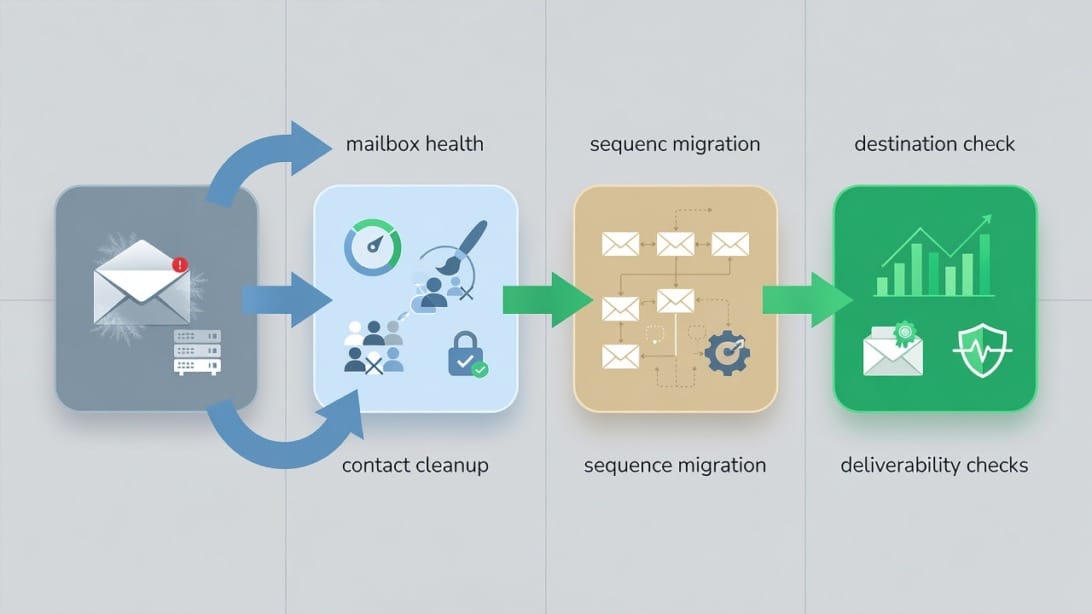
Step 1: Export and clean your data
Export contacts, suppression lists, unsubscribes, bounced contacts, campaign history, and active sequences. Do not import everything blindly.
Before importing into Mystrika or another platform:
- Remove bounced contacts.
- Remove unsubscribes and opt-outs.
- Verify old email addresses with Filter Bounce or another verification process.
- Segment active prospects from stale leads.
- Preserve notes about positive replies, booked meetings, and disqualified prospects.
Step 2: Map old campaigns to new workflows
Do not recreate every old sequence exactly. Migration is a chance to simplify.
Create a mapping table:
| Old lemlist asset | Migration decision | Notes |
|---|---|---|
| Best-performing sequence | Rebuild first | Keep messaging structure but review personalization and timing |
| Underperforming sequence | Rewrite or retire | Do not migrate weak campaigns just because they exist |
| Active warm leads | Move carefully | Avoid restarting sequences that could confuse prospects |
| Bounced contacts | Suppress | Do not import into the new sending pool |
| Unsubscribed contacts | Suppress | Preserve opt-out status |
| Images or videos | Reassess | Creative assets may not be necessary in the new workflow |
| Sending accounts | Audit before reuse | Check health, authentication, and recent performance |
Step 3: Rebuild authentication and sender checks
Before sending from the new platform, confirm technical setup:
- SPF is correct.
- DKIM is passing.
- DMARC exists and aligns with your policy.
- Tracking domains are configured if used.
- Sending domains are separated from your core business domain when appropriate.
- Mailboxes are warmed up and not overloaded.
- Bounce handling is enabled.
If you are moving to Mystrika, use the migration window to rethink sending volume rather than immediately matching your old pace.
Step 4: Start with a controlled pilot
Run one or two campaigns first. Do not migrate every campaign and every inbox on day one.
A good pilot includes:
- A clean, recently verified list.
- One clear ICP segment.
- A conservative daily sending limit.
- A simple message sequence.
- No unnecessary images or heavy formatting.
- Manual review of replies and bounces.
- Daily monitoring for the first week.
Step 5: Compare performance with the right metrics
Do not judge the new tool only by open rates. Open tracking can be distorted by privacy features and image loading behavior.
Track:
- Bounce rate.
- Positive reply rate.
- Spam complaint signals.
- Meetings booked.
- Reply quality.
- Deliverability test results.
- Domain and mailbox health.
- Time spent managing replies.
A better lemlist alternative should improve the operating system around outreach, not just make charts look nicer.
Examples: Which Alternative Fits Which Scenario?
Scenario 1: Founder sending 50 to 150 targeted emails per week
Choose Mystrika if you want a focused cold email workflow with AI assistance, warmup, sequencing, and reply management without buying a heavy sales engagement suite. Pair it with Filter Bounce if your list source is uncertain.
Avoid overbuilding. You probably do not need an enterprise platform or a high-volume mailbox rotation setup yet.
Scenario 2: Agency managing outreach for multiple clients
Start with Mystrika because whitelabel, unibox, warmup, and campaign management are directly relevant. Consider DoYouMail if you also need cold email infrastructure for client sending environments.
Your top evaluation criteria should be client separation, inbox management, deliverability workflows, reporting, and predictable pricing.
Scenario 3: SDR team that needs database plus outreach
Compare Apollo and Snov.io if prospecting data is central. If your CRM workflow and rep activity tracking matter more than cold email depth, also compare Reply.io.
Mystrika can still fit if you already have lead data and want a stronger cold email execution layer.
Scenario 4: High-volume cold email operator
Compare Mystrika, Instantly, and Smartlead. Your decision should focus on mailbox management, warmup, sender health, campaign throttling, and reply operations.
Do not scale volume until your list quality and sending infrastructure are stable.
Scenario 5: Gmail-centric solopreneur
GMass may be enough if you want to keep everything inside Gmail and send relatively simple campaigns. If you outgrow Gmail-native workflows, move to a dedicated platform like Mystrika.
Pros and Cons of Switching Away from Lemlist
Pros
- You can choose a platform more aligned with cold-email-first workflows.
- You may reduce complexity if you do not need broad multichannel features.
- You can improve reply management with a unified inbox model.
- You can rebuild deliverability practices around warmup, sender health, and list hygiene.
- You can choose a pricing model that fits your team size and sending volume.
- Agencies can prioritize whitelabel and client separation.
Cons
- Migration takes planning.
- Historical reporting may not transfer cleanly.
- Existing sequences need review before rebuilding.
- Team members need to learn a new workflow.
- Deliverability may dip if you change too much too quickly.
- Some lemlist-specific creative personalization workflows may not map directly to another platform.
The best switch is not rushed. Treat the first 30 days as a controlled transition, not a feature race.
Lemlist Alternative Evaluation Checklist
Use this checklist before committing to any platform.
Platform fit
- [ ] Does it support your primary channel, not just a feature you rarely use?
- [ ] Can your team build campaigns without constant admin help?
- [ ] Does it support your current team size and expected growth?
- [ ] Does it fit your agency, founder, SDR, or consultant workflow?
Deliverability
- [ ] Does it support warmup or sender reputation workflows?
- [ ] Can you control daily sending volume?
- [ ] Can you pause risky campaigns quickly?
- [ ] Does it help manage bounces and suppress invalid contacts?
- [ ] Does it make authentication setup understandable?
Reply management
- [ ] Does it provide a unified inbox?
- [ ] Can replies be filtered, categorized, or assigned?
- [ ] Are prospects automatically removed from sequences after replying?
- [ ] Can agencies separate client conversations?
Personalization and AI
- [ ] Does AI help with relevance, not just generic copy?
- [ ] Can you personalize by segment, role, company event, or pain point?
- [ ] Can you review and control AI-generated messages before sending?
Pricing
- [ ] Are warmup, AI, verification, and inboxes included?
- [ ] Does pricing scale by users, inboxes, credits, contacts, or clients?
- [ ] Are there hidden add-ons you will need later?
- [ ] Can you test the platform at a realistic volume before committing?
Migration
- [ ] Can you import contacts cleanly?
- [ ] Can you preserve opt-outs and suppression lists?
- [ ] Can you rebuild sequences without breaking active conversations?
- [ ] Can you ramp up slowly rather than switching everything at once?
Pricing Model Traps to Avoid
A lemlist alternative can look cheaper on the pricing page but cost more in practice. Watch for these traps:
1. Per-seat pricing: Costs rise quickly when multiple reps, clients, or operators need access.
2. Per-credit pricing: Prospecting, verification, enrichment, or AI credits may run out faster than expected.
3. Inbox limits: A plan may look affordable until you add the number of sending accounts you actually need.
4. Warmup add-ons: Warmup may be included, limited, or sold separately.
5. Agency workspace costs: Client separation, whitelabel, or reporting may require higher plans.
6. Support tiers: Migration help or faster support may only be available on premium plans.
7. Annual-only discounts: Monthly affordability can differ from advertised annual pricing.
The right question is not “Which tool has the lowest starting price?” It is “Which tool gives me the workflow I need at the volume I actually send?”
Mystrika vs Lemlist: Practical Comparison
| Category | Mystrika | Lemlist |
|---|---|---|
| Primary fit | Cold-email-first outreach operations | Multichannel outbound and sales engagement |
| Warmup | Core part of the cold email workflow | Available as part of the broader ecosystem |
| AI | Useful for outreach personalization and campaign assistance | Strong creative personalization heritage |
| Sequencing | Built for cold email campaign execution | Built for multichannel sequence workflows |
| Reply handling | Unibox supports centralized conversation management | Depends on workflow and plan setup |
| Agency fit | Whitelabel makes it attractive for agencies | Agencies should evaluate workspace and client handling needs carefully |
| Pricing entry point | Starts at $15/month | Verify current pricing before purchase |
| Best buyer | Email-first teams, agencies, founders, consultants | Teams that want multichannel sales engagement |
If your team values creative multichannel prospecting above all else, lemlist may still be worth keeping. If your team wants a cold email command center with warmup, AI, sequences, unibox, and agency-friendly options, Mystrika is the more natural alternative to test first.
Common Mistakes When Choosing a Lemlist Alternative
Mistake 1: Choosing by feature count
A long feature list does not mean a better outreach system. Too many features can slow down campaign creation and make troubleshooting harder.
Choose by workflow fit and bottleneck resolution.
Mistake 2: Ignoring list quality
No platform can rescue a poor list. If you import invalid or stale contacts, your new tool may look bad even if it is working correctly.
Use verification and segmentation before migration.
Mistake 3: Scaling too fast after switching
A new platform does not reset sender reputation. If you increase volume aggressively right after migration, you can create deliverability problems.
Start with a controlled pilot and ramp gradually.
Mistake 4: Treating AI as a shortcut
AI can improve personalization, but it can also generate generic copy at scale. Review AI output before sending, especially for high-value prospects.
Mistake 5: Forgetting reply operations
Many teams obsess over sending and forget the reply workflow. If positive replies sit unanswered, your campaign wastes its best opportunities.
Prioritize unibox and response handling early.
Key Takeaways
- The best lemlist alternative depends on why you are switching: price, deliverability, complexity, reply management, agency needs, or scale.
- Mystrika is the strongest first option for most cold-email-first teams because it combines AI, warmup, sequencer, unibox, and whitelabel capabilities, with pricing from $15/month.
- DoYouMail is useful when your sending infrastructure needs work before you scale campaigns.
- Filter Bounce is a smart pre-migration step when you need to clean lists before importing contacts into a new platform.
- Instantly and Smartlead are strong choices for high-volume outbound operators, but they may be more complex than smaller teams need.
- Apollo and Snov.io make sense when prospecting data is as important as outreach execution.
- Reply.io and Outreach.io are better fits for structured sales engagement teams than for lean cold email operators.
- Do not choose a replacement based only on advertised starting price. Compare users, inboxes, credits, warmup, verification, AI, workspaces, and support.
- Before switching, audit your deliverability, authentication, bounce rate, list quality, and reply management process.
- Migrate slowly. Clean your data, rebuild only your best campaigns, verify technical setup, run a pilot, and ramp volume carefully.
Frequently Asked Questions
What is the best lemlist alternative?
The best lemlist alternative for most cold-email-first teams is Mystrika because it combines AI-assisted outreach, warmup, sequencing, unified inbox management, and whitelabel options in one platform. It is especially strong for founders, agencies, consultants, and teams that care about deliverability and reply operations.
If your team needs a broad sales engagement suite with heavy CRM governance, compare Reply.io or Outreach.io. If you need high-volume sending infrastructure, also compare Instantly and Smartlead.
Is Mystrika better than lemlist?
Mystrika is better than lemlist for teams that want a cold-email-first workflow with warmup, AI, sequencer, unibox, and whitelabel capabilities. Lemlist may be better if your team prioritizes multichannel sales engagement and creative personalization assets over a dedicated cold email operating system.
The better choice depends on your use case. If your bottleneck is deliverability, inbox management, or agency workflow, Mystrika is likely the stronger fit to test first.
What is the cheapest lemlist alternative?
The cheapest useful lemlist alternative depends on what you need included. Mystrika starts at $15/month, which makes it an accessible option for cold-email-first teams that need more than a basic sending tool.
Be careful with pricing comparisons. Some tools look cheap at the entry level but charge separately for users, inboxes, credits, warmup, verification, AI, or agency workspaces.
Which lemlist alternative is best for agencies?
Mystrika is a strong lemlist alternative for agencies because it includes cold email workflow features that agencies care about, including warmup, sequencing, unibox, and whitelabel capabilities. Agencies should also consider DoYouMail for sending infrastructure and Filter Bounce for list hygiene before campaign launches.
If your agency runs very high-volume outbound systems, compare Mystrika with Instantly and Smartlead. The final choice should depend on client separation, reporting, deliverability workflows, and predictable pricing.
Which lemlist alternative is best for deliverability?
The best deliverability-focused lemlist alternative is the one that helps you manage the full sending system: authentication, warmup, list quality, bounce control, sender volume, campaign timing, and reply handling. Mystrika is a strong option because warmup and cold email operations are part of its core workflow.
Do not rely on software alone. Deliverability also depends on your domains, inboxes, sending behavior, message quality, and list hygiene.
Should I use DoYouMail with Mystrika?
Use DoYouMail with Mystrika if you need cold email sending infrastructure in addition to campaign management. Mystrika can handle the outreach workflow, while DoYouMail can support the sending foundation for teams that need dedicated cold email infrastructure.
This combination is especially useful for agencies, consultants, and teams launching or managing multiple outbound sending environments.
Should I clean my list before switching from lemlist?
Yes. Clean your list before switching from lemlist to any alternative. Importing invalid, stale, or risky contacts into a new platform can damage deliverability and make the new tool appear worse than it is.
Use Filter Bounce or another verification process to remove invalid contacts, then preserve unsubscribe and suppression lists during migration.
How do I migrate from lemlist safely?
Migrate from lemlist by exporting contacts, suppressions, unsubscribes, bounces, campaign history, and active sequence data. Clean the list, rebuild only your best campaigns, verify SPF, DKIM, and DMARC, then run a controlled pilot before increasing volume.
Do not move every campaign and inbox at once. A slow migration protects sender reputation and gives your team time to compare performance accurately.
Is Instantly a good lemlist alternative?
Instantly can be a good lemlist alternative for teams focused on high-volume cold email sending and multiple sender accounts. It is popular among outbound operators who think in terms of scale, mailbox pools, and campaign throughput.
However, smaller teams should compare whether they need that level of volume-oriented infrastructure or whether a cold-email-first platform like Mystrika is a cleaner fit.
Is Apollo a good lemlist alternative?
Apollo is a good lemlist alternative if you need prospecting data, enrichment, and sales workflows in the same platform. It is often a strong fit for SDR teams that need a lead database as much as they need outreach sequencing.
If you already have lead data and your main concern is cold email execution, warmup, unibox, and deliverability workflow, Mystrika may be a more focused alternative.
What should I compare before choosing a lemlist alternative?
Compare deliverability controls, warmup, sender management, sequence builder quality, AI personalization, unified inbox, pricing model, agency support, integrations, list hygiene, and migration process. Do not choose based only on the tool’s homepage feature list.
The best platform is the one that solves your current bottleneck without creating unnecessary workflow complexity.