
What Does Email Text Mean?
Email text usually means one of three things: the written body of an email, a text message sent from an email address, or a workflow where email alerts are converted into SMS messages. In search, most people using this phrase want to know how to send a text from email, why old carrier gateways stopped working, and what setup is safest now.
For this guide, we will use email text as the practical umbrella term for email-to-text and email-to-SMS workflows. That includes typing an email that lands on a phone as an SMS, forwarding system alerts to a mobile number, or choosing whether a message belongs in email, SMS, or both.
The short answer is simple: you can still send email to text, but the old free carrier-gateway method is no longer the dependable default. A business should treat email-to-SMS as a real messaging channel with sender setup, consent, filtering, reply handling, and delivery monitoring.

Here is the fast terminology map.
| Term | Plain-English meaning | Best fit | Main risk |
|---|---|---|---|
| Email text | Broad phrase for email copy or email-to-text workflows | Searchers comparing email and SMS | Ambiguous intent |
| Email to text | Sending an email that arrives as a text message | Personal alerts, simple notifications | Carrier filtering and unsupported gateways |
| Email to SMS | Business version of email-to-text through a provider | Alerts, appointment reminders, operations | Compliance and sender setup |
| SMS to email | Text replies or inbound SMS forwarded to email | Support, field teams, two-way alerts | Conversation tracking can get messy |
| SMS API | Programmatic text sending from an app or workflow | Developers, scale, automation | More setup and compliance work |
If you are here because `[email protected]` used to work and now fails, skip to the troubleshooting section. If you are deciding whether to use email text for outreach, alerts, or customer communication, read the decision matrix first.
Email Text vs Email Copy vs Email-to-SMS
The phrase can be confusing because marketers, IT teams, and everyday users use it differently. Before you choose a tool, define which problem you are solving.
Email text as copy means the words inside an email campaign. In that context, the problem is clarity, personalization, reply rate, and deliverability. Tools like Mystrika help outreach teams write, sequence, test, and manage cold email campaigns without treating SMS as a workaround.
Email text as email-to-SMS means the message starts in an email client or system alert and ends as a text message on a phone. This is common for urgent alerts, after-hours notifications, appointment reminders, and operational incidents.
Email text as SMS-to-email means the message starts as a text reply and lands in an inbox. This can be useful for teams that already live in Gmail or Outlook, but it needs rules for ownership, response time, and opt-outs.
A practical rule: use email for context, attachments, and non-urgent conversations. Use SMS for short, time-sensitive messages where the recipient has consented to receive texts. Use both only when each channel has a distinct job.
Can You Send a Text from Email in 2026?
Yes, you can send a text from email in 2026, but the reliable method is usually a dedicated email-to-SMS service or an SMS API, not a free carrier gateway. Carrier-gateway addresses may still work in some cases, but they are inconsistent, poorly monitored, and not suitable for business-critical communication.
Historically, users could send an email to an address like `[email protected]` and the carrier would convert it into an SMS or MMS. That felt convenient because it required no new software. It also created abuse problems: anonymous senders, poor attribution, spam, and limited control over consent.
Modern business messaging has moved toward registered senders, approved numbers, authenticated accounts, and monitored routes. This is annoying if you only want a quick alert, but it is better for deliverability and user protection.
Use this quick test:
- If the message is personal and non-critical, a carrier gateway might be acceptable for experimentation.
- If the message affects revenue, safety, uptime, appointments, or customer trust, use a provider.
- If you need scale, personalization, records, or automation, evaluate an SMS API or a messaging platform.
- If you are doing cold outreach, do not use email-to-SMS as a shortcut around consent or inbox rules.
How Email-to-Text Actually Works
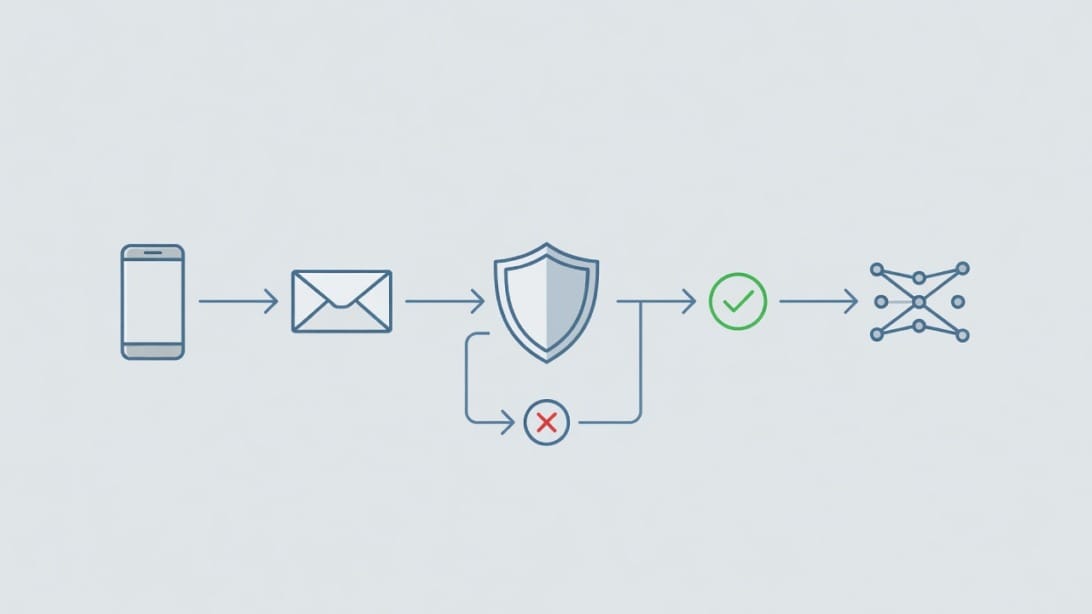
Email-to-text is a conversion path. The sender writes an email, a gateway receives it, the gateway extracts the recipient number and message body, and the SMS network delivers a text to the phone.
A simple workflow looks like this:
1. You send an email to a special address, such as `[email protected]`.
2. The email-to-SMS provider checks whether your sending email is allowed.
3. The provider cleans the subject, signature, disclaimer, and body.
4. The provider converts the remaining content into one or more SMS segments.
5. The provider sends the SMS through an approved messaging route.
6. If replies are enabled, the recipient response routes back to your inbox or dashboard.
The hidden work matters. Email was not designed to behave like SMS. Email has subjects, signatures, quoted replies, HTML, tracking pixels, footers, and attachments. SMS is short, plain, carrier-filtered, and tied to phone numbers. A good email-to-SMS setup is less about the send button and more about controlled conversion.
Example Email-to-Text Alert
Subject: Backup failed
Body: Production database backup failed at 02:10 UTC. Check job `db-nightly-prod` before 04:00 UTC.
A good gateway should send only the useful body. A poor gateway might include the subject, the signature, the confidentiality footer, and an entire quoted thread. That is how a clean alert becomes unreadable.
Example Two-Way Reply Flow
1. A customer receives: “Your appointment is confirmed for Tuesday at 3 PM. Reply C to confirm or R to reschedule.”
2. The customer replies: “C”.
3. The gateway forwards the reply to the team’s inbox or shared dashboard.
4. The team records the confirmation and stops reminder follow-ups.
This is useful when the workflow is simple. It becomes risky when dozens of teammates receive replies with no ownership rules.
The Four Ways to Send Email Text
There are four common ways to make email text work. Each has a different level of reliability and control.
| Method | How it works | Best for | Avoid when |
|---|---|---|---|
| Carrier gateway | Email goes to a carrier-provided SMS/MMS domain | Personal experiments | Business, compliance, urgent alerts |
| Email-to-SMS service | Provider gives you a send-to address and controls delivery | Operational alerts, teams, simple reminders | You need deep app integration |
| SMS API | Your app sends SMS through code or automation | Scale, product alerts, custom workflows | You need a no-code setup today |
| Messaging platform | Web app, inbox, automations, logs, team roles | Support, marketing, operations | You only need one tiny alert route |
Competitor pages often push one answer. A better approach is to choose based on risk.
Option 1: Carrier Gateway
Carrier gateways are the old-school method. You find the recipient’s carrier, format an address, and send an email. If everything lines up, it arrives as a text.
Pros:
- No new paid account in some cases.
- Easy to test for personal use.
- Can work with basic email rules.
Cons:
- Requires knowing the carrier.
- Delivery is inconsistent.
- Replies can be unreliable.
- Filtering is opaque.
- Not a responsible business channel.
- No proper logs, consent controls, or support.
Option 2: Email-to-SMS Service
A dedicated service gives you a controlled gateway. You authenticate senders, configure formatting, and route messages through managed SMS infrastructure. Competitors such as Textmagic and ClickSend emphasize setup simplicity, allowed sender lists, reply forwarding, and signature stripping.
Pros:
- Easier than building an API workflow.
- Works from normal email clients.
- Better logs and reply handling than carrier gateways.
- Useful for monitoring alerts and operations.
Cons:
- Costs money per message or through credits.
- May require sender registration.
- Still needs compliance discipline.
- Not ideal for complex product workflows.
Option 3: SMS API
An SMS API is the developer route. Your application calls a provider endpoint, passes a recipient number and message, and receives delivery events. It is more work than sending an email, but it offers better control.
Pros:
- Best for scale and automation.
- Cleaner error handling.
- Easier to integrate with databases and user preferences.
- Better for event-driven systems.
Cons:
- Requires technical setup.
- Requires careful compliance implementation.
- Needs monitoring, retries, and fallback logic.
Option 4: Messaging Platform
A messaging platform combines SMS sending, team inboxes, templates, analytics, opt-outs, and sometimes email or chat channels. It is overkill for one alert, but useful for customer operations.
Pros:
- Team workflow and accountability.
- Shared inboxes and history.
- Better permission controls.
- Reporting and templates.
Cons:
- More moving parts.
- Subscription or usage costs.
- Setup can be slower than a simple email gateway.
The Email Text Decision Matrix
Use this matrix before choosing a tool. It prevents a common mistake: using the easiest setup for the highest-risk message.
| Use case | Recommended channel | Why | Setup priority |
|---|---|---|---|
| Cold outreach to prospects | Email, not SMS | Email allows context and professional reply flow | Use Mystrika sequencing and deliverability controls |
| Emergency server alert | SMS or push plus email | Time-sensitive and short | Use provider logs and escalation rules |
| Appointment reminder | SMS with consent plus email confirmation | High urgency and simple action | Use opt-out and reply handling |
| Newsletter | Long-form content and preference management | Segment list and verify addresses | |
| Password reset | SMS, email, or authenticator depending on risk | Security-sensitive | Avoid exposing sensitive content in SMS |
| Internal team update | Email, chat, or SMS based on urgency | Depends on response time | Document escalation rules |
| Lead follow-up | Email first, SMS only with consent | Avoid intrusive outreach | Keep CRM records and consent source |
Choose Email When
- The message needs context or explanation.
- The recipient may need to search it later.
- Attachments or links matter.
- The conversation should stay professional and auditable.
- You are doing cold outreach.
For outreach, a purpose-built cold email platform is usually the safer path. Mystrika supports sequencing, inbox rotation, warmup, unibox management, and campaign controls so teams do not try to force SMS into a job that email handles better. If inbox placement is the concern, start with email deliverability fundamentals instead of jumping channels.
Choose SMS When
- The message is urgent and short.
- The recipient has clearly agreed to receive texts.
- A quick reply is expected.
- The workflow has opt-out handling.
- You can monitor delivery and failures.
Choose an API When
- Messages are triggered by product events.
- You need logs, retries, and structured error handling.
- You need user preferences and regional routing.
- You have engineering resources.
How to Set Up Email-to-Text Safely
A safe email-to-text setup is more than a send-to address. Use this checklist before sending real traffic.
Step 1: Define the Message Type
Write down the exact message category: alert, reminder, confirmation, internal update, support reply, or marketing message. The category determines consent, sender setup, frequency, and urgency.
Do not mix categories casually. A phone number collected for appointment reminders should not automatically receive promotional texts. A server alert channel should not become a sales notification channel.
Step 2: Pick the Delivery Method
Choose the lowest-complexity method that still meets the risk level.
- Personal experiment: carrier gateway test.
- Small operations alert: email-to-SMS provider.
- Product notification: SMS API.
- Customer conversation: messaging platform with inbox and opt-outs.
Step 3: Authenticate Allowed Senders
A good provider lets you define which email addresses can trigger SMS. Restrict this list tightly. Do not allow every employee, alias, or forwarding address to send texts.
Recommended controls:
- Use role-based senders, not personal inboxes when possible.
- Limit who can add allowed addresses.
- Use strong account authentication.
- Review allowed senders quarterly.
- Remove ex-employees immediately.
Step 4: Clean the Message Body
SMS should not include an email signature, quoted thread, tracking footer, legal disclaimer, or giant HTML block. Configure trimming rules.
A clean SMS has:
- One clear reason for the message.
- One action or next step.
- No unnecessary formatting.
- No sensitive data unless absolutely required.
- A recognizable sender or context.
Step 5: Handle Replies
Decide where replies go before launch. A two-way setup is only helpful if someone owns the inbox.
Reply handling checklist:
- Who receives replies?
- What is the response-time expectation?
- Are replies synced to the CRM or ticketing system?
- What happens after hours?
- How are opt-outs processed?
- How are wrong-number replies handled?
Step 6: Test Failure Modes
Test more than the happy path. Send messages with long content, missing subjects, signatures, quoted replies, non-US numbers if relevant, and invalid numbers. Confirm what appears in logs and what the recipient sees.
Email Text Compliance and Consent Basics
This section is practical risk guidance, not legal advice. If you send business texts, especially promotional or recurring messages, talk to counsel and follow your provider’s compliance requirements.
The big idea is simple: SMS is more regulated and more intrusive than email. You need a valid reason to text, clear consent where required, accurate sender identity, and a way for recipients to stop receiving messages.
Important concepts:
| Concept | Why it matters | Practical action |
|---|---|---|
| Consent | Texting without permission can create legal and trust risk | Record where and when permission was captured |
| Opt-out | Recipients need a clear way to stop messages | Support STOP-style workflows where required |
| Sender registration | Some regions and routes require approved numbers or campaigns | Complete provider verification before volume sending |
| Message category | Transactional and promotional messages may have different rules | Separate lists and templates by purpose |
| Sensitive content | SMS is not ideal for confidential details | Send minimal information and link to secure portals |
| Quiet hours | Timing can affect compliance and user trust | Respect local time and message urgency |
For cold outreach, do not treat email-to-text as a loophole. If a prospect gave you an email address, that does not automatically mean they invited SMS outreach. Keep cold prospecting in email unless you have a compliant reason and consent for texting.
If your real issue is email quality, fix the email system. Use email verification, list hygiene, authentication, and deliverability monitoring. Filter Bounce can help remove risky or invalid addresses before they damage sender reputation, while DoYouMail can support sending infrastructure when you need clean outbound email capacity.
Email Text for Cold Outreach: What to Do Instead
Email text is not a shortcut for cold outreach. SMS is personal, immediate, and easy to abuse. If your goal is to reach prospects, build a better email motion first.
A better cold outreach workflow looks like this:
1. Define the audience and buying trigger.
2. Verify addresses before sending.
3. Warm up sending inboxes gradually.
4. Authenticate domains with SPF, DKIM, and DMARC.
5. Write concise, relevant email copy.
6. Use follow-up sequences with spacing.
7. Centralize replies in a unibox.
8. Remove bounces, unsubscribes, and non-fit contacts.
Mystrika is built for this kind of workflow: sequencer, AI assistance, warmup, inbox management, and reply handling in one platform. If you are sending from new domains or inboxes, review cold email warmup before increasing volume.
Where SMS can fit:
- Existing customer appointment reminders.
- Event reminders for registered attendees.
- Support follow-ups after a user starts a conversation.
- Renewal or billing alerts where text consent exists.
Where SMS should not fit:
- Scraped phone-number prospecting.
- Mass promotional blasts without consent.
- Attempts to bypass email unsubscribes.
- Sending sensitive account details in plain text.
Email-to-Text Templates You Can Adapt
Use short, specific messages. SMS is not the place for paragraphs.
| Use case | Email subject | SMS body |
|---|---|---|
| Monitoring alert | API latency high | API latency exceeded threshold for 10 minutes. Check incident dashboard. |
| Appointment reminder | Appointment tomorrow | Reminder: your appointment is tomorrow at 3 PM. Reply C to confirm or R to reschedule. |
| Internal escalation | Payment queue stalled | Payment queue stalled after release 42. Owner needed within 15 minutes. |
| Delivery update | Order delayed | Your order is delayed due to weather. New delivery window: Friday 2-5 PM. |
| Support callback | Callback requested | We received your callback request. A support rep will call from the number ending 0142. |
Bad Email Text Example
“Hi, just checking in to see whether you saw my earlier message about our amazing solution. We help companies like yours improve growth. Would you like to book a call?”
Why it fails: it is vague, promotional, and intrusive as a text. It belongs in a better-targeted email campaign, not SMS.
Better Operational Example
“Backup failed for production database at 02:10 UTC. Runbook: incident dashboard > backups > db-nightly-prod. Escalate if unresolved by 04:00 UTC.”
Why it works: it is specific, urgent, and action-oriented.
Troubleshooting Email Text Problems
Email text failures usually come from routing, formatting, filtering, or consent problems. Diagnose in layers instead of resending the same message repeatedly.
| Symptom | Likely cause | What to check | Fix |
|---|---|---|---|
| Message never arrives | Carrier gateway unsupported or filtered | Gateway domain, recipient carrier, provider logs | Use a dedicated provider or API |
| Message arrives late | Route throttling or carrier delay | Timestamps in logs | Use higher-quality route and escalation fallback |
| Message is cut off | SMS length or provider trimming | Segment count, max length rules | Shorten template and remove signature |
| Reply never returns | Reply routing not enabled | Inbound number settings | Enable two-way messaging or shared inbox |
| Whole email footer appears | No body cleanup | Signature and disclaimer rules | Configure cut-off phrase and plain text body |
| Some recipients fail | Invalid numbers or unsupported region | Number format, country support | Validate numbers and check provider coverage |
| Messages flagged as spam | Content or sender reputation issue | Repetition, links, sender setup | Reduce promotional language and register sender |
| Internal alert floods phones | Bad monitoring rule | Trigger frequency and dedupe logic | Add thresholds, grouping, and escalation windows |
Troubleshooting Checklist
- Confirm the recipient number is valid and in international format if required.
- Confirm the sender email is on the provider’s allowed list.
- Send a plain text test with no signature.
- Remove links and attachments for the first test.
- Check provider logs before blaming the recipient carrier.
- Test a reply and confirm where it lands.
- Check whether opt-out or blocked-number rules suppressed the send.
- Verify that automation is not sending duplicate alerts.
Security and Privacy Considerations
Email-to-text can leak more information than teams realize. Email often includes signatures, prior thread history, tracking links, and internal wording. SMS often appears on lock screens. Combining the two can expose sensitive details.
Use these rules:
- Do not send passwords, full payment details, medical details, or confidential account data by SMS.
- Keep operational alerts minimal.
- Use links to authenticated dashboards instead of dumping private details into a text.
- Restrict who can trigger messages.
- Audit logs for unexpected senders and unusual volume.
- Rotate credentials and remove unused allowed email addresses.
For customer-facing messages, write as if the SMS could be seen by someone standing near the recipient’s phone. For internal alerts, write as if the message could be forwarded to the wrong person.
Provider Selection Checklist
When comparing email-to-SMS providers, do not stop at “Can I send from Gmail?” Ask operational questions.
| Requirement | Question to ask | Why it matters |
|---|---|---|
| Sender control | Can we restrict allowed email senders? | Prevents accidental or abusive sends |
| Formatting | Can we strip signatures and disclaimers? | Keeps messages readable |
| Replies | Where do replies go? | Prevents missed customer responses |
| Logs | Can we see delivery status and failures? | Needed for troubleshooting |
| Compliance | What registration or opt-out setup is required? | Reduces legal and carrier risk |
| Pricing | What is the real per-message cost? | Prevents surprise bills |
| Regions | Which countries and carriers are supported? | Avoids failed international workflows |
| Rate limits | How much can we send per minute or day? | Prevents alert floods and throttling |
| Support | Is support available during incidents? | Matters for operational alerts |
| Data handling | How long is message content stored? | Affects privacy and compliance |
A strong provider should make the safe path clear. If a page only says “send texts from email in seconds” but does not explain compliance, sender setup, opt-outs, or logs, keep looking.
Common Mistakes With Email Text
The biggest mistake is treating SMS like email with fewer characters. It is not. SMS has different user expectations, legal risk, technical routing, and reply behavior.
Avoid these mistakes:
1. Using SMS for cold prospecting without consent. This can damage trust quickly.
2. Sending long email bodies as texts. Most of the content will be cut, split, or ignored.
3. Forgetting signatures. A 20-word alert can become a 300-word mess.
4. Ignoring replies. Two-way SMS creates an obligation to respond.
5. Skipping logs. If you cannot prove delivery attempts, troubleshooting is guesswork.
6. Sending sensitive data. SMS is not a secure document channel.
7. Relying on one channel for emergencies. Critical alerts need escalation paths.
8. Mixing marketing and transactional messages. Keep consent and templates separated.
A Practical Email Text Workflow for Teams
Here is a simple operating model for teams that want email-to-text without chaos.
For Alerts
- Source: monitoring system or scheduled job.
- Gateway: email-to-SMS provider or API.
- Message: one incident, one action, one owner.
- Reply route: incident inbox or on-call channel.
- Fallback: phone call, push alert, or chat escalation.
- Review: monthly alert fatigue audit.
For Customer Reminders
- Source: booking system or CRM.
- Gateway: messaging platform with opt-out handling.
- Message: date, time, action, support contact.
- Reply route: shared inbox or appointment desk.
- Fallback: email confirmation.
- Review: opt-out rate and wrong-number replies.
For Outreach
- Source: verified prospect list.
- Gateway: email platform, not SMS.
- Message: relevant email sequence.
- Reply route: unibox.
- Fallback: stop contacting if bounced, unsubscribed, or not relevant.
- Review: deliverability, replies, bounces, and list fit.
This separation keeps every channel honest. Email does what email is good at. SMS does what SMS is good at. Teams avoid turning a convenient gateway into an uncontrolled messaging system.
Email Text and Deliverability: The Overlooked Connection
Many people search for email text because email feels slow, crowded, or unreliable. But if your emails are not landing, SMS is not always the right fix. It may be a sign that your email deliverability system needs work.
Check these items first:
- Domain authentication with SPF, DKIM, and DMARC.
- Inbox warmup and sending history.
- Bounce rate and invalid address rate.
- Message relevance and personalization.
- Sending volume by inbox and domain.
- Spammy language, excessive links, or attachments.
- Reply management and unsubscribe handling.
DoYouMail can help when you need outbound sending infrastructure, while Filter Bounce helps remove invalid addresses before they hurt sender reputation. Mystrika brings the workflow together for cold email campaigns, including warmup, sequences, AI support, and unibox handling.
If the message is not urgent, fix email first. If the message is urgent and consented, add SMS as a separate alert or reminder channel.
Key Takeaways
- Email text can mean email copy, email-to-text, email-to-SMS, or SMS-to-email. Define the workflow before choosing a tool.
- Carrier email-to-SMS gateways are not reliable enough for business-critical communication.
- Dedicated email-to-SMS services are useful for simple alerts, reminders, and teams that work from an inbox.
- SMS APIs are better for product workflows, scale, retries, and structured delivery events.
- SMS is not a cold outreach loophole. Use email for prospecting unless you have clear consent to text.
- Safe email-to-text needs sender controls, message trimming, reply routing, logs, opt-out handling, and compliance review.
- If your real issue is email performance, improve deliverability, verification, warmup, and campaign management before switching channels.
Frequently Asked Questions
What is email text?
Email text can refer to the written body of an email or to a workflow where an email is converted into a text message. In most how-to searches, it means sending a text from email or using email-to-SMS for alerts and reminders.
How do I send a text from email?
The reliable method is to use an email-to-SMS provider that gives you a special recipient format and routes the message through SMS infrastructure. You may also see carrier gateway addresses, but those are inconsistent and should not be used for critical business messages.
Does email to text still work?
Yes, email to text still works when you use a supported provider or SMS API. The old carrier-gateway method is less dependable because many carriers have limited, filtered, or discontinued those routes.
Is email-to-SMS free?
Usually not for reliable business use. Free carrier gateways may work in limited cases, but managed email-to-SMS services and SMS APIs typically charge for message delivery, sender setup, or credits.
Can I use email text for cold outreach?
You should not use email-to-text as a shortcut for cold outreach. Keep prospecting in email unless you have clear consent to send SMS, and use a platform like Mystrika to manage sequencing, warmup, deliverability, and replies properly.
What is the difference between email-to-SMS and SMS-to-email?
Email-to-SMS starts in an email client or system and arrives as a text message on a phone. SMS-to-email starts as a text reply and is forwarded into an email inbox or shared workflow.
Why did my email-to-text message stop working?
Common causes include unsupported carrier gateways, filtering, invalid numbers, blocked senders, long message bodies, signatures, or missing provider setup. Start by checking provider logs, allowed sender settings, number format, and whether the route is still supported.
Should I use an SMS API instead of email-to-SMS?
Use an SMS API when you need scale, automation, retries, user preferences, delivery events, or tight product integration. Use email-to-SMS when you need a simpler inbox-based workflow for alerts or reminders.