
Emailing remains the most direct and effective digital communication channel for businesses in 2026. Whether you are sending marketing newsletters, transactional notifications, or cold outreach sequences, understanding how emailing works at a technical and strategic level determines whether your messages land in inboxes or spam folders. This guide covers everything from email authentication protocols and warm-up sequences to multi-channel integration and platform selection, with practical advice you can implement immediately.
What Is Emailing and Why Does It Matter in 2026?
Emailing refers to the practice of sending electronic messages to individuals or groups for communication, marketing, sales, or transactional purposes. In 2026, emailing has evolved far beyond simple message delivery into a sophisticated discipline combining technical infrastructure, data-driven strategy, and artificial intelligence. Businesses that master emailing gain a direct communication channel that bypasses social media algorithms and search engine dependency.
The email landscape in 2026 presents both opportunities and challenges. Inbox providers have become increasingly aggressive with spam filtering, using machine learning models that analyze hundreds of signals to determine message placement. Sender reputation, authentication configuration, engagement patterns, and content quality all factor into whether your email reaches the primary inbox, lands in promotions, or gets blocked entirely.
Emailing matters because it delivers the highest return on investment of any digital marketing channel. For every dollar spent on email marketing, businesses see an average return of $36 to $42 according to industry benchmarks. Cold email outreach, when executed properly with the right infrastructure and targeting, generates response rates of 1 to 5 percent and can produce significant pipeline revenue for B2B organizations.
The difference between successful emailing and failed emailing comes down to understanding the full ecosystem: how authentication works, what inbox providers look for, how to build and maintain sender reputation, and how to structure campaigns that respect recipient expectations while achieving business goals.
How Does Emailing Actually Work? The Complete Technical Breakdown
When you click send on an email, a complex chain of events unfolds in milliseconds. Understanding this chain helps you diagnose deliverability issues and optimize your sending infrastructure.
The Email Delivery Chain
Your email travels from your sending platform through your email service provider (ESP) or sending infrastructure, across the internet via Simple Mail Transfer Protocol (SMTP), through the receiving mail server’s security checks, and finally into the recipient’s inbox or spam folder. Each step in this chain introduces potential failure points.
The sending server connects to the recipient’s mail exchange (MX) server and negotiates the transfer. The receiving server checks the sending IP address against reputation databases, verifies authentication records, scans the content for spam signals, and evaluates engagement history with the sender. Only after passing all these checks does the email land in the inbox.
Email Authentication Protocols: SPF, DKIM, and DMARC
Authentication is the foundation of email deliverability. Three protocols work together to prove your identity as a legitimate sender.
SPF (Sender Policy Framework) authorizes specific IP addresses to send email on behalf of your domain. You publish an SPF record in your DNS that lists all authorized sending servers. When a receiving server gets your email, it checks the SPF record to confirm the sending IP is authorized. Without SPF, receiving servers have no way to verify the email came from your infrastructure.
DKIM (DomainKeys Identified Mail) adds a cryptographic signature to each email. Your sending platform signs the email with a private key, and the receiving server verifies the signature using a public key published in your DNS. DKIM ensures the email content was not tampered with during transit and confirms the message genuinely came from your domain.
DMARC (Domain-based Message Authentication, Reporting, and Conformance) tells receiving servers what to do when SPF or DKIM checks fail. Your DMARC policy can instruct servers to deliver the email anyway, quarantine it to spam, or reject it entirely. DMARC also provides reporting that shows you who is sending email on your behalf and whether authentication is passing.
Setting up all three protocols correctly is non-negotiable for modern emailing. Missing or misconfigured authentication is the single most common cause of deliverability problems.
Sender Reputation and Inbox Placement
Every sending IP address and domain carries a reputation score maintained by mailbox providers like Gmail, Outlook, and Yahoo. This reputation is built from engagement signals: how many recipients open your emails, how many mark them as spam, how many reply, and how many delete without reading.
A new sending domain or IP starts with no reputation, which means inbox providers treat it with suspicion. This is why warm-up sequences exist. You must gradually build positive engagement signals before sending at full volume.
Bounce Handling and List Hygiene
Bounces fall into two categories. Soft bounces are temporary delivery failures caused by a full inbox or a server timeout. Hard bounces are permanent failures caused by invalid email addresses. Hard bounces damage your sender reputation and should be removed from your list immediately.
Maintaining bounce rates below 2 percent is critical for deliverability. Higher bounce rates signal to inbox providers that you are sending to purchased or unverified lists, which triggers reputation penalties.
Email Warm-Up Sequences: Building Your Sending Reputation from Scratch
A new domain or IP address has no sending history, which means inbox providers treat every message as potentially suspicious. Email warm-up is the process of gradually increasing sending volume while building positive engagement signals to establish sender reputation.
How Warm-Up Works
Start by sending 10 to 20 emails per day to recipients who are likely to engage. These should be people who know you, have opted in, or have previously interacted with your brand. Monitor open rates, reply rates, and spam complaint rates closely.
Each week, increase your daily volume by 30 to 50 percent. By week two, you might send 30 to 50 emails daily. By week three, 100 to 150. By week four, you can typically reach your target volume of 200 to 500 emails per day, depending on your domain’s age and the quality of your engagement.
The full warm-up process takes 2 to 4 weeks for most domains. Older domains with existing positive reputation can warm up faster. Brand new domains registered specifically for cold emailing may need 4 to 6 weeks of careful warm-up.
What Happens During Warm-Up
Each positive engagement signal improves your reputation. Recipients opening your emails tells inbox providers your content is wanted. Replying signals high-value communication. Moving emails from spam to inbox tells the algorithm it made a mistake.
Negative signals during warm-up are particularly damaging because your reputation is fragile. A single spam complaint from a recipient who did not opt in can set your warm-up back by days. This is why warm-up sequences should target engaged recipients, not cold prospects.
Automated Warm-Up Tools
Manual warm-up is tedious and error-prone. Platforms like Mystrika offer automated warm-up that sends your emails to a network of real inboxes that engage with them naturally, building positive signals without manual effort. The system gradually increases volume based on your reputation metrics and pauses if it detects negative signals.
Automated warm-up tools also handle the technical aspects: rotating subject lines, varying send times, and maintaining natural engagement patterns that inbox providers expect from legitimate senders.
Monitoring Warm-Up Progress
Track these metrics during warm-up:
- Open rate: Should be above 30 percent during warm-up. Below 20 percent indicates a problem.
- Reply rate: Even 1 to 2 percent replies during warm-up is positive.
- Bounce rate: Must stay below 2 percent. Remove hard bounces immediately.
- Spam complaint rate: Should be below 0.1 percent. Above 0.5 percent is dangerous.
- Inbox placement rate: Use tools to verify your emails are landing in the primary inbox, not spam.
If any metric goes negative, reduce volume and investigate the cause before continuing.

Permission-Based Email Marketing vs Cold Email Outreach: Understanding the Critical Differences
These two approaches to emailing serve different purposes, follow different rules, and require different strategies. Understanding the distinction prevents compliance problems and helps you choose the right approach for each situation.
| Aspect | Permission-Based Email Marketing | Cold Email Outreach |
|---|---|---|
| Relationship | Existing subscriber or customer | No prior relationship |
| Primary Goal | Nurture, educate, retain | Generate new business |
| Audience | Opted-in subscribers | Targeted prospects |
| Legal Basis | Explicit consent | Legitimate interest or implied consent |
| Typical Open Rates | 15-25 percent | 1-5 percent |
| Typical Response Rates | 2-5 percent clicks | 1-5 percent replies |
| Content Style | Educational, promotional | Personalized value proposition |
| Volume | High volume, regular cadence | Lower volume, targeted sequences |
| Best For | Customer retention, brand building | Lead generation, pipeline creation |
Permission-Based Email Marketing
Permission-based emailing requires explicit consent from recipients. They joined your list through a signup form, purchased a product, or downloaded a lead magnet. These recipients expect your emails and are more likely to engage.
The key advantage of permission-based emailing is higher engagement rates. Because recipients opted in, open rates of 15 to 25 percent are normal, and click rates of 2 to 5 percent are achievable. The relationship is already established, so your job is to nurture it.
Compliance is straightforward with permission-based lists. You have documented consent, and as long as you honor unsubscribe requests and provide accurate sender information, you meet regulatory requirements.
Cold Email Outreach
Cold emailing targets prospects who have no prior relationship with your business. The legal basis is typically legitimate interest rather than explicit consent. This means you must be more careful about targeting, content, and frequency.
Cold email outreach requires personalized, value-driven messaging. Generic templates sent to purchased lists are spam. Targeted, researched emails sent to prospects who fit your ideal customer profile are legitimate business communication.
The success of cold emailing depends on three factors: targeting accuracy, message relevance, and sending infrastructure. Poor performance in any of these areas leads to low response rates and reputation damage.
When to Use Each Approach
Use permission-based emailing for existing customers, newsletter subscribers, and anyone who has explicitly opted into your communications. Use cold email outreach for prospecting into new accounts, generating leads in new markets, and initiating conversations with decision-makers who have not yet discovered your brand.
Many successful email programs combine both approaches. Permission-based emails nurture existing relationships while cold outreach expands the top of the funnel. The infrastructure requirements differ, but the authentication and deliverability fundamentals are the same.
The 7 Types of Email Campaigns Every Business Needs to Master
Different business goals require different email campaign types. Each type has specific best practices, optimal timing, and success metrics.
1. Promotional Emails
Promotional emails announce offers, discounts, product launches, or limited-time opportunities. These emails drive immediate action and are typically sent to your most engaged subscribers.
Best practices for promotional emails include clear subject lines that communicate the offer, prominent call-to-action buttons, mobile-optimized design, and scarcity elements like countdown timers or limited availability. Send promotional emails to engaged segments only to avoid list fatigue.
2. Newsletters
Newsletters deliver regular content to subscribers who want to hear from you. They build relationships, establish authority, and keep your brand top-of-mind between purchases.
Effective newsletters have consistent scheduling, valuable content that educates or entertains, and a clear structure that readers can scan quickly. Include a mix of original content, curated resources, and subtle promotional elements.
3. Transactional Emails
Transactional emails are triggered by user actions: purchase confirmations, shipping notifications, password resets, and account updates. These emails have the highest open rates because recipients are actively expecting them.
Transactional emails should be reliable, fast, and clear. Include all necessary information, provide next steps, and add subtle cross-sell or upsell opportunities only when relevant to the transaction.
4. Welcome Emails
Welcome emails greet new subscribers or customers and set expectations for future communications. They are the most-opened emails in any program, with open rates often exceeding 50 percent.
A strong welcome sequence introduces your brand, delivers the promised value (discount, download, or resource), explains what subscribers can expect, and encourages a first action. Send 3 to 5 welcome emails over the first two weeks.
5. Re-Engagement Campaigns
Re-engagement campaigns target subscribers who have stopped opening or clicking your emails. The goal is either to win them back or to remove them from your active list to protect deliverability.
Start with a gentle reminder of the value you provide, then escalate to a compelling offer or survey about their preferences. If they still do not engage after 3 to 4 emails, move them to a suppressed list or remove them entirely.
6. Educational Emails
Educational emails teach your audience something valuable without a hard sell. They build authority, demonstrate expertise, and create trust that converts over time.
Structure educational emails around a single concept or skill. Use clear explanations, examples, and actionable takeaways. Include a soft call-to-action that invites deeper engagement with your product or service.
7. Cart Abandonment Emails
Cart abandonment emails recover lost sales by reminding customers what they left behind. These automated emails generate significant revenue for e-commerce businesses.
Send the first reminder within one hour of abandonment, a second email after 24 hours with social proof or reviews, and a final email after 48 hours with a small incentive if appropriate. Keep the messaging helpful rather than pushy.
Building Your Email List: Strategies That Actually Convert
Your email list is your most valuable marketing asset. How you build it determines the quality of your engagement and the health of your deliverability.
Permission-Based List Building
Lead magnets remain the most effective way to build a permission-based list. Offer a resource that solves a specific problem for your target audience: an ebook, a template, a checklist, a webinar, or a discount code. The key is matching the lead magnet to the audience’s immediate need.
Optimize your signup forms for conversion. Keep fields minimal (name and email is usually enough), place forms prominently on high-traffic pages, and use exit-intent popups that offer value before visitors leave.
Double opt-in confirmation adds a verification step that ensures subscribers genuinely want to hear from you. While double opt-in reduces list size by 10 to 20 percent, it dramatically improves engagement rates and reduces spam complaints.
Cold Email List Building
Cold email lists come from research, not purchase. Identify prospects who fit your ideal customer profile using LinkedIn, industry directories, company websites, and professional databases. Verify each email address before adding it to your list.
Never buy email lists. Purchased lists contain outdated addresses, spam traps, and recipients who have no interest in your offering. Sending to purchased lists guarantees high bounce rates, spam complaints, and eventual domain blacklisting.
List Segmentation
Segmentation improves every email metric. Divide your list by behavior (opens, clicks, purchases), demographics (industry, role, company size), engagement level (active, at-risk, inactive), and stage in the customer journey.
Segmented campaigns consistently outperform broadcast emails by 30 to 50 percent on engagement metrics. The more relevant your message is to the recipient, the more likely they are to engage.
List Hygiene
Regular list cleaning protects your sender reputation. Remove hard bounces immediately, suppress unengaged subscribers after 60 to 90 days of inactivity, and honor unsubscribe requests within 24 hours.
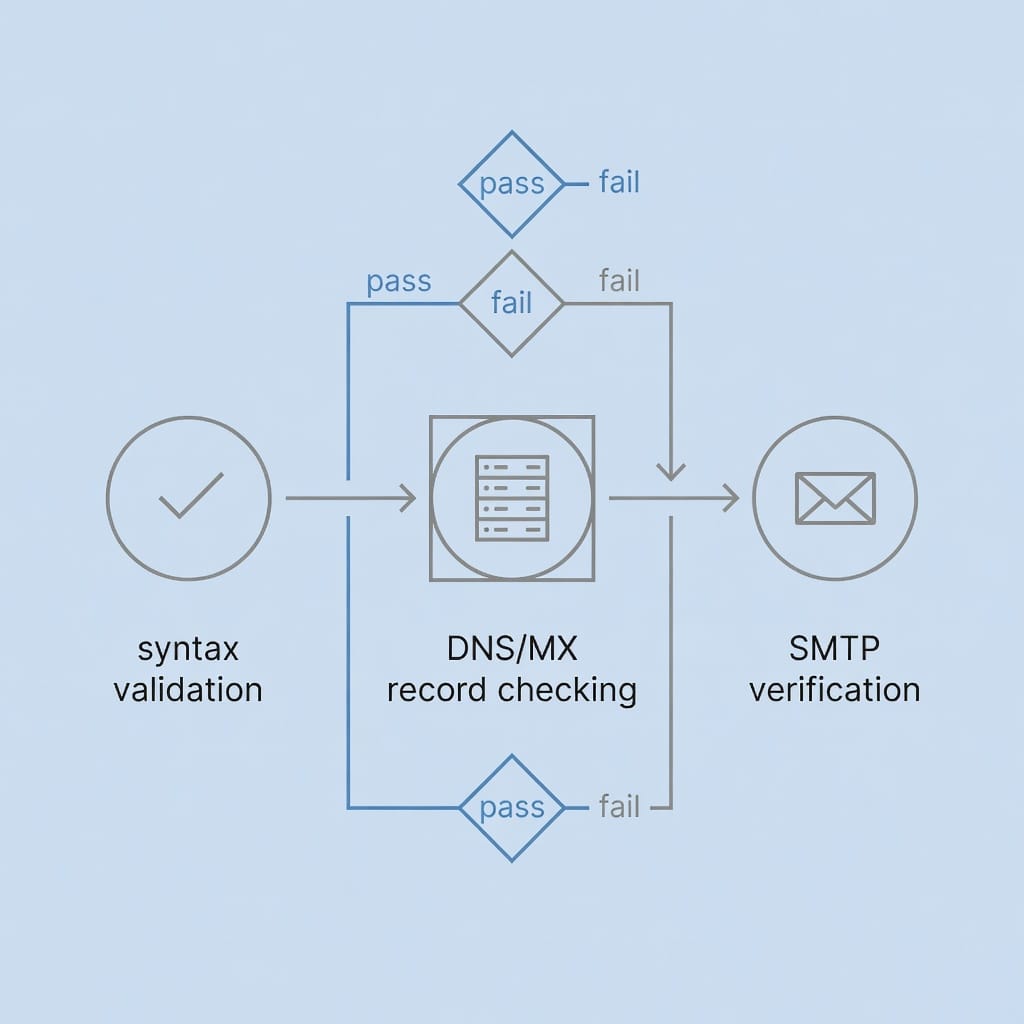
Use email verification services like DoYouMail or Filter Bounce to validate addresses before sending. These services check syntax, domain validity, mailbox existence, and known spam traps. The cost of verification is minimal compared to the deliverability damage from high bounce rates.
Email Deliverability in 2026: What Actually Determines Whether Your Emails Reach the Inbox
Deliverability is the single most important technical metric in emailing. It measures whether your emails reach the inbox rather than being blocked, bounced, or filtered to spam.
The Inbox Placement Algorithm
Mailbox providers use machine learning models that evaluate hundreds of signals to determine inbox placement. These signals fall into categories: sender identity (authentication, IP reputation, domain reputation), engagement history (opens, clicks, replies, spam complaints), content analysis (spam keywords, formatting, links), and recipient behavior (how the recipient has interacted with similar senders).
No single signal determines inbox placement. The algorithm weighs all signals together to produce a sender score. Improving any signal helps, but you need strong performance across all categories for consistent inbox placement.
Authentication Is the Price of Entry
SPF, DKIM, and DMARC are not optional. Gmail and Yahoo enforce DMARC policies for bulk senders. Without proper authentication, your emails will be rejected or quarantined regardless of content quality.
Check your authentication configuration regularly using free tools. Verify that SPF includes all authorized sending IPs, DKIM keys are properly generated and rotated, and DMARC policy is set to at least quarantine (p=quarantine) or reject (p=reject) for maximum protection.
Engagement Signals Drive Reputation
Inbox providers track how recipients interact with your emails. High open rates signal that recipients want your messages. High reply rates signal valuable communication. Low spam complaint rates signal that you are sending to the right people.
The most damaging signal is spam complaints. A complaint rate above 0.1 percent triggers reputation penalties. Above 0.5 percent, providers may block your emails entirely. Monitor complaint rates in your sending platform and investigate any spikes immediately.
Content Quality and Spam Filters
Spam filters analyze email content for patterns associated with unwanted messages. Excessive use of sales language, all-caps text, misleading subject lines, and too many links trigger spam scores.
Modern spam filters are sophisticated enough to evaluate context, not just keywords. A well-written email about a relevant offer to an engaged recipient passes content checks easily. A poorly written email to a cold list triggers multiple spam signals.
Sending Infrastructure
Your sending IP address, domain age, and sending volume patterns all affect deliverability. Shared IP addresses carry the reputation of everyone using them. Dedicated IPs give you full control but require warm-up.
Sending volume should follow natural patterns. Sudden spikes in volume trigger spam filters. Gradual increases that match engagement growth appear natural to inbox providers.
AI-Powered Email Automation: How Modern Platforms Transform Cold Outreach
Artificial intelligence has transformed emailing from a manual, template-driven activity into an intelligent, adaptive process. Modern platforms use AI to optimize every stage of the email workflow.
AI-Powered Personalization
Basic personalization inserts the recipient’s name into the email. AI-powered personalization analyzes the recipient’s role, company, recent activities, and communication patterns to craft messages that feel individually written.
AI can research prospects automatically, identify relevant talking points from their LinkedIn activity or company news, and generate personalized opening lines that demonstrate genuine understanding. This level of personalization at scale was impossible before AI.
Intelligent Sequencing
AI-powered sequencing determines the optimal order, timing, and content of follow-up emails. The system learns from response patterns across your entire campaign and adjusts future sends accordingly.
If a particular subject line generates higher open rates, the AI uses similar patterns in future emails. If a specific message angle produces more replies, the AI emphasizes that approach. The system continuously optimizes based on real-time performance data.
Automated Response Handling
When prospects reply to your emails, AI can categorize responses, suggest replies, and even automate follow-up actions. Positive responses get routed to sales. Negative responses trigger suppression. Questions get flagged for human attention.
This automation reduces response time from hours to minutes, which directly impacts conversion rates. Faster responses to inbound interest produce higher close rates.
Mystrika’s AI Capabilities
Mystrika integrates AI throughout the emailing workflow. The platform’s AI sequencer optimizes send times, message content, and follow-up timing based on engagement patterns. The AI-powered personalization engine researches each prospect and generates tailored messaging at scale.
The combination of AI sequencing with automated warm-up and centralized inbox management creates a complete emailing solution that handles everything from reputation building through response management.
Multi-Channel Outreach Integration: Combining Email with LinkedIn and Phone for Maximum Impact
Emailing does not exist in isolation. The most effective outreach strategies combine email with LinkedIn engagement, phone calls, and other channels to create a coordinated touchpoint sequence that maximizes response rates.
Why Multi-Channel Works
Prospects receive dozens of emails daily. A single email channel is easy to ignore. When you combine email with LinkedIn messages, profile visits, and phone calls, you create multiple touchpoints that reinforce your message and increase the likelihood of a response.
Multi-channel outreach also accommodates different communication preferences. Some prospects prefer email. Others respond better to LinkedIn messages. A coordinated approach reaches prospects through their preferred channel while reinforcing your value proposition across all touchpoints.
Structuring Multi-Channel Sequences
Start with a LinkedIn connection request or profile visit to establish recognition. Follow with an email that references your LinkedIn interaction. Add a second email with additional value. Then engage on LinkedIn with a comment or message. Follow up with a phone call if appropriate.
The key is coordination. Each touchpoint should build on previous ones, not repeat the same message. Reference your earlier interactions to demonstrate genuine interest and attention to detail.
Channel-Specific Best Practices
Email remains the primary channel for detailed value propositions and follow-up sequences. LinkedIn is best for establishing context, building recognition, and initiating conversations. Phone calls work well for time-sensitive opportunities and closing discussions.
Use each channel for what it does best. Do not send the same message across all channels simultaneously. That feels like spam. Instead, use each channel to add a new dimension to your outreach.
Tools for Multi-Channel Coordination
Managing multi-channel sequences manually is impractical at scale. Platforms that integrate email, LinkedIn, and phone tracking in a single interface make coordination manageable. Mystrika’s Unibox provides a centralized view of all prospect interactions across channels, ensuring nothing falls through the cracks.
Email Verification and Bounce Management: Protecting Your Sender Reputation
Every hard bounce damages your sender reputation. Email verification prevents bounces by identifying invalid addresses before you send. Bounce management handles the inevitable bounces that slip through.
How Email Verification Works
Email verification services check each address against multiple data points. They verify syntax (is the format valid?), domain (does the domain exist and accept mail?), and mailbox (does the specific address exist on that server?).
Advanced verification also checks for disposable email domains, catch-all addresses that accept all mail, role-based addresses like info@ or sales@, and known spam traps. Each of these represents a risk to your deliverability.
When to Verify
Verify addresses at three points: when you acquire them (before adding to your list), before each campaign (to catch addresses that have gone invalid), and after periods of inactivity (to clean unengaged segments).
Batch verification processes your entire list at once. Real-time verification checks addresses as they are submitted through forms or imports. Both approaches have their place in a comprehensive verification strategy.
Verification Services
DoYouMail offers budget-friendly email verification with high accuracy rates. The service checks syntax, domain validity, and mailbox existence while flagging risky addresses. For teams that need reliable verification without enterprise pricing, DoYouMail provides an accessible solution.
Filter Bounce provides another verification option with a focus on accuracy and speed. The service catches hard bounces, spam traps, and disposable addresses before they damage your reputation. Filter Bounce is particularly useful for teams that send high volumes and need consistent verification throughput.
Bounce Management Best Practices
Set up automated bounce handling in your sending platform. Hard bounces should be removed from your list immediately. Soft bounces should be retried automatically and removed after repeated failures.
Monitor bounce rates in real time. A sudden spike in bounce rate indicates a problem with your list source or verification process. Investigate and fix the issue before sending more emails.
Centralized Inbox Management: Why Unibox Transforms Email Outreach Operations
When you send email campaigns across multiple domains, inboxes, and team members, managing replies becomes chaotic. Centralized inbox management solves this problem by aggregating all prospect responses into a single interface.
The Problem with Disconnected Inboxes
Without centralized management, replies to your campaigns land in individual inboxes across your team. Team members miss replies, duplicate responses, or fail to follow up in a timely manner. Prospects receive inconsistent messaging, and opportunities slip through the cracks.
Disconnected inboxes also make it difficult to track campaign performance. You cannot easily measure response rates, sentiment, or conversion patterns when replies are scattered across multiple accounts.
How Unibox Works
Mystrika’s Unibox aggregates all replies from all your sending domains and campaigns into a single, unified inbox. Every team member sees every response in real time. The system tracks which replies have been handled, which need attention, and which require escalation.
Unibox also provides context for each reply. You can see the full conversation history, the campaign the prospect is responding to, and any previous interactions across channels. This context enables informed, personalized responses without switching between tools.
Team Collaboration Features
Centralized inbox management enables team collaboration on email responses. Assign replies to specific team members, add internal notes, and track response times. The system prevents duplicate responses and ensures every prospect gets a timely, appropriate reply.
For agencies managing email campaigns for multiple clients, Unibox provides client-specific views that keep communications organized and professional.
Agency and Whitelabel Solutions: Scaling Email Services for Clients
Agencies that offer email outreach services face unique challenges. They need to manage multiple client campaigns, maintain separate sending infrastructures, and present a professional brand to each client’s prospects. Whitelabel solutions address these needs.
What Whitelabel Means in Emailing
Whitelabel email platforms allow agencies to rebrand the software as their own. The agency’s logo, colors, and domain replace the platform’s branding. Clients see a seamless, branded experience without knowing the underlying technology provider.
Whitelabel capabilities extend to the sending infrastructure. Each client can have their own sending domains, IP addresses, and authentication configurations. This separation protects each client’s reputation from the others.
Benefits for Agencies
Whitelabel emailing enables agencies to offer email outreach as a branded service. Clients perceive higher value from a branded solution compared to a resold platform. The agency controls pricing, service levels, and client relationships without technology limitations.
Agencies can also offer tiered service packages based on features. Basic packages might include automated warm-up and sequencing. Premium packages add Unibox access, AI personalization, and dedicated IP addresses.
Mystrika’s Whitelabel Capabilities
Mystrika provides comprehensive whitelabel capabilities for agencies. The platform supports custom branding, separate sending infrastructures per client, and centralized management through the agency dashboard. Agencies can offer Mystrika’s full feature set under their own brand, including AI sequencing, automated warm-up, and Unibox.
The platform’s pricing starting at $15 per month makes it accessible for agencies of all sizes. Smaller agencies can start with a few clients and scale as their business grows.
Measuring Email Success: Metrics That Actually Matter Beyond Open Rates
Open rates are the most visible email metric but not the most important. A comprehensive measurement framework tracks engagement, conversion, and revenue impact.
Engagement Metrics
Open rate measures how many recipients opened your email. While useful for comparing subject lines and send times, open rates are increasingly unreliable due to Apple’s Mail Privacy Protection and similar privacy features that pre-load images.
Click-through rate (CTR) measures how many recipients clicked a link in your email. CTR is a stronger engagement signal than opens because it requires intentional action.
Reply rate is the most valuable engagement metric for cold email outreach. A reply indicates genuine interest and starts a conversation. Track reply rates by campaign, sequence step, and message variant.
Conversion Metrics
Conversion rate measures how many recipients took your desired action: booked a meeting, made a purchase, or signed up for a trial. This is the metric that connects email activity to business outcomes.
Pipeline attribution tracks which email campaigns generated opportunities and revenue. Connect your email platform to your CRM to track the full journey from email engagement to closed deal.
Deliverability Metrics
Inbox placement rate measures what percentage of your emails reached the primary inbox versus spam. This is the most important technical metric because it determines whether your other metrics have any meaning.
Bounce rate tracks delivery failures. Hard bounce rate should stay below 2 percent. Soft bounce rate should stay below 5 percent. Spam complaint rate should stay below 0.1 percent.
ROI Calculation
Calculate email ROI by comparing revenue generated from email campaigns against total costs. Include platform fees, verification services, team time, and any advertising spend for list building.
For cold email outreach, track cost per meeting booked, cost per qualified lead, and customer acquisition cost from email-sourced opportunities. These metrics help you optimize spending and compare email ROI against other channels.

Choosing the Right Email Platform: A Decision Framework for 2026
Selecting the right email platform depends on your specific needs, technical capabilities, and budget. This decision framework helps you evaluate options systematically.
Feature Requirements Assessment
Start by listing your must-have features. Do you need automated warm-up? AI-powered sequencing? Centralized inbox management? Whitelabel capabilities? Multi-channel integration? Email verification?
Rate each feature as essential, important, or nice-to-have. This prioritization prevents feature bloat and keeps your decision focused on what actually matters for your use case.
Platform Comparison Framework
| Feature Category | Essential Questions |
|---|---|
| Authentication | Does the platform handle SPF/DKIM/DMARC setup? |
| Warm-Up | Is automated warm-up included or requires separate tool? |
| Sequencing | Does it support multi-step sequences with conditional logic? |
| AI Features | What AI capabilities are included (personalization, optimization)? |
| Inbox Management | Is there a unified inbox for managing replies? |
| Whitelabel | Can you rebrand the platform for client use? |
| Verification | Does it integrate with email verification services? |
| Analytics | What metrics and reporting are available? |
| Pricing | Is pricing per user, per contact, or flat rate? |
Mystrika’s Position
Mystrika combines all essential features in a single platform starting at $15 per month. The platform includes automated warm-up, AI-powered sequencing, centralized Unibox management, preheader optimization, and whitelabel capabilities. For teams that want a complete emailing solution without managing multiple tools, Mystrika provides an integrated alternative to fragmented tool stacks.
The platform’s agency features make it particularly suitable for service providers who need to manage multiple client campaigns under their own brand. The combination of warm-up, sequencing, and inbox management in one platform reduces operational complexity and cost.
Budget Considerations
Email platform costs vary widely. Basic email marketing platforms start around $10 to $20 per month for small lists. Cold email platforms with warm-up and sequencing range from $30 to $100 per month. Enterprise solutions with dedicated infrastructure can cost $500 or more per month.
Factor in additional costs for email verification services like DoYouMail or Filter Bounce, which typically charge per verification. Also consider the cost of dedicated sending infrastructure if your volume requires it.
Key Takeaways
- Emailing in 2026 requires a complete understanding of technical infrastructure, authentication protocols, sender reputation, and engagement optimization.
- SPF, DKIM, and DMARC authentication are non-negotiable for inbox placement. Configure all three correctly before sending any campaigns.
- Email warm-up takes 2 to 4 weeks and requires gradual volume increases with careful monitoring of engagement signals.
- Permission-based emailing and cold email outreach serve different purposes with different legal bases, strategies, and success metrics.
- AI-powered automation transforms emailing through intelligent personalization, sequencing optimization, and automated response handling.
- Multi-channel outreach combining email, LinkedIn, and phone produces higher response rates than any single channel alone.
- Email verification services like DoYouMail and Filter Bounce protect sender reputation by catching invalid addresses before campaigns launch.
- Centralized inbox management through tools like Mystrika’s Unibox prevents missed replies and enables team collaboration.
- Whitelabel capabilities enable agencies to offer branded email outreach services to clients.
- Measure success through reply rates, conversion rates, pipeline attribution, and inbox placement rates, not just open rates.
- Platform selection should prioritize essential features over feature count, with Mystrika offering a complete integrated solution starting at $15 per month.
Frequently Asked Questions
What is the difference between cold emailing and spam?
Cold emailing targets prospects who fit your ideal customer profile with relevant, personalized value propositions, while spam sends irrelevant bulk messages without regard for recipient interest or consent. Cold emails comply with regulations like CAN-SPAM and GDPR when properly executed with accurate sender information and unsubscribe options. The key distinction lies in targeting quality, message relevance, and adherence to legal requirements rather than volume-based blasting.
How long does email warm-up take before I can send at full volume?
Email warm-up typically requires 2 to 4 weeks of gradual volume increases starting from 10 to 20 emails daily and scaling to your target volume. The timeline depends on your domain age, IP reputation, target volume, and engagement rates from recipients. During warm-up, focus on high-quality engagement rather than volume, monitoring bounce rates and spam folder placements. Tools like Mystrika automate this process with intelligent volume ramping and engagement tracking.
What email authentication protocols do I need to set up for deliverability?
You need SPF (Sender Policy Framework), DKIM (DomainKeys Identified Mail), and DMARC (Domain-based Message Authentication, Reporting, and Conformance) configured for your sending domain. SPF authorizes which servers can send email on your behalf, DKIM adds cryptographic signatures to verify message integrity, and DMARC tells receiving servers how to handle authentication failures. These three protocols work together to establish sender legitimacy and improve inbox placement rates.
How do I measure cold email ROI beyond basic open and response rates?
Track pipeline attribution by connecting email engagement to CRM opportunities and closed deals, measure cost per qualified lead and cost per meeting booked, calculate customer acquisition cost from email-sourced opportunities, and monitor long-term metrics like customer lifetime value from email-generated leads. Advanced attribution requires UTM parameters, CRM integration, and multi-touch tracking to connect email activities to revenue outcomes.
What makes Mystrika different from other cold email platforms?
Mystrika combines AI-powered sequencing, automated email warm-up, centralized Unibox management, preheader optimization, and whitelabel capabilities in a single platform starting at $15 per month. Unlike fragmented tool stacks, Mystrika handles the complete cold email workflow from domain warming through response management. The platform’s agency-focused features enable service providers to deliver branded email solutions to clients while maintaining operational efficiency.
Do I need email verification services like DoYouMail or Filter Bounce?
Email verification protects your sender reputation by removing invalid addresses before campaigns launch, reducing bounce rates that damage deliverability. Services like DoYouMail and Filter Bounce validate email addresses in real-time, catching typos, catching disposable domains, and identifying risky addresses. The cost of verification is minimal compared to the deliverability damage from high bounce rates, making it essential for any serious email outreach operation.
How should I structure my email sequences for maximum response rates?
Effective sequences start with a personalized value proposition in the first email, follow with social proof or case studies in email two, address common objections in email three, and include a clear call-to-action with easy response options throughout. Limit sequences to 4 to 6 touches over 2 to 3 weeks, varying subject lines and message angles while maintaining consistent value delivery. Test different sequence lengths and timing based on your industry and audience response patterns.
What compliance requirements apply to cold emailing in 2026?
Cold emailing must comply with CAN-SPAM Act requirements including accurate sender identification, subject lines that match message content, physical postal addresses, and functional unsubscribe mechanisms. GDPR applies for EU recipients requiring legitimate interest assessment or explicit consent. Industry-specific regulations may add requirements for healthcare, finance, or other regulated sectors. Always maintain suppression lists and honor unsubscribe requests within regulatory timeframes.
Can I use the same sending domain for warm-up and cold campaigns?
Using the same domain for warm-up and cold campaigns is not recommended because warm-up requires high engagement from known recipients while cold campaigns target unknown prospects with lower expected engagement. Mixing these signals confuses inbox providers and can damage your warm-up progress. Use separate domains for warm-up and cold outreach, or use a dedicated warm-up tool that manages the separation automatically.
How often should I clean my email list?
Clean your email list before every major campaign and at least monthly for ongoing programs. Remove hard bounces immediately, suppress unengaged subscribers after 60 to 90 days of inactivity, and verify new addresses before adding them to your list. Regular cleaning prevents reputation damage and improves engagement metrics by ensuring you only send to active, interested recipients.